What's new

Portrait Processing for C&C

Trever1t

Been spending a lot of time on here!
Joined
Dec 30, 2010
Messages
9,331
Reaction score
2,724
Location
San Jose, CA
Can others edit my Photos
Photos NOT OK to edit
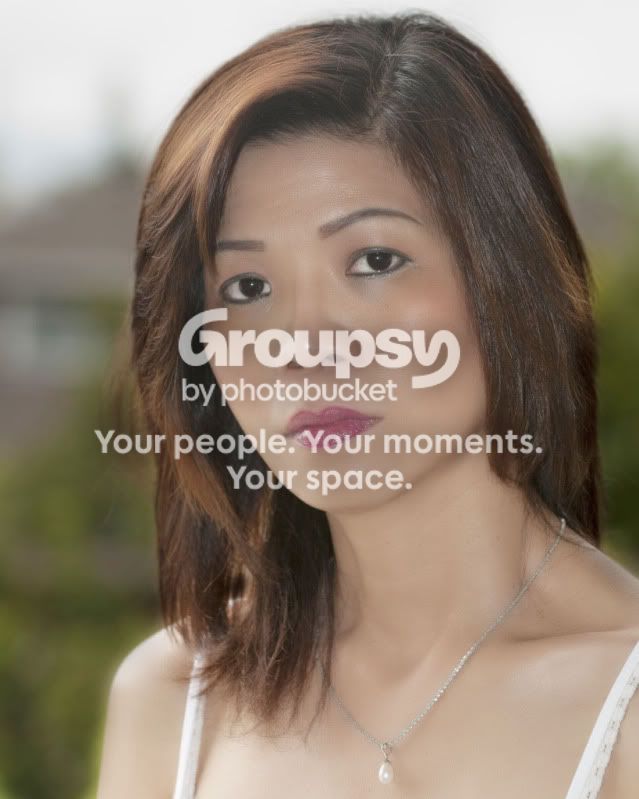
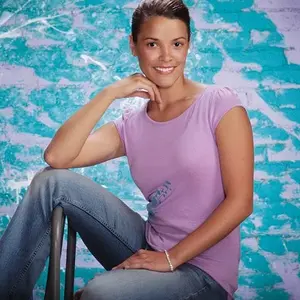
Here's my shot SOOC converted from RAW with ACR and CS5 sharpened for screen only.

SOOC.jpg


and here's my shot with some adjustment in LR3 using the adjustment brush and some skin smoothing, detailing in CS5.
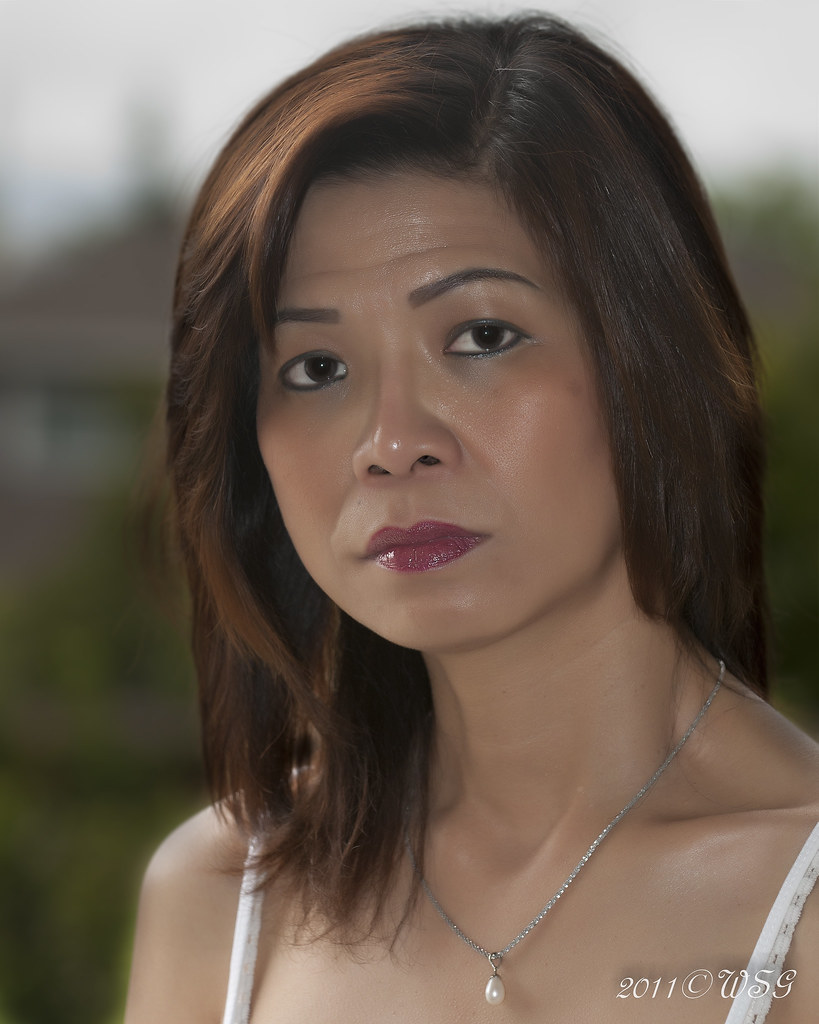

Untitled by Trever1t, on Flickr

Looking at it now I see a bright spot on her nose from the on-board flash I could tone down. I need light stands to put these speedlights to better use.

What do you think of the process?


Last edited:
Her skin is overdone. Retouching to enhance skin tones is nice, but creating barbie skin is overkill. Less is more. Try about half the level you did.
 
^ +1, i think you could use more separation between the subject and the background.
 
I was attempting to keep some flaws and avoid making her look plastic, noted and thank you.

Do you mean color/contrast by separation chaosrealm93? Yeah, this wasn't a prepared shot by any means. Just grabbed a few before heading out, off the back porch. I wanted to practice with a back-lit subject and DOF.
 
I don't think it actually looks all that plasticized when it sits alone. When side by side the origional, yes it looks plasticized... But not overly when seen on its own imo. I think the eyes could use a bit more brightening though.
 
What is bothering me more is not the smoothing but the oilysweaty skin remains after the smoothing. This does an injustice to the smoothing.
This has nothing to do with the smoothing but her pose angle has you looking straight into her nostrils.
 
Yeah, I notices that, her skin is really reflective. Is there a technique to reduce that glistening other than powdering her face? I imagine if I had the flash on a stand off center or better, through a diffuser, I wouldn't have the issue? The nostril thing I also noted....the look on her face is from me trying to get her to pose, lol.. I am in no way experienced in matters of directing.
 
I don't think it actually looks all that plasticized when it sits alone. When side by side the origional, yes it looks plasticized... But not overly when seen on its own imo. I think the eyes could use a bit more brightening though.

^^^^^What willis_927 said, I'm in agreement with.
 
well thanks!
 
One trick, remove the small hot spots, on nose, forehead and around the eyes, leave the biguer hotspot there but smooth them out so they look more even. Its creates a more natural look with no white hotspots.
 
dude, i just realized you have Not ok to edit. I already edited it. Let me know if you want to see it.
 
lol, sure let's see what you got and thanks for asking!
 
that looks pretty darn good! Can you detail some technique for me?
 

Create an account or login to comment

You must be a member in order to leave a comment

Create account

Create an account on our community. It's easy!

Log in

Already have an account? Log in here.

Back
Top Bottom