What's new

Portraits for C&C

spacefuzz

No longer a newbie, moving up!
Joined
Jan 18, 2011
Messages
1,832
Reaction score
318
Location
Southern California
Can others edit my Photos
Photos OK to edit
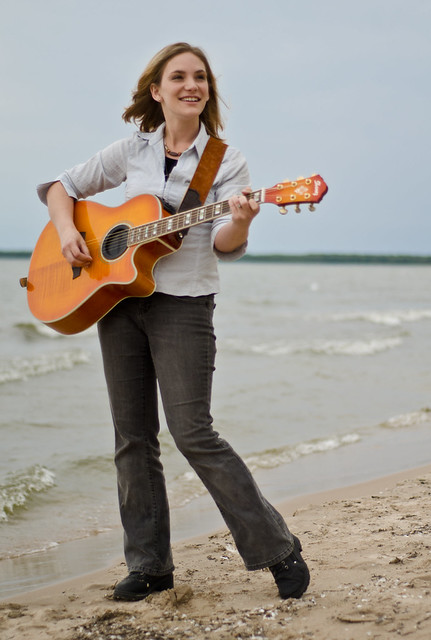
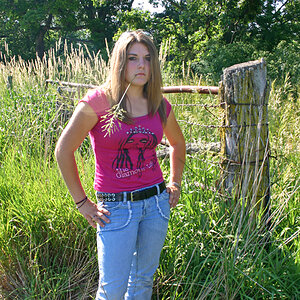
So let me start by saying I usually shoot landscapes, but I was visiting family and my cousin wanted some photo's for her band. I shot these with a d7000, 50mm prime f/1.8. Shot mostly at f/1.8 to soften them up, focused on her left eye. Was an overcast day, very soft light so i thought I might be able to pull it off without a flash setup (since all I had was the popup). At home realized that was not the case and her eyes are just too dark.
I'd love to know what feedback you have so I can improve for the future, tear me up!
And thanks for taking the time to look.

1. (I also should have paid more attention to the blowing strands of hair....)
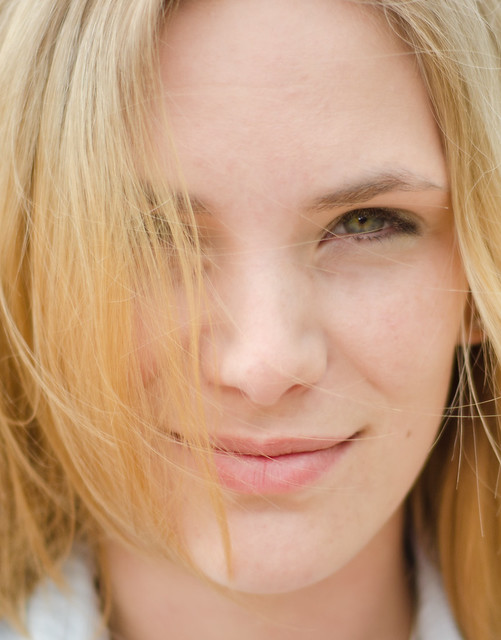
5914307599_d95d69bcee_z.jpg


2.
5914865902_475076c7e5_z.jpg


3. (most likely should have included a tad more foreground grass)
5914304689_414ae89309_z.jpg
 
Given the equipment you had available, these are pretty good. I think your self-critique has hit the main points (the blowing hair and cropped foot). She definitely has a case of racoon eyes, but I think that in both 2 and 3 a little work in post will reduce it to the point where it is acceptable. Why not suggest doing a re-shoot when you have more gear available?
 
I'm in CA and she is in WI, but I will definitely take the proper gear alone for a reshoot next time I visit.
 
Just curious to know what you think the "right" gear is?
I really like the first one. The second could use a little work and the 3rd could have been recomposed a bit differently. But that being said. I feel you could have made some great photos with the gear you had.
 
Next time don't shoot at F1.8, no where near enough DOF
 
Don't discount your pop-up flash in outdoor portraits. You could have used it to reduce the raccoon eyes and add some catchlights. (Other than as a CLS controller, it's just about the only thing for which it's of any use.)
 
Next time don't shoot at F1.8, no where near enough DOF

But why would you want a lot of depth of field in a portrait type setting? I know many people soften up the skin anyways in post, I was always taught that eyes, lips, and hair should be sharp and its ok if your DOF is narrow enough that the ears are out of focus.
I know the lens is most likely sharper in the f/6-f/8 range but I was only planning on selectively sharpening anyways......
 
Just curious to know what you think the "right" gear is?
I really like the first one. The second could use a little work and the 3rd could have been recomposed a bit differently. But that being said. I feel you could have made some great photos with the gear you had.

I guess for "right gear" I would consider my SB600 incase I needed it and a reflector for fill light on the face. I dont currently have the transmitter for off camera flash setup as I would rarely use it.
 
Next time don't shoot at F1.8, no where near enough DOF

But why would you want a lot of depth of field in a portrait type setting? ......
Do you know how much space, front to back, you have to work with at f/1.8? I don't either, but there is an on-line DoF calculator you can Google. Whatever it is.... it ain't much. You can still get a blurred background at f/5-5.6.
 
Next time don't shoot at F1.8, no where near enough DOF

But why would you want a lot of depth of field in a portrait type setting? ......
Do you know how much space, front to back, you have to work with at f/1.8? I don't either, but there is an on-line DoF calculator you can Google. Whatever it is.... it ain't much. You can still get a blurred background at f/5-5.6.

at 50mm with f/1.8 you have ~.5-2.5" DOF depending on your distance from subject. I think I had ~ 1".
I suppose how much DOF you want comes down to personal preference.
 

Create an account or login to comment

You must be a member in order to leave a comment

Create account

Create an account on our community. It's easy!

Log in

Already have an account? Log in here.

New Topics

Back
Top Bottom