What's new

Practicing with developing from RAW. Opinions?

Mikeyb90

No longer a newbie, moving up!
Joined
Feb 9, 2013
Messages
126
Reaction score
34
Location
Ohio, US
Can others edit my Photos
Photos OK to edit
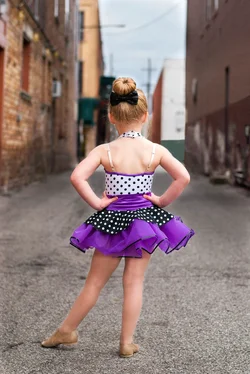
This is my first time developing pics from RAW format(with decent equipment).. My friend wanted some pictures of her daughter in her dance costume, and I wanted some practice. So heres where I'm at with my first one.. Whatcha think?
Original.
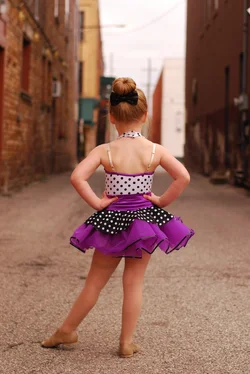
DSC_1291.webp
After Lightroom & Photoshop
roo1.webp
 
Am I heading in the right direction at least? Lol
 
White balance looks better for sure, but it's pretty hard to say much more IMO because the pictures are so small. I'd make the long side of the photo at least 1000 pixels on export -- it'll be a lot easier for people to comment.
 
White balance looks better for sure, but it's pretty hard to say much more IMO because the pictures are so small. I'd make the long side of the photo at least 1000 pixels on export -- it'll be a lot easier for people to comment.

Thank you.. Wasn't sure how to size them for export.
 
Looks like you're making very good progress. Exposure and color look good. And RAW processing is a bear for first-timers. It took me a LONG time to produce anything that wasn't a total disaster. So very nice job.
 
Looks like good first steps.

When I first started processing RAW images I would use the AUTO buttons in Lightroom. Then I would check and see what it changed. Then UNDO the auto settings and adjust the sliders myself. Then I'd add more sliders like shadows, etc. Then got into more of the colors. Slowly but surely. :)
 
Agree, this is a good first step!

One thing I also try to do is to use the before and after views. So, for example, in the processed photo, there's an oval to the right of her head that looks a tad odd? There's also some obvious haloing around her entire body where you increased exposure. There are some leftover lines/artifacts (likely from burning?) to the left of her neck.

I'm interested in why you lightened the building to the left, and why you brought the green wall upwards at her shoulder. I found both of these to somewhat pull my eye.

I would not have noticed these (as fast) if I was not able to look at the before and after pictures. :smile:
 
Thanks guys! I spent 3-4 hours on this one between the two programs. I'll post some more today if I get them done
 
This is my first time developing pics from RAW format(with decent equipment).. My friend wanted some pictures of her daughter in her dance costume, and I wanted some practice. So heres where I'm at with my first one.. Whatcha think?
The pose is somewhat out of the ordinary, which is good, but the background is terrible!

As to the editing; Original has her legs in shadow, and your editing has brought them up a bit, but doing a global lightening has brightened her back too much, IMO.

As to how big to post; size your photos to be no larger than 1024 pixels on the longest side, then they will nicely fit the webpage. And FWIW, I don't bother with any compression.
 
Agree, this is a good first step!

One thing I also try to do is to use the before and after views. So, for example, in the processed photo, there's an oval to the right of her head that looks a tad odd? There's also some obvious haloing around her entire body where you increased exposure. There are some leftover lines/artifacts (likely from burning?) to the left of her neck.

I'm interested in why you lightened the building to the left, and why you brought the green wall upwards at her shoulder. I found both of these to somewhat pull my eye.

I would not have noticed these (as fast) if I was not able to look at the before and after pictures. :smile:

Didn't see that by her head! Must have been an accidental brush stroke or something..
Instead of increasing exposure on the subject, I decreased exposure in the background.. Tried to blend the best I could to get rid of the haloing. The building on the left.. Not sure why I brightened it.. Thought it looked better at the time.. The green on the right was because her arm kinda blended into the white wall, so I thought I could make a more definite edge with the green. Still learning the tools of Photoshop but I was honestly pretty happy with this for my first go around
 
Thanks guys! I spent 3-4 hours on this one between the two programs.
Wow.

I typically spend less than 3-4 minutes per edited shot, if that.
 
This is my first time developing pics from RAW format(with decent equipment).. My friend wanted some pictures of her daughter in her dance costume, and I wanted some practice. So heres where I'm at with my first one.. Whatcha think?
The pose is somewhat out of the ordinary, which is good, but the background is terrible!

As to the editing; Original has her legs in shadow, and your editing has brought them up a bit, but doing a global lightening has brightened her back too much, IMO.

As to how big to post; size your photos to be no larger than 1024 pixels on the longest side, then they will nicely fit the webpage. And FWIW, I don't bother with any compression.

I didn't care for the background either, moms choice, she loved the composition of it lol. And since I don't have any lighting to fill my shadows I tried to make it look like it did.. Like I said, first time doing this much to a picture
 
Thanks guys! I spent 3-4 hours on this one between the two programs.
Wow.

I typically spend less than 3-4 minutes per edited shot, if that.

I did a lot of playing around/experimenting.. I accidentally blurred her right arm in with the wall somehow so it took me a while to re-define that edge
 
One of the things that I learned from @Derrel after he commented on my photos is different ways to use the adjustment brush. He wrote an awesome post for me, that I've linked below because I think you might find it useful...

Baby's First Bites
 
Thanks guys! I spent 3-4 hours on this one between the two programs.
Wow.

I typically spend less than 3-4 minutes per edited shot, if that.
I wouldn't act so surprised when you hear that someone spent a few hours perfecting their image to their liking; it's very easy to get lost in your work and before you know it quite a lot of time has passed. Even after 7 years of obsessively perfecting and streamlining my craft both in camera and in post production, I find that there are very few ways to cut corners without the image suffering for it.
I spend hours on some photos. It's actually not unheard of to spend upwards of 8 hours on a single photo. The hired in-house retoucher for the photographer I used to intern for often did just that, staying overnight at the office working all for the sake of getting the best out of the images. A lot of steps go into getting the right colors throughout the image to create a pleasing palette, be it universal changes or using masks for targeting specific areas that need color or exposure adjustments (which is a pain in the ass and takes time), or making contrast adjustments, or liquefying, dodging, burning, cloning, healing, sharpening, etc, all while being very careful to remove any evidence of editing to begin with so that it still actually looks like a real photograph. And these are already photos that can pass for "perfect" straight out of camera.
 
Last edited:

Create an account or login to comment

You must be a member in order to leave a comment

Create account

Create an account on our community. It's easy!

Log in

Already have an account? Log in here.

Back
Top Bottom