What's new

Product Photography

joel28

TPF Noob!
Joined
Apr 23, 2012
Messages
146
Reaction score
0
Location
Brooklyn, NY
Can others edit my Photos
Photos OK to edit
I Just got my first DSLR, the Nikon D5100, With a Sigma 17-70mm Macro Lens.

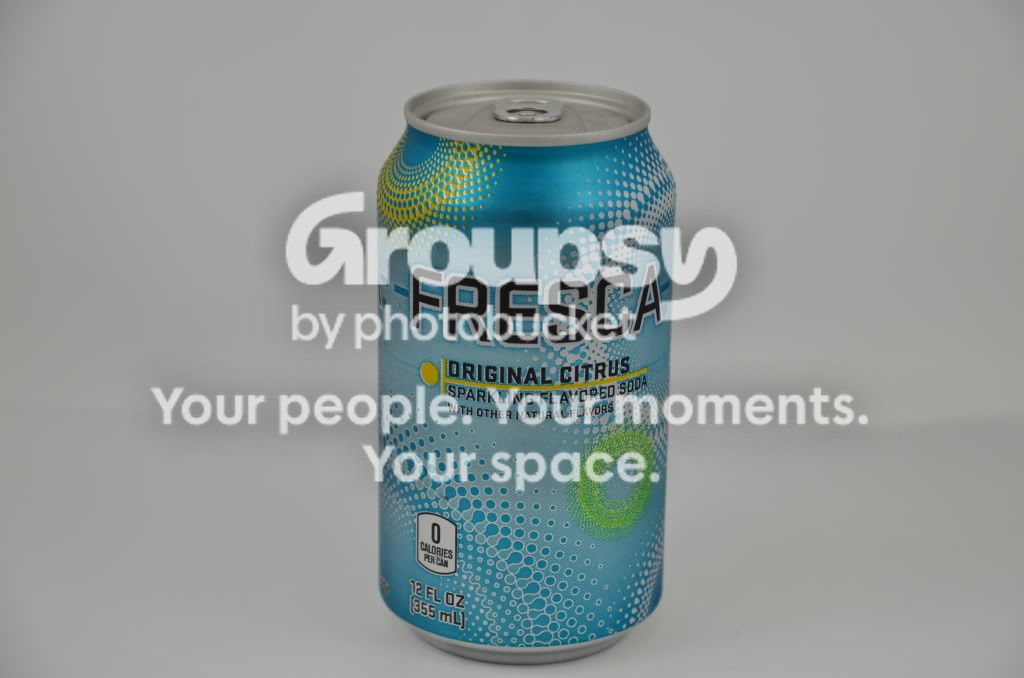
This photo was taken in Auto mode, How can it be improved?
DSC_0080.jpg


Take a look at some ads for sodas, either in magazines or on TV even. Two basic tips I think of right away are, shoot from a more exciting/interesting/engaging angle (i.e. lettering on a diagonal), and get that can of fresca cold, wet and dripping with ice water. How about sitting it next to a textured drinking glass filled with ice, fresca and bubbles? Maybe a lime or lemon wedge/twist/peel? Next look at your lighting setup and think; how can I add more contrast to the photo?
 
It can be improved by knowing that the camera's light meter is calibrated based on the assumption a majority of scenes will have a average reflectance of about 18%.

When a scene has a lot of white in it the camera will usually under expose the photo (white looks gray), which is what happened with your product shot.

When a scene has a lot of white in it Exposure Compensation is often used to increase the exposure.

The software in digital cameras is just a rote program, and the camera has no idea what you are actually taking a photo of. Consequently, when auto mode is used the camera often uses the wrong settings and a less than good photo results.

I would have corrected the exposure to illustrate to you how under exposed the photo is, but I honored your My Photos Are NOT OK to Edit.
 
Not sure if it's me, or if it really is (I am looking at this on my tablet at the moment), but the photo seems to be crroked as well... that never helps. Use a sprayer and put some water droplets on the can, then try again. That will make it look like it's just been pulled out of a cooler, and now it's nice and cold!
 
Take a look at some ads for sodas, either in magazines or on TV even. Two basic tips I think of right away are, shoot from a more exciting/interesting/engaging angle (i.e. lettering on a diagonal), and get that can of fresca cold, wet and dripping with ice water. How about sitting it next to a textured drinking glass filled with ice, fresca and bubbles? Maybe a lime or lemon wedge/twist/peel? Next look at your lighting setup and think; how can I add more contrast to the photo?

I'm not trying to get a picture when its cold, rather Nice and Sharp.

How would i adjust the contrast?

Thank you!
 
The photo looks too dark and could have probably gone for a longer exposure. Use a tripod (if you aren't already) and take a few shots at different exposures/ apertures and see what looks best. If you use Photoshop you can adjust everything in there (exposure, contrast, etc.), but you shouldn't rely on PS. Here's how I think the photo could be improved. I edited the "curves", centered the can, and increased the sharpness.
$DSC_0080a.webp
 
I would try shooting vertical and use some props as mentioned earlier. Best advice is to look in magazines for inspiration and try different things. Post some updated shots when u do so.
 
The photo looks too dark and could have probably gone for a longer exposure. Use a tripod (if you aren't already) and take a few shots at different exposures/ apertures and see what looks best. If you use Photoshop you can adjust everything in there (exposure, contrast, etc.), but you shouldn't rely on PS. Here's how I think the photo could be improved. I edited the "curves", centered the can, and increased the sharpness.
View attachment 6927

Wow, Beautiful!

How do you increase sharpness?

Thanks!
 
In Photoshop you can do Filter > Sharpen > Smart Sharpen .
 
This soda is really asking for much more light and shine and water drops! :) Just my two cents.. (1) start using manual controls (2) camera angle / distance make it look disproportional and it's too soft - you would rather want to fix it in the camera before starting oversharpening in PS. Focus on the center of the can on a tripod and put on higher aperture or use focus stacking. Also put more light on the background for crispier edges..
 

Create an account or login to comment

You must be a member in order to leave a comment

Create account

Create an account on our community. It's easy!

Log in

Already have an account? Log in here.

New Topics

Back
Top Bottom