What's new

Proper DPI for different sized images

asheeants

TPF Noob!
Joined
Jul 30, 2008
Messages
117
Reaction score
1
Location
KY
Can others edit my Photos
Photos OK to edit
Opinions please! New to sizing images. What would be the ideal DPI's for a 2.5 x 3.5 wallet, 4x6, 5x7, & 8x10? Someone told me 300 for all is good, but that can't be right. Also, when I change the size of my photo do I or do I not have Resample Image checked in photo shop to effect pixel dimensions?
Thanks
Ash
 
I use 300DPI for everything also as I was told the same thing from people on this forum.
 
I am totally new to this. I just figured it would need to be changed slightly especially scaling down to a wallet but if not that's great.
 
Do the pixel dimensions need to be changed when sizing an image? In what instance would you check "Resample Image" and when would you not?
 
Technically you're asking what would be the ideal PPI (pixels per inch). Use DPI to refer to the printer and PPI to refer to your image. A lot of folks just say DPI for both but it can cause confusion, for example a 300 PPI photo prints to a 2400 DPI printer.

Although the size of the print your making can be a factor the most direct determinant of PPI in the photo is the physical DPI capability of the printer being used. So if you know who/how the prints are being made you ask what's the best PPI to target the printer.

300 as a standard comes from the press industry in the days of line-screened offset printing. 2400 DPI imagesetters were best targeted by a 300 PPI image. Since "artists" tend to be a little math phobic it's been hard to get them to let go of such a nice round easy-to-remember number. It's kinda like "f/8 and be there": "300 and be happy."

With modern technologies we can typically relax the 300 figure a little and depending on the printer type being used a PPI for the image closer to 200 is just fine. So there's no single answer fits all beyond just telling you somewhere between 200 and 300 should do you -- ask your printer.

Your print size is a less significant factor but it does come into the calculation. Since we back up to view larger prints we can again relax the PPI requirement when making large prints. Highway billboards are printed at much lower PPI values than a 8x10 print.

Resample in Photoshop: If you're not absolutely sure what resample is doing and if you have any questions about it at all then keep it checked OFF at all times. If you do use resample you NEVER want to save the change over your original photo. Resample physically and permanently either removes pixels from your photo or invents filler pixels to add to your photo. You could forever regret either operation.

Joe
 
Pixels are square or rectangular. Dots are round.

It takes multiple dots, to print 1 pixel.

On that basis- DPI and PPI are not interchangeable terms.

Many factors determine what PPI a print requires. There is no one-size-fits-all value, like 300 PPI.

The simplest home printers use 3 dots - 1 cyan, 1-magenta, 1-yellow (CMY) to print a pixel. Some home printers have print heads that squirt over 100 dots of each of 3 or 4 colors to print a pixel.

A very common and popular types of print (chromogenic) made by photo print shops aren't even made using dots. Instead they use photo paper that has a CMY light sensitive emulsion on one side. The image to be printed is projected onto the paper, and the paper is then the light sensitive emulsion is chemically developed to make the photo appear on the paper.

How big a print will be has a lot to do with how far from the print a viewer will stand. So, viewing distance has a bearing on what PPI you would want to assign to a image that is to be printed.
The next consideration is the image content. The 'busier' an image is (the frequency of edges/lines in the image), the higher the PPI a print will need. A landscape shot dominated by leafy foliage will require more PPI than a scene that has far fewer edges/lines in it.

Note that many online labs are willing to stake their print quality reputations by accepting images that have as little as 100 PPI assigned, regardless the size the image will be printed.
 
With modern technologies we can typically relax the 300 figure a little and depending on the printer type being used a PPI for the image closer to 200 is just fine. So there's no single answer fits all beyond just telling you somewhere between 200 and 300 should do you -- ask your printer.

This simply doesn't make sense. With higher printer screen resolution (frequency), the higher the pixel pitch you'd require, until the individual pixels are not visible at around 300ppi.

Obviously if the dots of ink are larger than the pixels, then the printer will be unable to resolve the pixels. But if the dots are smaller, then you'd have to have smaller pixels else they become visible.

Bill boards are printed at very low screen frequency, so even if you were up close you wouldn't see individual pixels, because the dots of ink that make up the image are going to be larger than the pixels that make up the file.
 
unpopular said:
This simply doesn't make sense. With higher printer screen resolution (frequency), the higher the pixel pitch you'd require, until the individual pixels are not visible at around 300ppi.

Obviously if the dots of ink are larger than the pixels, then the printer will be unable to resolve the pixels. But if the dots are smaller, then you'd have to have smaller pixels else they become visible.

Bill boards are printed at very low screen frequency, so even if you were up close you wouldn't see individual pixels, because the dots of ink that make up the image are going to be larger than the pixels that make up the file.

The correct answer is to check your printer documentation or your printing company. Each have different requirements for optimal results.
 
With modern technologies we can typically relax the 300 figure a little and depending on the printer type being used a PPI for the image closer to 200 is just fine. So there's no single answer fits all beyond just telling you somewhere between 200 and 300 should do you -- ask your printer.

This simply doesn't make sense. With higher printer screen resolution (frequency), the higher the pixel pitch you'd require, until the individual pixels are not visible at around 300ppi.

Obviously if the dots of ink are larger than the pixels, then the printer will be unable to resolve the pixels. But if the dots are smaller, then you'd have to have smaller pixels else they become visible.

Bill boards are printed at very low screen frequency, so even if you were up close you wouldn't see individual pixels, because the dots of ink that make up the image are going to be larger than the pixels that make up the file.

Probably just me showing my age here. Before I turned my attention to the cameras that fit in your hand I used to operate a stat camera in a print shop (undergrad-age job) and back then all photos had to be screened. At lower PPIs the non-random pattern of the screen could become visible. Now days with computer generated stochastic screening technologies this isn't a problem. It's been a long time but whenever someone uses the word printer and DPI in a sentence I still get transported back to that stat camera and screening photos to make press plates. So that's what I was thinking.

Joe
 
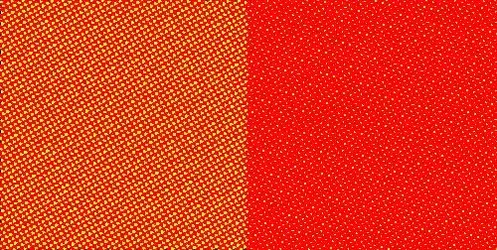
Here are two mondo-sized pixels, one orange, one red:

$two_pix-smooth.webp

Pixels represent the file's data. They have no specific size or dimension, they are just bundles of numbers that represent information. Pixels have no dimension that can be measured in terms of "per inch" until they are represented in the physical world.

Representing this data in the physical world is tricky. Our monitors and printers don't have access to every color you have in the original scene. So in most cases, they are represented through dots. Dots are little blobs of color (ink or pigment) that when viewed at a distance merge together to form color:

$two_pix-large.webp

So as you can see, the definition of the pixel kind of goes away, but at a normal viewing distance it's kind of hard to tell that the pixels represent orange and red. Fair enough. Make the dots smaller:
$two_pix-small.webp

Well, that's better, but now the pixels are distinct again, and the image will appear all pixely.

What does this mean in the real world, a printer screen with a lower frequency can have a lower ppi without resolving individual pixels:
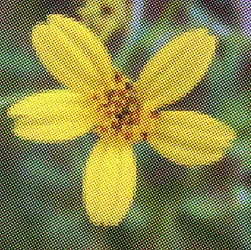
$half-tone flower.webp
(click for detail)

However, a higher quality printer with higher screen frequency will require more pixels per inch (ppi) in order to avoid pixely results:
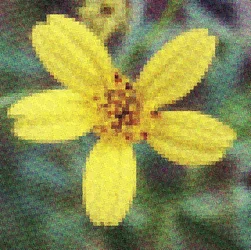
$half-tone flower_smaller.webp
(click for details, flower image courtesy of Eric Gunther File:Bidens flwr.jpg - Wikipedia, the free encyclopedia)

So no, you're not going to get away with lower ppi on a better printer. But photoprinters require as continuous tone as possible, and have outlandish screen frequencies. So for photography, the best solution is to ensure that the pixels are smaller than what we can see, this is why 300ppi is kind of teh standard. Beyond that, you're not going to get much better results, because the eye cannot resolve below about 1/300"

 
Last edited:
To get the proper DPI for different sized images, you need to know the exact printer that will be used. Different printers have different printing resolutions for photo printing. Canon inkjets print at 600 PPI. Epson inkjets print at 720 PPI. Durst Theta printers print at 254 PPI. Noritsu printers can print at 450 PPI.

Printers don't print PPI they print DPI. To say that Canon printers print at 600 PPI you're suggesting they have a DPI resolution of 4800. They don't; it's 4800x2400 which is not the same as 4800x4800.

Joe
 
How big a print will be has a lot to do with how far from the print a viewer will stand. So, viewing distance has a bearing on what PPI you would want to assign to a image that is to be printed.
The next consideration is the image content. The 'busier' an image is (the frequency of edges/lines in the image), the higher the PPI a print will need. A landscape shot dominated by leafy foliage will require more PPI than a scene that has far fewer edges/lines in it.

Note that many online labs are willing to stake their print quality reputations by accepting images that have as little as 100 PPI assigned, regardless the size the image will be printed.[/QUOTE]

Ok it's making much more sense now but I obviously need to read up on this. At the moment I am working with engagement photos. The thing is, I am putting these on a disc for them to print themselves. I will ask where they print so I meet the printers specifications but as far as online printing is there a any place you suggest?
 
Putting images on a disc that the customer later prints can cause some issues related to print aspect ratios (the shape of the rectangular (or square) print.

What is going to happen is your customer will want an 8x10 print (5:4 aspect ratio), or a 5x7 (7:5 aspect ratio), or a 11x14 (oddball/uneven aspect ratio) from what is likely a 3:2 aspect ratio image (8x12) that you put on the disc. (Most DSLR cameras make 3:2 aspect ratio photos, because that is the aspect ratio of the 35 mm film frame they are based on.)
The only way that can be done is if the 3:2 aspect ratio image is cropped to the 5:4 aspect ratio. To go from 8x12 to 8x10 2 inches have to be cropped away.

Mpix will do the crop, but will orient the crop from the center of the 3:2 aspect image, so parts the customer wants in the 8x10 (or 5x7)may get cropped away.

A square print has a 1:1 aspect ratio.
 
A dot is not a pixel. Forget dots...DPI has nothing to do with pixels, per se.
In printing , DPI expresses how ink is administered, not pixels directly.

PPI is the value you should reference. Even some printshop info online erroneously uses the expression DPI.
DPI is print technology dependant...how ink is output. Has nothing to do with photo-editing as we need to understand it.
Supply 300 or 360 ppi to the printer and you are done.
 

Create an account or login to comment

You must be a member in order to leave a comment

Create account

Create an account on our community. It's easy!

Log in

Already have an account? Log in here.

New Topics

Back
Top Bottom