What's new

Riley's Photo shoot

mindfloodz

TPF Noob!
Joined
Apr 5, 2011
Messages
231
Reaction score
7
Location
Chicago
Can others edit my Photos
Photos OK to edit
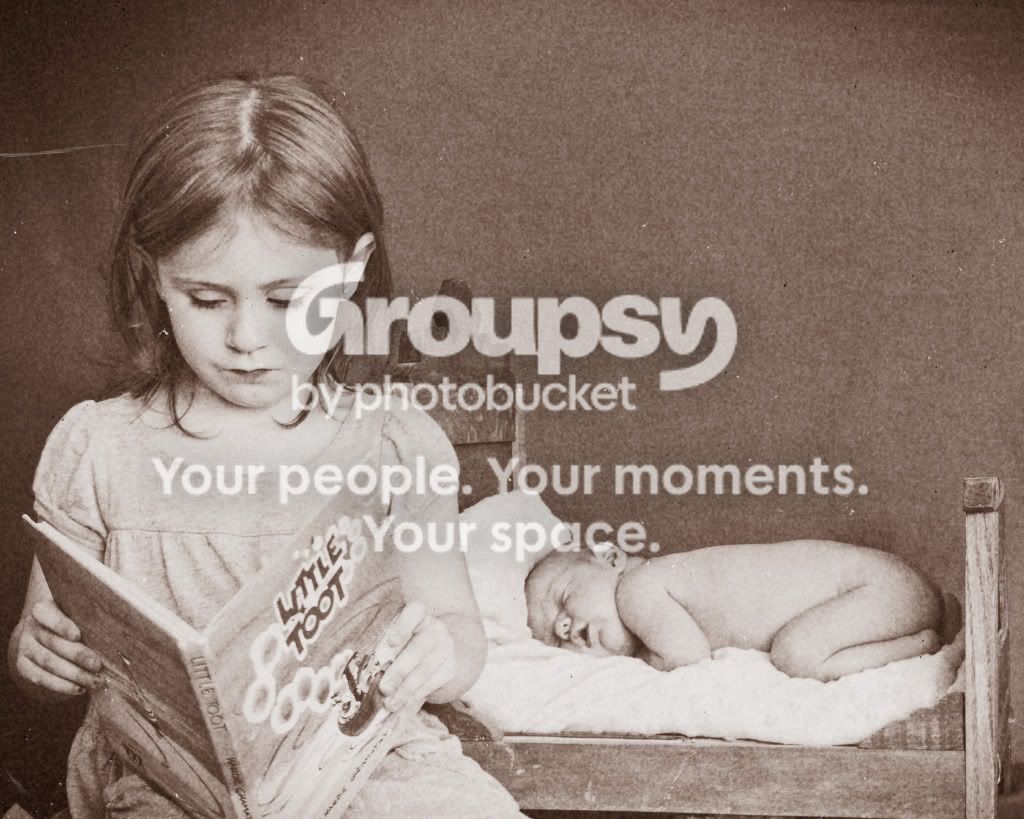
This is my newborn Riley and I just started getting into Newborn photography the past couple weeks. I took a few photos today. I am going to post variations of the pictures. Tell me what cha think

BabyBedRiley.jpg


babybedcovers.jpg


BabyBedRileybw.jpg


PaitynReadingtoRileyOLD.jpg


I already removed the piece of thread hanging on the bottom of her finger
Mommysfinger.jpg


PaitynReadingtoRiley.jpg
 
Last edited:
the first one and the last ones are my favorite of this series, but i think the last one you lose focus of who your subject really is, and in this newborn session it is well the newborn... if you could of position the little girl reading the book behind the bed i think it would be better compositionally.. this is of course my opinion. and the wonderful thing about photography is that its subject to your own opinion.

i also don't think i would do a b&w on such a flat backdrop, it has not interest to it, just a gray background, if it had a muted texture to it, that might help. hope that helps.
 
How about working on subject/wrinklybackground separation?
 
look where the bed and the background meet on the floor, it is not smooth there, asl on the left side of some of the pictures a little less than halfway down it looks wrinkled.. at least thats what i see, not sure if he is talking about the same ones i see.
 
and as far as background separation, he might be talking about how the little girls head is not separated, to me it looks like she was digitally put in, it might be your processing, it is kinda strong (IMHO) and if you were to add a texture to the background, this would be even more amplified.
 
I used a bed sheet for my background and a patio table to place the little bed on. I set the bed on a table because I wanted to use my mirror lock, and I tend to get a crap focus cuz I'm a little shaky when trying to snap a sharp picture. Also, if I had the means to do so, I would have placed them on the floor, but this still would have presented a problem with my lighting that was coming in from the window. I need that lift to get the full natural light from outside. I don't have the moeny to buy a lighting setup or get an external flash at this time. babies are expensive.

I had my wife that is still recovering from a c-section trying to hold the background up in the back while trying to maintain a wrinkle free surface. I had no place else to put my older daughter in the picture to make it look like she was reading her a story. I just wanted the background to cover both of them, which is why she had to be positioned as such. Why she looks Photoshopped in, IDK cuz I placed my focal point on the right eye of my newborn.

I'm still confused as to what BitterJeweler meant. Was he making a snide remark when referring to background separation by saying, subject / "wrinkly" background separation? I know it's wrinkly and there's really nothing i could do about it under the circumstances... Also what's right with the work I've done, what should i continue to keep doing? Gimme some tips to fix these problem, rather than just pointing them out. CONSTRUCTIVE!!!!! BE CONSTRUCTIVE!!! Take a tip from Sbakewell! That's what I need!!! Thanks Sbakewell

Molested Cow, may I ask how they look unrelated? The newborn is lying in bed and she is reading her a story. Pretty related to me... Although i could have had her behind the newborn as Sbakewell has mentioned, which would have been a more pleasing composition. So for them to appear unrelated is just not entirely valid to me.
 
aww thanks! do you have a relfector? that would help get the light back to their faces. instead of using your poor wife, what if you used velcro? and hooked it to a wall? then you can bring them forward more get them away from the background, i definitely think she girl needs to be behind the baby. or something you could try and do is have you older daughter sit with her legs completely straight out then with the baby wrapped in a blanket of some kind lay the baby on her legs with her head toward her feet and then give your daughter the book... i seen this somewhere and it was adorable, i am going to assume that it was a composite one shot with someone holding the head, one shot holding something else so the baby is supported not just by the childs legs then composited together, if if you have ps you can do this easily..

Molested cow is right when he says they look unrelated because they are not "interacting" the baby is behind the girl so your eye goes to the book, then the girl, and as an afterthought the baby.

the bed is not so small for the baby, but the thing under her that comes up is to big for this bed, imo, i have a baby bed, it is bigger than yours and i use a pillow, in your case I would just take a baby blanket and fold it up and then wrap that blanket with what you want showing in your picture.

you also mentioned that you wanted the background to cover the whole picture so thats why you placed them they way they did, but if you bring them away from the background and you are catching the end of your background then in ps you can take the rectangle selection tool and hit ctrl +T this puts it into a transform mode and then you can drag it out, since you are using a plain background it should not look streched out, if it does use the clone tool. :-D

 
when you say you get crap focus, what focus are you using? and shutter speed? if you shutter speed is not high enough to freeze motion it will be blurred.
 
Bitterjeweler - How should I constructively fix the problem if you don't mind me asking

Sbakewell - My shutter speeds were between 1/4 and 1/10 for these pictures with the exclusion of the finger picture which was a 1/60 shutter speed. It must be understood that my lighting conditions where VERY VERY POOR! I unfortunately do not have the money to invest in a lighting setup or even a speedlite at this point in time, I would really like to get one as soon as possible, but it's just not an option right now. My focus is one shot auto focus. Would you recommend I use AI focus? The lens I used for this shoot is not my lens, but a friends kit lens (18-55mm) being that I opted not to get the kit lens so I could get the 50mm f/1.8 and the 55-250mm IS... I probably wouldn't go back and buy the kit lens to accommodate my need for a wider angle, but I'd rather just get a 17-85mm IS USM lens for my wide angle needs, being that I tend to shoot in more confined spaces.
 
Last edited:
How about working on subject/wrinklybackground separation?

Maybe use Photoshop to select the pink tones, and then paste-in a faked backdrop. Or clone or smudge the "real" background a little bit.
 
I used the dynamic skin softener in Nik Color Efx Pro and selected the colored areas of the wrinkles and smoothed the out quite a bit with the brush.... This was done before I posted them on here. I could do further processing. If I put my RAW up would someone wanna give it a try and kinda guide me in the right direction as to how these edits were performed?

RAW File:

Hotfile.com: One click file hosting: IMG_9278.CR2
 
This is where i did the shoot.... Just to give you an idea of what I was working with....

IMG_9267.jpg
 

Create an account or login to comment

You must be a member in order to leave a comment

Create account

Create an account on our community. It's easy!

Log in

Already have an account? Log in here.

New Topics

Back
Top Bottom