What's new

River Flows Past Gollum's Cave....

OK, it is bright enough, so keep your eyes unharmed. ;) Actually, as usual, that's an intriguing composition. I see a face on the left side of the cave, and a black cat on the right side. The texture is really amazing and there are all kinds of things you can imagine yourself seeing in the whorls and grain of the old wood. I hope you are intending to print some of these in a largish format (say 16x20) - I'd be pretty happy to have that kind of print on a wall!
 
Pretty cool! I can see the title! :)
 
pgriz said:
OK, it is bright enough, so keep your eyes unharmed. ;) Actually, as usual, that's an intriguing composition. I see a face on the left side of the cave, and a black cat on the right side. The texture is really amazing and there are all kinds of things you can imagine yourself seeing in the whorls and grain of the old wood. I hope you are intending to print some of these in a largish format (say 16x20) - I'd be pretty happy to have that kind of print on a wall!

Hey thanks :). I'm just getting my first prints made up here shortly...with help from a TPF buddy. Ive never printed anything. I'm thinking of doing a showing somewhere if someone will put my crap up in a coffee shop or something...pictures of cars.....jk...wood of course.

But yes .... I'm still struggling with my monitor lightness & contrast...I can't adjust it!!! Crappy old monitor I guess.
 
The_Traveler said:
yours or ours?

Mine if course...but I'll be mailing the bloody eye to whoever posts the comment.

Just make sure u leave your address ...thx ;)
 
Hmmm ... do I value my eyes?

No comment. Looks fine ....

;)

Totally see Gollum's cave by the way.

:)
 
.... If anyone says it is underexposed I may claw an eye out

beach wood 29 by charlie766, on Flickr

Very nice shot.

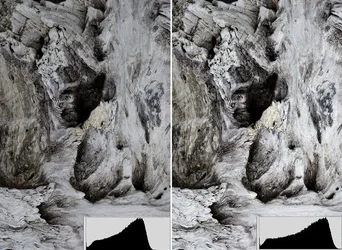
It's not underexposed so you can keep both your eyes. It is however flat. It' lacks normal contrast. Look at a histogram for the photo (inset illustration) and you'll see that it falls far short of the right corner. That means the photo has no highlights. Simple Levels correction to shift the histogram over (again inset) and balance the tone response.

Joe

$low_contrast.webp
 
Ysarex said:
Very nice shot.

It's not underexposed so you can keep both your eyes. It is however flat. It' lacks normal contrast. Look at a histogram for the photo (inset illustration) and you'll see that it falls far short of the right corner. That means the photo has no highlights. Simple Levels correction to shift the histogram over (again inset) and balance the tone response.

Joe

<img src="http://www.thephotoforum.com/forum/attachment.php?attachmentid=13694"/>

I appreciate the critique Ysarex. I have a few comments/questions in return. I only shoot this sort of thing in cloudy skies...always grey. I try to get my pictures to emulate that mood, so I generally use a lot of grey tones. Bright whites I am not too keen on, personally, when it comes to this sort of thing. I am confused about the levels. Is it a rule-of-thumb to make sure you have the entire range of tones in an image/histogram? This is something I have always been unclear on.

Secondly, I used the flat image on purpose, as I thought the flat element would worlk better with this composition. I have about 100 variations of this image on my computer, with all different aperatures. I am having a big focus issue though....something I feel I should know the answer to. I have found that when I use large aperatures, the focus is crystal clear toward the middle, but blurry as hell as you move away from the center of the frame. With smaller f-stops, the edges maintain some sort of focus, which is why this image apperars flat.

Please, any suggestions/tips for getting sharp images on the ENTIRE frame with large f-stops, not just the center. I have resorted to using f9 or f10 for these shots, but this is making me crazy!
 
how close are you to your subjects when shooting them?
 
Online Depth of Field Calculator

I used to struggle with this with my flowers. Same would apply to your wood. (haha). You don't have to memorize numbers, but it gives you an idea so when in the field you know "ok...at x aperture i'll only have about 4 inches...so I need more"
 
Ernicus said:
how close are you to your subjects when shooting them?

I am generally 2-4 feet away...using up to 100mm zoom. I am having issues with this focus problem of mine...so I actually just started a thread to get some feedback on this stuff.
 
Ernicus said:
Online Depth of Field Calculator

I used to struggle with this with my flowers. Same would apply to your wood. (haha). You don't have to memorize numbers, but it gives you an idea so when in the field you know "ok...at x aperture i'll only have about 4 inches...so I need more"

Right now, I am not-so-much struggling with depth-of-field in the center, but depth around the edges of the frame. It is making me pretty friggin insane actually. Do I really have to sacrifice sharpness in the center (use a smaller aperture) if I want focus around the edges? Stupid question, right? Is there no other options? If I back off and zoom in more?
 
dof is all inclusive man...not just center point and back and forth.

also consider the lens, you may be having fall off as well.
 

Create an account or login to comment

You must be a member in order to leave a comment

Create account

Create an account on our community. It's easy!

Log in

Already have an account? Log in here.

Back
Top Bottom