What's new

Sexiest model ever...

KevinPutman

TPF Noob!
Joined
Apr 13, 2011
Messages
545
Reaction score
19
Location
Nebraska
Can others edit my Photos
Photos OK to edit
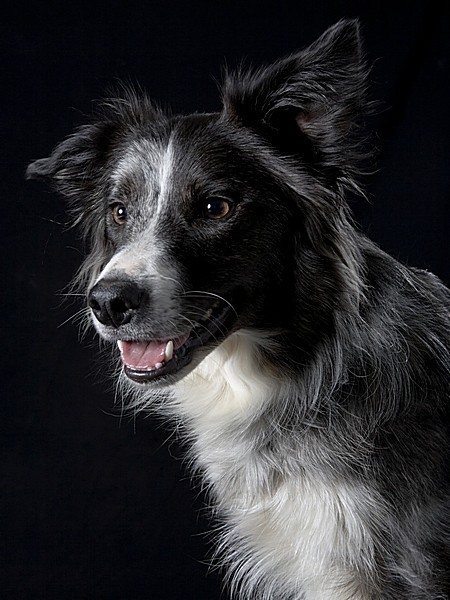
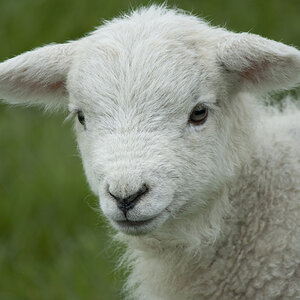
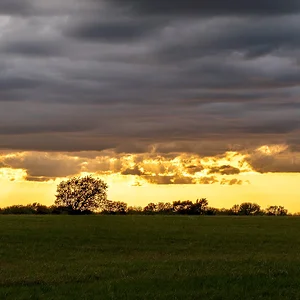
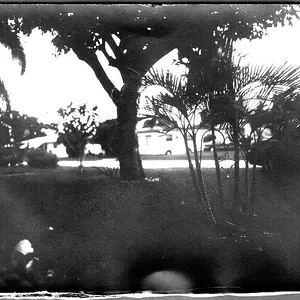
So this was mostly just a lighting experiment. Sources were 2 indirect lights behind me to the left, and the on-board flash..I would have liked the flash to be brighter..but my camera only has high, med. and low. These were on low, medium was too bright.

Also, no PP was done to any of these.


Whatchathink?

Her name is nibbles, btw ^-^
1
d.jpg


2
c.jpg


3
b.jpg


4
a.jpg


Edit:
Took someone's advice, this is a pic from the reshoot.
2m2f3eu.jpg
 
Last edited:
They look underexposes, but I'm also on my phone...
 
Which one is your favorite and why?
 
@ Geaux, they probably are, I'm not sure what the proper exposure techniques are for shooting like this..I also couldn't up my shutter speed too much, she's a wiggly bunny. Same with ISO, didn't want too much noise. I'll take then into PS and see if I can get them looking better.

I like 2 the best,
I just feel composition on that one is the best (rule of thirds wise), and it just strikes me as the most appealing.


Edited original post with updated, better exposed photos.
 
I really can't tell what exactly you were trying to achieve with these, so having said that I really can't say anything about them. I understand that it is meant to be a lighting experiment, however what type of experiment / what style you were trying to achieve / what look you wanted are all still a mystery :)

It appears the light is very soft, and very low. You could have increased the flash to medium and increased your shutter speed to compensate.
 
You could have increased the flash to medium and increased your shutter speed to compensate.

I'm glad there are people here on this site to think for me, I never would have come up with that myself, hahaha. thanks!

And I guess just a starter for lighting in general. I've never done anything outside of natural lighting, so just any feedback on it (such as what you provided) is great. ^-^
 
Took your advice shmne,
although I had to drop my ISO all the way down to 80, my Fstop up to 8 (as high as it goes), and my shutter speed to 1/1600 (although it wouldn't shoot at that speed, it kept bouncing to 1/500 for the pictures..I'm guessing because of flash sync?

But anyways, I still had some photos that were blown out =p
But I think they came out much better, and she was being much more photogenic this time around.

2m2f3eu.jpg
 
Much better! Just keep playing with light... it takes a very long time to master, and the more you experiment the easier the process becomes in time.
 
Bestiality. Not cool.
 
You really need to learn how to focus and know about the exposure triangle before you start playing with flash and lighting!
 
Try again with your 2 lights coming from behind at 45 degs from each side and pop some flash you should be able to get some seperation from the back ground
like this on, i onl used 2 lights 1 camera left with a shoot through brolly and 1 from behind with a 7" reflector fitted with a honeycomb
1221198821_HR3ae-L.jpg
 
So this was mostly just a lighting experiment. Sources were 2 indirect lights behind me to the left, and the on-board flash..I would have liked the flash to be brighter..but my camera only has high, med. and low. These were on low, medium was too bright.

Also, no PP was done to any of these.


Whatchathink?
You need more light. For starters, take the two indirect light sources and direct them. Have one as your main light for the bunny, one lighting the background and use your on-board for fill. If needed, flag your background light to prevent spill. Bring the main light in close to increase its size, creating softer light source. This may also require you to use some difussion material. You'll also want to have your lights at a color temperature of around 5500K. You should be able to find typical bulbs for house lamps at that rating or labeled "daylight".

i-RmSbDhB-XL.png

You are also fighting yourself for exposure by using that black "thing" for a background. Black subtracts light. Try finding a lighter color or white material for the background.
 
You really need to learn how to focus and know about the exposure triangle before you start playing with flash and lighting!
I know both.
If any focus in that picture is off, it's not my fault. I set the focus on the bunny's eyes every time, then composed the shot. I also know the exposure triangle..as I said earlier, I just totally didn't think about increasing the shutter speed, lowering the ISO, raising the aperture, in order to brigten my flash..


@ Kudalini,
when using a lighting setup like that, what will the outcome be? What will the picture look like, lol.
Also, you said diffusion material..how would I go about getting something like that for my camera's onboard flash?
Maybe like a scrap of white cloth held over the flash?


and @ gsgary,
for lighting I was using a light stand, with regular 60w house bulbs in them..it has 3 lights on the one stand, so it's more for decorative purposes..
although I'd be willing to turn my basement into a studio, if someone could recommend cheap gear..
for a reflector..I can use like, a white sheet of paper correct? or tinfoil for silver, gold, etc?
No idea what a honeycomb is.
 
@ Kudalini,
when using a lighting setup like that, what will the outcome be? What will the picture look like, lol.
Also, you said diffusion material..how would I go about getting something like that for my camera's onboard flash?
Maybe like a scrap of white cloth held over the flash?
The outcome should be a better exposed image than the one here.
I was referring to diffuse the main light, although you could also diffuse or bounce the on-board flash. A white bed sheet, tee shirt, clear shower curtain...... anything really that doesn't give off a color cast, unless you want a particular color cast.
 

Create an account or login to comment

You must be a member in order to leave a comment

Create account

Create an account on our community. It's easy!

Log in

Already have an account? Log in here.

Back
Top Bottom