What's new

So frustrated just feel like packing the whole blooming lot in :(

BaileySnapz

TPF Noob!
Joined
Jan 28, 2013
Messages
16
Reaction score
0
Location
Ireland
Can others edit my Photos
Photos OK to edit
I just cant get any decent crystal clear shots, no matter what I do & im so fed up.... I even bought a new 7D for the super AF system & fast fps. The camera tells me they are perfectly exposed, they look fine, detailed really clear on the LCD they I upload & they are just rubbish, dull lots out of focus & to me look really really fuzzy as opposed to other peoples online shots & when I view through the Raw converter where my camera says it was perfectly exposed the software frequently highlights clipping with big exclamation marks. I just don't know what im doing wrong. Mainly using a sigma 30mm 1.4. I thought maybe the fuzziness was noise but had a photographer friend look & what I thought was noise (the fuzziness) he says is just the shallow DOF, but even when I zoom into the focal points like the eye its still fuzzy but not on my LCD I just don't get it can anyone suggest ANYTHING!!! getting desperate here!! please & many thanks in advance.
 
Can you post a picture with the exif data as an example? Without one it is hard to narrow things down, it can be so many things!
 
If you are getting a small area in focus, but not as much as you want then you may need to make sure the apature the camera selected isn't too shallow. Shooting a bigger number f-stop will let more of the image be in focus and give you a much wider depth of field.

As for clipping highlights, auto mode on cameras try's to get 50% grey throughout the image, try underexposing you images slightly by keeping the arrow a mark under what the camera thinks is exposed. With RAW files you can pull details out of shadows, but overexposed detail in highlights is gone.

Keep with it, maybe put the camera down for a week if you get too frustrated. Just know that starting out was rocky for all of us. I still have my first exposures when I started getting into digital and my hit rate of pictures I was happy with was super low.
 
pics or it isn't happening
icononethumbup.gif
 
So I am guessing you are shooting wide open. I say that judging by your friend stating that it is merely the shallow depth of field. First you need to use different apertures like f/6- f/11 if you want sharpness across a wide range. Since you are shooting RAW you need to adjust those photos. RAW format will always require post processing to get the most from a photo. Or you can shoot RAW+Jpeg, and then change your picture controls for the Jpegs, not sure what Canon offers for this. You can then Sharpen in camera for jpegs to offset the effects of the AA filter in your camera, which does effect sharpness. You can get more color by adding Saturation. If you are getting the blinkies I am guessing this is from over exposed parts, which in this case you may need to under expose some. I shoot in Manual all the time, and I have learned what my camera does with the given lighting, so I adjust for what I am shooting. I do much of what I have stated above, it took some time to learn how the settings effect the final image. Photography is pretty much a hobby of patience when starting out, I started in film, and when I went to digital I had to somewhat learn all over. And your photos will always look good on the LCD for the most part, it is not a true representation of the final image. I suggest you get a good book or two on photography, and maybe your camera in this case if you do not like experimenting. I like to experiment myself, sometimes you find things you did not know your camera could do.
 
The LCD on the back of your camera displays a JPEG rendition of the image. There is an inherent sharpening applied by default. If you're shooting RAW, you will need to apply some sharpening in the final steps of your post processing. Still, your focal point should be sharp. As PixelRabbit said, the EXIF data can reveal some problems that may show a possibility of user error.
 
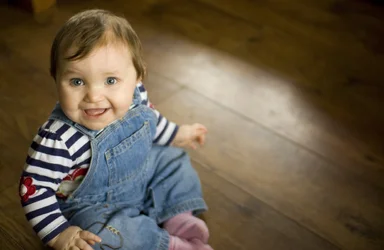
$Head & shoulders 3 sized.webp you guys are so quick thanks so much for your replies! Im sorry I don't know how to get the exif data on it? unless maybe it is already what is that the settings used for an image?
 
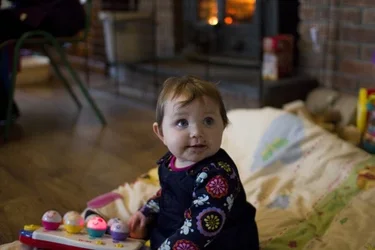
doesn't look as bad here as it does in photoshop although when you zoom in still fuzzy. ill upload another but this next one the ISO is 2000 so I suppose cant expect great things or should I? Would a full frame really be that much better for these conditions? indoors no flash?
 
I'm a noob so take my comments for what they are worth.
Looks like the elbow is in focus - which is also the thing closest to the camera. Looks like you may be in auto mode letting the camera decide what to focus on. Manually select your focus point (closest eye) and close the iris a bit to get more in focus.
 
I can tell by looking at it that the aperture is your problem if you want more of the image in focus. Your shooting wide open, you need to knock the aperture back a couple to get a wider DOF. The smaller the hole in the lens the wider your depth of field is. Try shooting identical images at f3, f6, f8, f11 and then compare.
 
Yeah, you shot this at 1.4 and you were fairly close, so narrow DOF. Having said that, it's not bad enough to quit over. Looks like you focused on the eyes, which is correct, but I think I'm seeing some motion blur even with the 100th sec exposure at 30mm. Do you have a tripod?
 
Hi Bailey, I found the 7D a pretty steep learning curve and had a similar experience to what yours sounds like. I went through stages of thinking it was me, the camera body, the lenses etc. I finally got the time to sit down and test everything, and I found that it was in fact the soft bit of skin behind the equipment.

In the end I found that I need to be more precise with my use of the camera and pay alot more attention to dof, minimal focal distance, metering use of AF points and bear in mind that raw images allways need sharpened as well.

I'd suggest calibrating the viewfinder, and testing your lenses, metering modes, focal points using a tripod and mirror lock up at different dofs. As a quick comparison take a couple of shots in jpeg as well to make sure you aren't just zooming in too much as well.

And as PixelRabbit says post an example so we can see what you are getting, as we can tell a lot more from an image than a description.
 
$forum test.webpmaybe I made this too small I re-sized to a 6x4 print :/ straight out of camera nothing done to it converted to DNG then saved as JPEG
 
No, full frame is not the problem. You should be able to nail it with what you have. Try the same shot at f4 or 5.6, up the ISO a bit. Practice your handheld technique and/or get a tripod.
 

Create an account or login to comment

You must be a member in order to leave a comment

Create account

Create an account on our community. It's easy!

Log in

Already have an account? Log in here.

New Topics

Back
Top Bottom