What's new

Some Landscape for C&C

spacefuzz

No longer a newbie, moving up!
Joined
Jan 18, 2011
Messages
1,832
Reaction score
318
Location
Southern California
Can others edit my Photos
Photos OK to edit
1. Wide angle shot at a beach near Santa Cruz. 2 RAW files blended in photoshop. Had to take a bunch of shots to get the waves just right.
5459526986_7b4a37674c_o.jpg


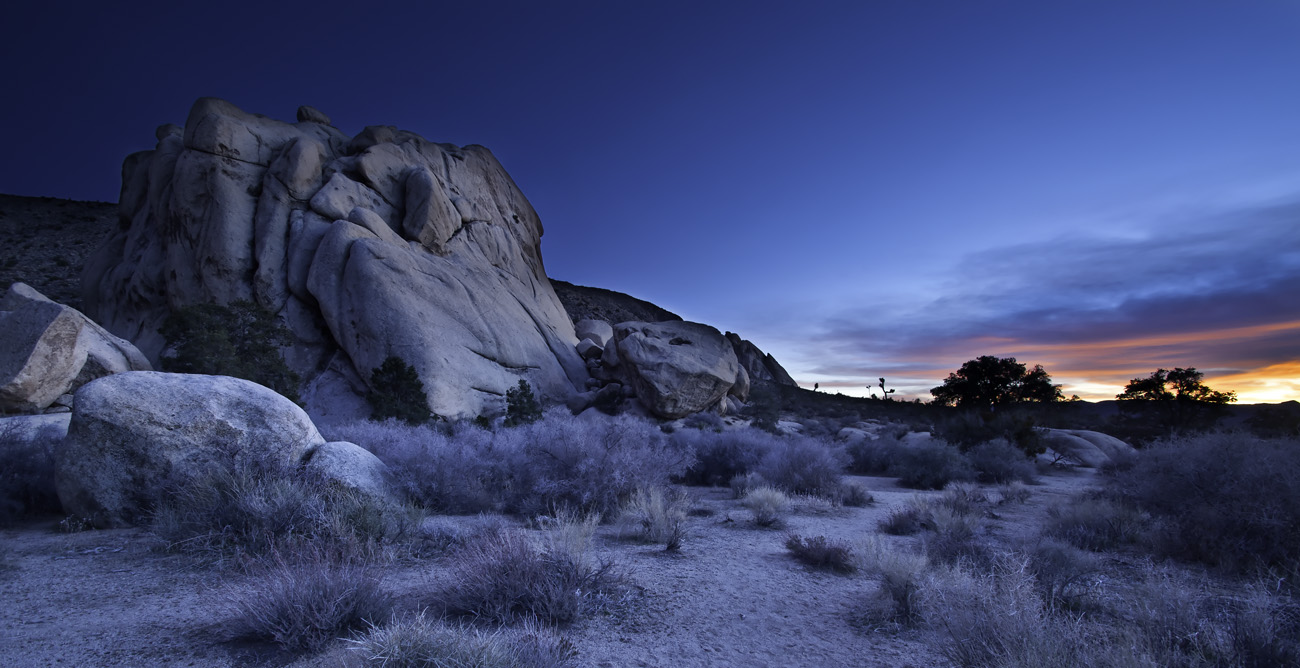
2. Wide angle shot in Joshua Tree National Park. 2 RAW files blended in photoshop. f/8 I think and at least 30 seconds.
5452430789_0e5f84f3b9_o.jpg


3. Wide angle shot in the mountains by LA, 3 RAW files hand blended in photoshop.
5472838321_2f804a4167_o.jpg
 
I feel like #1 and #2 are pretty cold. Were they shot at dusk? #1 feels a bit empty to my eye, pretty but a bit empty. #2 is a really nice, nothing else to say than good job. #3, what else to say than WOW! Only little technical point, I see a very light halo around the tree top. Might be my monitor, might be blending or highlight recovery. Overall, it's pretty impressive especially #2 and #3!
 
Yeah #1 and 2 are colder, they were taken after sunset with longer shutter speeds. On #3 yes there is some haloing, I tried to keep some detail in the pine needles so blended in the background exposure at a 50% level around the tree. Do you think I should sacrifice the needles and remove the halo?
 
That's how I do my "HDR" stuff by hand blending in photoshop. You did a pretty good job. I can see some halos, as mentioned. You might decrease the opacity of the brush tool to around 15% to 25%. This way you'll have a better chance of eliminating the halos.

I really like the last one, BTW!
 
Would anyone mind explaining this "Blending multiple RAW files together" thing for me?

Also #3 is my favorite, looks fantastic and the sky is amazing!
 
Would anyone mind explaining this "Blending multiple RAW files together" thing for me?
To make an HDR I usually either bracket my shots so I start with two files, or process the same raw file twice to end up with two files which I drop photoshop on different layers. Then you can just use a layer mask to brush in where you want each layer to show up. On that last picture I have a file for the foreground, a file for the bottom part of the sky where its hottish, and then a file for the rest of the sky. I used varying opacity layer masks to blend them all together. Takes more time than running it through photomatix but I like the end result better. The halo on the tree is from the overexposed sky in the foreground file shining through the 50% opacity mask for the correctly exposed sky. I wasnt sure how noticable it would be, so I will have to go in and touch it up.
 
Would anyone mind explaining this "Blending multiple RAW files together" thing for me?

Also #3 is my favorite, looks fantastic and the sky is amazing!

I should write a better tutorial and post it to my site, but for now I wrote a short explanation here: Blending Be sure to go to the second page, as I posted more stuff there.
 
Thanks for the explanation and the link, ive been very interested in HDR pictures, i just want to make sure ive got everything before i go out and shoot :)
 
Yeah #1 and 2 are colder, they were taken after sunset with longer shutter speeds. On #3 yes there is some haloing, I tried to keep some detail in the pine needles so blended in the background exposure at a 50% level around the tree. Do you think I should sacrifice the needles and remove the halo?

It depends on what your goal is. If your goal is to have a perfectly life representative picture, I would say, get rid of the halo. However, if your goal is to focus the attention of the tree and give it a look of some magical tree, I would say keep it. It gives the impression that your tree is some kind of mountain spirit with that halo;)
 
Number 3 looks like a shot from Lord of the Rings or something.
 
These are really special - some amazing venues and the pictures are incredible. Have to agree that 2 and 3 are the best - wish i lived near something like that....the lone tree with the rolling clouds and sunset is my fav!!
 
They have a very surreal feeling to them. I'm quite in love with them.
 

Create an account or login to comment

You must be a member in order to leave a comment

Create account

Create an account on our community. It's easy!

Log in

Already have an account? Log in here.

Back
Top Bottom