What's new

Straight newbie, my first set of picture ever.... Enjoy!! C&C please.

Gian_01

TPF Noob!
Joined
Dec 1, 2012
Messages
16
Reaction score
1
Location
New York City
Can others edit my Photos
Photos OK to edit
1.
$DSC_0652.webp
2.
$DSC_0648.webp
3.
$DSC_0610.webp
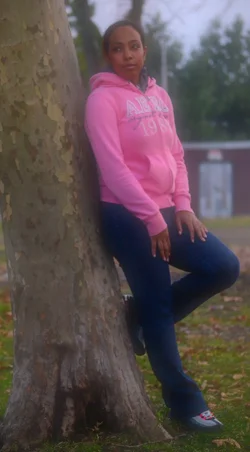
These are photos of my girlfriend and was trying to get a nice portrait, a pictures with leading lines and a framed photo. I would love feedback I am learning and very interested. Thanks and happy holidays!!
 
She is quite a lovely woman.

C&C as requested:
#1 - First off, the orientation to view is off. The photo is underexposed and this is exemplified on her face. In portraiture, the face is thae paramount element. It should be the brightest part of the image, forcing the viewer to go there first and then explore the surroundings. It's amazing how much a reflector can enhance a photo of this type. I think a complimentary angle of the right arm to her left leg might have been an improvement. One basic "rule" is .... if it bends, bend it.

#2 - As an environmetal portrait, the leading lines do work with a caveat. I'm not so fussed that she and the child are slightly out of focus, but the abruptness of the beginning of the leading lines do put this out of kilter for me. I feel that if you had stepped closer so that the beginning of the bench was not shown, it would be a more shot. The use of the on-board flash so far in front of the image also is a detriment. Using a bounce card underneath the flash might have given a better result.

#3 - Gorgeous smile. Be cogzinant of having some white on either side of the cornea. Otherwise, it can look slightly manic.
 
OK.

You need to do some reading on
1) use of the camera
get a book on exposure or read on the web about the exposure triangle, when to use which camera mode, how to make images bright dark, how to control the depth of field.
learn to use the camera just to get decent sharp well exposed pictures.
Don't worry about taking good pictures, just OK ones.

note this first picture is way out of focus.
figure out why.

$DSC_0652-head.webp


2) composition
do some searches and reading on how to compose pictures.
search for 'Rules of Composition"
Let's look at just the first picture.

typically, important things are placed in powerful positions, like where the thirds of the image meet (rule of thirds)
In this picture, the real center of interest, her face, is way up in the corner and the rest of the picture is taken up by stuff that isn't important.
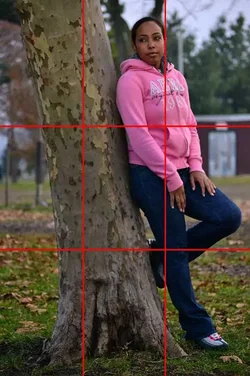
$DSC_0652thirds.webp

My single overarching rule is Know what you are taking a picture of and compose around that.

The axioms that follow are:
  • Everything in the frame must have a purpose - either to be something important to look at or to support artistically what you want people to look at.
  • The important things should be in important places
  • Elements of the image that add to its impact should be maximized and things that detract should be minimized

Photography is a great passion and you are just starting.
Keep on trying, decent start.

Lew

 
#1 pretty good, but the background is distracting.
#2 Subjects are too far away, and nearly insignificant in the frame.
#3 Good pose, but I think it needed more light and probably portrait orientation.
 
I guess in part what I need is a easy to use photo editor for my mac so anyone have any suggestions?
 
Liked the composition in #2 ; but not that far distant

Liked #3 also

But i can't understand why you posted #1 that way :scratch:
 
I guess in part what I need is a easy to use photo editor for my mac so anyone have any suggestions?

Use iPhoto until you feel the need to purchase something else.

Look at the "edit" icon, lower right corner.
 
View attachment 27619
I was thinking maybe have them sit down on the bench and make it look like she is comforting her knee or something. I was just trying to challenge myself on leading lines.
Also if anyone can help me on how to expose the second picture more. I was using a Nikon D3100 55-200mm lens.
 
OK.
composition
do some searches and reading on how to compose pictures.
search for 'Rules of Composition"
Let's look at just the first picture.

typically, important things are placed in powerful positions, like where the thirds of the image meet (rule of thirds)
In this picture, the real center of interest, her face, is way up in the corner and the rest of the picture is taken up by stuff that isn't important.

View attachment 27593
Lew

This better as far as composition?
$CSC_0653.webp
 
IMO, no.
Her face is still up in the corner, the pose draws my eyes to her hands and the tree takes up most of the space.
Don't try to fix this up to be better, there are too many things wrong for that.
Start from scratch with better preparation on your part, better focus, better exposure.

There is no shortcut.
 
IMO, no.
Her face is still up in the corner, the pose draws my eyes to her hands and the tree takes up most of the space.
Don't try to fix this up to be better, there are too many things wrong for that.
Start from scratch with better preparation on your part, better focus, better exposure.

There is no shortcut.

I agree with Lew on this. I was trying to understand why you asked about software, when the c&c that is being given to you is on composition and focus, which are corrected in camera and not with software.
 
My general rule is to make it look great in the camera so that you don't spend too much time in post fixing everything. Also, in my experience, if its out of focus, no amount of editing software is going to make it look better.
 
My general rule is to make it look great in the camera so that you don't spend too much time in post fixing everything. Also, in my experience, if its out of focus, no amount of editing software is going to make it look better.


One post and Three likes already....... you're off to a good start navygoddess. :biggrin:
 
$DSC_0629.webp
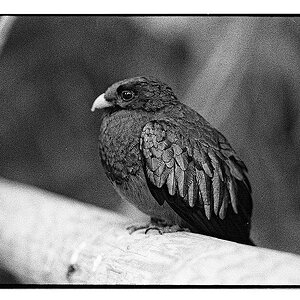
This was another photo I took when I was with my girlfriend, she finally convinced me to post it.
Its of an American Bald Eagle.
 

Create an account or login to comment

You must be a member in order to leave a comment

Create account

Create an account on our community. It's easy!

Log in

Already have an account? Log in here.

New Topics

Back
Top Bottom