What's new

Struggling

aikoheiwa

TPF Noob!
Joined
Mar 16, 2016
Messages
5
Reaction score
0
Can others edit my Photos
Photos NOT OK to edit
Hi everyone.

My name is Amanda and I'm new to the forum. Although I have had digital SLRs since the original Rebel was released, I would still consider myself a beginning photographer.

Recently, I upgraded to a new camera. My XSI has been having problems focusing. Originally, I was going to have it serviced with Canon ($200 expense), but found a T6i with a rebate at a decent price on Amazon. I purchased it, only to be extremely disappointed as the first one, all the pictures were blurry, and the focus never got any wider than an extremely small area no matter what I set the aperture on. Amazon sent a replacement camera and the pictures came out better. Unfortunately, while they weren't what I call blurry, they were definitely soft around the edges.

When I first purchased the original Digital Rebel, I was amazed at the clarity and clean lines of the pictures. I had the same reaction with the pictures when I originally got my XSI. With this one, however, any picture I took was 'soft', no matter what I did. After struggling with it, I finally went to a brick and mortar store and they spent a good hour with me attempting to figure things out. Even they could not get the picture to be crisp and clean, the edges were still soft. The store said it was possible that Amazon, who they said often buys things in bulk, could have gotten a bad batch of cameras.

With disappointment, I returned the second T6i as well. Woot then had an amazing deal on a T5 for 300 dollars. I thought I'd give this a try, but I am still having the same problem. Now I'm beginning to think this is a user error. Even when I set it on the automatic (green) setting, however, I don't get those clean, crisp, clear pictures.

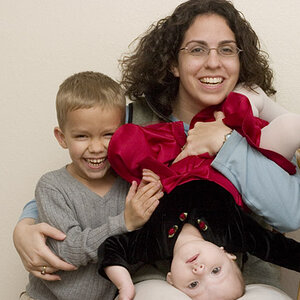
If this is a user error, I find it odd since I get this problem whether I use the automatic settings or the manual ones. Regardless, I thought I'd post here and see if anyone had any advice to offer. I've also uploaded the pictures I took today of my children and one of my elder son's friends. Any help would be greatly appreciated.

Amanda

Pictures: Index of /canonpics
 
Any chance you could post the EXIF data from some of those pictures? It looks to me like they are a bit underexposed, and I'm wondering if auto mode is messing with you a bit. Maybe a combination of a small aperture and slow shutter speed causing a little bit of blur. There seems to be a bit of noise too.
 
Any chance you could post the EXIF data from some of those pictures? It looks to me like they are a bit underexposed, and I'm wondering if auto mode is messing with you a bit. Maybe a combination of a small aperture and slow shutter speed causing a little bit of blur. There seems to be a bit of noise too.

Most certainly! They are below. As you can see, I took some on auto, some on manual and still got blurry/soft results. Thank you for your help!

Amanda

****

8758:
Exposure Time: 1/200 sec.
Program: Manual
aperture: 6.00 EV (f/8.0)
Metering Mode: Pattern
Flash: Flash did not fire, compulsory flash mode
Focal length: 55.0 mm
Shutter speed: 7.62 EV (1/197 sec.)
ISO Speed: 200


8761:

Exposure Time: 1/200 sec.
Program: Manual
aperture: 6.00 EV (f/8.0)
Metering Mode: Pattern
Flash: Flash did not fire, compulsory flash mode
Focal length: 55.0 mm
Shutter speed: 7.62 EV (1/197 sec.)
ISO Speed: 400


8763:
Exposure Time: 1/200 sec.
Program: Manual
aperture: 6.00 EV (f/8.0)
Metering Mode: Pattern
Flash: Flash did not fire, compulsory flash mode
Focal length: 18.0 mm
Shutter speed: 7.62 EV (1/197 sec.)
ISO Speed: 400


8765:

Exposure Time: 1/200 sec.
Program: Manual
aperture: 6.00 EV (f/8.0)
Metering Mode: Pattern
Flash: Flash did not fire, compulsory flash mode
Focal length: 46.0 mm
Shutter speed: 7.62 EV (1/197 sec.)
ISO Speed: 400

8766:

Exposure Time: 1/200 sec.
Program: Manual
aperture: 6.00 EV (f/8.0)
Metering Mode: Pattern
Flash: Flash did not fire, compulsory flash mode
Focal length: 46.0 mm
Shutter speed: 7.62 EV (1/197 sec.)
ISO Speed: 400

8768:

Exposure Time: 1/200 sec.
Program: Manual
aperture: 6.00 EV (f/8.0)
Metering Mode: Pattern
Flash: Flash did not fire, compulsory flash mode
Focal length: 27.0 mm
Shutter speed: 7.62 EV (1/197 sec.)
ISO Speed: 400

8771: Exposure Time: 1/200 sec.
Program: Manual
aperture: 6.00 EV (f/8.0)
Metering Mode: Pattern
Flash: Flash did not fire, compulsory flash mode
Focal length: 47.0 mm
Shutter speed: 7.62 EV (1/197 sec.)
ISO Speed: 400

8772:

Exposure Time: 1/200 sec.
Program: Manual
aperture: 6.00 EV (f/8.0)
Metering Mode: Pattern
Flash: Flash did not fire, compulsory flash mode
Focal length: 47.0 mm
Shutter speed: 7.62 EV (1/197 sec.)
ISO Speed: 400

8773:

Exposure Time: 1/200 sec.
Program: Manual
aperture: 6.00 EV (f/8.0)
Metering Mode: Pattern
Flash: Flash did not fire, compulsory flash mode
Focal length: 47.0 mm
Shutter speed: 7.62 EV (1/197 sec.)
ISO Speed: 400

8774:

Exposure Time: 1/200 sec.
Program: Manual
aperture: 6.00 EV (f/8.0)
Metering Mode: Pattern
Flash: Flash did not fire, compulsory flash mode
Focal length: 55.0 mm
Shutter speed: 7.62 EV (1/197 sec.)
ISO Speed: 400

8776:

Exposure Time: 1/200 sec.
Program: Manual
aperture: 6.00 EV (f/8.0)
Metering Mode: Pattern
Flash: Flash did not fire, compulsory flash mode
Focal length: 39.0 mm
Shutter speed: 7.62 EV (1/197 sec.)
ISO Speed: 400

8777:

Exposure Time: 1/200 sec.
Program: Manual
aperture: 6.00 EV (f/8.0)
Metering Mode: Pattern
Flash: Flash did not fire, compulsory flash mode
Focal length: 39.0 mm
Shutter speed: 7.62 EV (1/197 sec.)
ISO Speed: 400


8779:

Exposure Time: 1/200 sec.
Program: Manual
aperture: 6.00 EV (f/8.0)
Metering Mode: Pattern
Flash: Flash did not fire, compulsory flash mode
Focal length: 44.0 mm
Shutter speed: 7.62 EV (1/197 sec.)
ISO Speed: 400

8783:

Exposure Time: 1/200 sec.
Program: Manual
aperture: 6.00 EV (f/8.0)
Metering Mode: Pattern
Flash: Flash did not fire, compulsory flash mode
Focal length: 44.0 mm
Shutter speed: 7.62 EV (1/197 sec.)
ISO Speed: 400

8785:

Exposure Time: 1/200 sec.
Program: Manual
aperture: 6.00 EV (f/8.0)
Metering Mode: Pattern
Flash: Flash did not fire, compulsory flash mode
Focal length: 24.0 mm
Shutter speed: 7.62 EV (1/197 sec.)
ISO Speed: 400

8790:

Exposure Time: 1/80 sec.
Program: Normal program
aperture: 5.38 EV (f/6.4)
Metering Mode: Pattern
Flash: Flash did not fire, compulsory flash mode
Focal length: 24.0 mm
Shutter speed: 6.38 EV (1/82 sec.)
ISO Speed: 100

8798:

Exposure Time: 1/100 sec.
Program: Normal program
aperture: 5.00 EV (f/5.7)
Metering Mode: Pattern
Flash: Flash did not fire, compulsory flash mode
Focal length: 55.0 mm
Shutter speed: 6.62 EV (1/98 sec.)
ISO Speed: 320

8801:

Exposure Time: 1/80 sec.
Program: Normal program
aperture: 5.300 EV (f/5.7)
Metering Mode: Pattern
Flash: Flash did not fire, compulsory flash mode
Focal length: 55.0 mm
Shutter speed: 6.38 EV (1/82sec.)
ISO Speed: 1200
 
After a quick look, I'm not seeing anything that jumps out at me as being "wrong" with these images, from a faulty camera perspective. Could you post a link to a couple of images which display the qualities to which you refer?
 
Checked a couple of the shots, shutter speed 1/200, f/8, ISO 400. Also, using 9 point multi-point AF focusing and generally have some focus points locked on the kid. There does seem to be a bit more softness just outside the focus point than I would have expected at f/8. At that shutter speed I would try also turning off the IS, in at least one of the shots it showed it was on in panning mode.
Do you have a filter on the lens?
The Img-8772 also had flash the shirt (that had locked focus points) is in focus, but the eyes are just out of focus. The other shots I looked at did not have flash and seem to have more of a problem. In img-8771 there was focus-lock on the girls right knee and it looks in focus, but the face is very soft. As both images were at the same exposure it seems that some fill flash was needed to get a decent exposure so the ones without flash were probably underexposed.
 
How close to the subjects were you?
Your shots look to me like a combination of a bit of softness from the kit lens (it's not the sharpest lens but these shots are pretty much what I'd expect from one) and shallow depth of field (depth of field is also dependant on subject to camera distance, so expect a smaller depth of field if you are closer to the subject as well)
 
After a quick look, I'm not seeing anything that jumps out at me as being "wrong" with these images, from a faulty camera perspective. Could you post a link to a couple of images which display the qualities to which you refer?

Hey Tirediron. 8761 is probably my clearest shot, but it doesn't look like it's quite completely in focus. My son is soft. 8763 is the same as is 8772.


Checked a couple of the shots, shutter speed 1/200, f/8, ISO 400. Also, using 9 point multi-point AF focusing and generally have some focus points locked on the kid. There does seem to be a bit more softness just outside the focus point than I would have expected at f/8. At that shutter speed I would try also turning off the IS, in at least one of the shots it showed it was on in panning mode.

Forgive me, I have no idea what you mean by "IS".


Do you have a filter on the lens?

I do not.

The Img-8772 also had flash the shirt (that had locked focus points) is in focus, but the eyes are just out of focus. The other shots I looked at did not have flash and seem to have more of a problem. In img-8771 there was focus-lock on the girls right knee and it looks in focus, but the face is very soft. As both images were at the same exposure it seems that some fill flash was needed to get a decent exposure so the ones without flash were probably underexposed.

Honestly, the knee and the shirt don't look in focus to me either. They're still soft. Do they look in focus to you?

I don't understand why I'm having trouble with these updated cameras when I had fantastic results with the original rebel and xsi right out of the box. :( I know I need to educate myself more, but I'm just so frustrated. I've read, and even gone to a brick and mortar, but I can't seem to find what it is I'm doing wrong.
 
How close to the subjects were you?
Your shots look to me like a combination of a bit of softness from the kit lens (it's not the sharpest lens but these shots are pretty much what I'd expect from one) and shallow depth of field (depth of field is also dependant on subject to camera distance, so expect a smaller depth of field if you are closer to the subject as well)

I wasn't too far from the subjects for most of the shots. With the ones with them high in the trees, I was a bit further away, but the rest were done at a shorter distance. At the same time, I wasn't right up to them and I was standing far enough away where I had to zoom in to get the shot that I did.
 
When you went to the store, did they try using a different lens (like a prime) to see if the lens itself might be the problem?
 
When you went to the store, did they try using a different lens (like a prime) to see if the lens itself might be the problem?
I did when I tried that T6i. I guess I'll make another trip to test this one out too.
 
My suggestion, go into the menus and set auto iso on if it isn't already, then change the af settings to where it uses only a single AF point rather than selecting from 9. Stand about 8-10 feet back, select the subjects eye as your focal point and take a few test shots. Start with a high shutter speed and work your way down, then check the results on your pc.

Shoot raw + jpg and examine both.

Sent from my N9518 using Tapatalk
 
Last edited:
As I'm looking at these (I did not look at all of them... just a few), I also downloaded a few and pulled them up in Canon Digital Photo Professional and used that to inspect settings and also to switch on the focus-point overlay (it'll draw red or gray boxes of the AF pattern on the image and if the box is "red" it means it used that as one of the active focus points to establish focus. The gray boxes are just for reference indicating that there is a focus point at that position but it wasn't used for the shot.)

I see a few things.

First... nothing wrong the camera body (I'm guessing there was nothing wrong with your T6i camera bodies either.)

I do notice in the very first image (8758) that the lens has something called "axial chromatic aberration". Look around the edges of the image and you'll see that the tree branches that are CLOSER than the focused distance have a red halo around them but the tree branches which are FARTHER than the focused distance have a blue halo around them. That's an issue of the lens, but keep in mind this is an entry level lens designed to keep the cost low. I think the T5 comes with the EF-S 18-55mm f/3.5-5.6 IS II lens, while the T6i comes with the EF-S 18-55mm f/3.5-5.6 IS STM. The "STM" is a different focus motor design (intended to be much quieter, smoother, and also faster than the previous lens) -- but also Canon redesigned the optics on the STM version so it's generally going to provide a better image quality. I don't know how it compares on axial CA.

There are other issues that can be attributed to use automatic focus selection. I'll explain.

The camera has a pattern that it displays through the viewfinder showing the locations the focus points. When you allow the camera to use "all" focus points it can't actually use them all... it really only evaluates them all and chooses just one as the best point. The magic question is: How does it decide which single focus point is THE point it should use for the shot? The answer is: It uses the point which can achieve focus at the CLOSEST distance to the camera.

This usually makes sense because if you're taking a photo of a person in the foreground and some trees in the background then you probably do want the camera to focus on the person and not the trees. In most shots, the closest subject is usually the subject you want in focus.

The problem is... that's not always true. Sometimes something else in the image is closer than your intended subject and when that happens the camera will still go after whatever is closer.

It turns out you can tell the camera precisely which focus point you want to use. When you do that, it will only evaluate focus at that point and ignore the rest. Suppose we just pick the center point (an easy choice). When shooting a person, the usual focus target is their eyes. So you point the camera so that the focus point is positioned at your subjects eyes and lock focus. The problem is having their eyes smack in the middle of the frame isn't usually an attractive composition for a shot. So you can "focus and recompose" meaning you point to their eyes, press the shutter button merely half-way and let the camera lock focus (if your audio beep is on you'll hear the camera chirp) and then while continuing to hold the shutter button half-way you re-compose the frame so things look the way you want and THEN press the shutter button the rest of the way down to take the shot. This nails the focus on the eyes and you get the composition you want.

You could also pick a focus point not in the center (you can pick any point you want). The center point is usually the most accurate. Also, manufacturers usually try to make the plane of focus "flat" for a lens but it's never really perfectly flat. That means in some cases where the focus is really critical and the depth of field (the range of distance at which a subject will appear to be acceptably focused) is very narrow, re-composing can miss focus (but now I'm getting into more detail then you need to know right now.)

The next issue is the focus mode with respect to the use of "One Shot", "AI Focus", and "AI Servo" modes.

One Shot is the default mode. In this mode the camera WILL NOT take a shot until some AF point has decided that it has achieved focus. But (and here's the important bit), once it HAS achieved focus, it stops focusing. This means if YOU move or if your SUBJECT moves then the camera will NOT re-focus to compensate for that new focused distance. This means you'll get an out-of-focus shot. "One Shot" is the default mode. But it's only valid to use that mode when your subject is not moving and when you are not moving... everyone must remain still.

The other important mode is called "AI Servo" mode. In this mode the camera will CONTINUOUSLY focus ... when you half-press the shutter button it starts focusing and it never stops until you take the shot. You can move. Your subject can move. It just keeps focusing. BTW, it doesn't "chirp" for focus in this mode because it never quits focusing.

You might think that this is the ultimate mode... why not just put it in "AI Servo" mode and leave it there all the time?? It turns out there are two downsides.

First... if you KNOW the subject and camera aren't moving there is no reason to use this mode and it turns out tiny things can trick the camera into thinking there is movement AND the AI Servo mode is "predictive" so when it sees something moving nearer or farther it thinks the subject will continue in that same direction. It will try to "guess" where the subject will be and move the focus in advance to intercept the subject (sort of like the great Wayne Gretzky's hockey advice "I skate to where the puck is going, not where it's been.") This means it's possible to trick the camera into missing focus when using AI Servo mode and having a stationary subject that isn't really moving at all.

Second... "AI Servo" was really made for action photography such as sports or action wildlife photography. In this type of photography the camera is often put in continuous shooting mode and the photographer shoots bursts of shots in hopes of capturing that precise frame where the action is just perfect (they'll sort through and discard the rejects later.) But in order to help the photographer not miss that perfect moment, the camera takes on a new behavior called "release priority". This means that unlike "one shot" mode where the camera won't take a shot until it locks focus... in this mode the camera WILL take the shot(s) the moment you fully press the shutter button and it will do this whether or not it had time to focus. In other words if you're too fast to press the shutter, you'll just get blurry out-of-focus shots. Action photographers know this so they start focusing in the moments before they think they need to shoot.

There is a third downside to having too much reliance on AI Servo mode and that is that the lens can only mechanically change focus so fast... it is actually possible for a subject to change focus distance faster than the lens can re-focus. But this is a lens issue... so it turns out there are more expensive lenses with focusing motors that move faster.

There is another mode called "AI Focus". It's technically just a mode that auto-decides whether it should behave as "One Shot" mode or "AI Servo" mode. It evaluates the subject when you half-press the shutter and it tries to determine if it thinks the focus distance is changing. If not it behaves as if you are using "One Shot" mode and if so it behaves as if you are using "AI Servo" mode. While this sounds perfect (why not just use this mode all the time) it does take a second for the computer to make up it's mind. So... if you know exactly what your shooting situation will be, it's best to just pick the right mode for the occasion.

In the shot where the subject is hanging from the tree branch, I'm thinking that your subject may have been swinging and if that's the case... that's going to be a tough shot for "One Shot" AF mode. It's even a tough shot for "AI Servo" mode because the subject keeps changing direction (swinging nearer and farther) and the lens you have doesn't have a snappy focusing motor. This is a situation where you can put the "Drive" mode in "Continuous" burst and take a lot of shots (10 or so) and then evaluate them to decide which shot is the best (and discard the rejects.)
 
TCampbell has it summed up. My impression loading the pictures was that they were in focus, but not where you intended them to be. Also, all of the ones i looked at had the same settings, 1/200 at f:8, which may not have bee quite right sometimes. A few of them looked rather underexposed. The scene was strongly backlit, so if you were using the meter you might have been "lied to," so to speak. maybe spot metering instead of matrix (whatever Canon calls that - sorry, I don't know Canon's terms.)

Your question was about focus, though, not exposure, and all of the pictures have an area of sharp focus, it's just not where you want it. Learning how to choose the AF point yourself instead of letting the camera choose is going to be important. It may be that your previous camera's AF system only had a single center sensor, or that it had been set to use that, and these camera's are using a broader range of sensors and the camera is locking on what it "sees" best. Something with a sharper edge that falls on one of the sensors may take priority in the focus selection, even though it's 15 feet beyond your subject. if the camera likes it better, then the camera uses it, so that's why you need to learn to control the AF modes and selections.

You've probably seen by now that longer focal lengths or closer subjects give you shallower depth-of-field results. The area in front of and behind the focus area go blurry faster. In some cases that could be a matter of fractions of an inch (although f:8 would not be that sensitive.)

Lastly, the comment about the kit lens is spot on. Kit lenses are not the best out there. they are inexpensive enough to be delivered as "standard" equipment without making the kit so expensive the buyer goes elsewhere without realizing the difference. they are quite fine for general use, but they are not up to "critical" work. better glass always results in better images, but better glass always costs more. Still, in the future, when you get to thinking about what you need to get to improve your images, look to lenses before you look to camera bodies, unless the body is missing some feature you want to have. For example, I had a Nikon D50 with a 55-200 kit lens, which was fine. I upgraded to a D5000, and the higher resolution sensor in that camera exceeded what the lens was capable of delivering. I bought Nikon's 70-300 ED lens and was blown away by the difference. So getting a better camera took me backwards, because the older lens wasn't up to the newer body. My next upgrade was for a feature, though, as i wanted faster continuous shooting. the D5000 only had about 3 frames per second, so i got a D7000 to get 6.5 fps. I still use the 70-300 on that, and my next upgrade will be a lens, not a body.
 
I can see none of your photos, but can see the EXIF data, but without photos, tough to know what the degree of problem is. One thought though **IMMEDIATELY** came to mind, based on your situation and on reading TCampbell's post that mentioned chromatic aberration; A number of years ago I bought a Canon Rebel XSi for a bargain price when Ritz camera filed for bankruptcy. They had a NOS or New Old Stock Rebel XSi and threw in an old 18-55 kit lens. As you might or might not know, the very first 18-55 kit zoom for the digital Rebel cameras was sold in the USA with a simply atrociously poor 18-55 kit lens without an ultrasonic motor, while throughout Asia, the camera was sold only with a higher-grade lens that did have an ultrasonic focusing motor. The first year or so, Canon sold a lot of their Rebels with this crappy lens in North America--probably because they understood that in the Japan and Asia markets, people would be much more knowledgeable about lenses. In effect, North America was sold thousands of realllly crappy 18-55 lenses, and the rest of the world was sold a better grade of 18-55 lens.

I shot the 18-55 low-end Canon kit lens on the XSi and also on a Canon 20D--and it was HORRIBLE! It suffered from terrible chromatic aberration, and was one of the absolute WORST lenses have ever owned. It ringed everything with CA...I recall one day taking it out after a rare snowstorm and shooting it, and well, just awful CA, which many people call "color fringing". CA is one of the optical faults that's not so obvious on older sensors; back in the 6- and 8-megapixel days, CA was often not all that visible, but as we've moved to higher and higher resolution sensors, it becomes more of a problem.

Maybe the issue really is just that you are shooting what was originally a $99 lens that has a pretty high amount of in-built lack of image quality. I would definitely try another lens on the camera, something new and good.
 
With the ones with them high in the trees, I was a bit further away, but the rest were done at a shorter distance
 

Create an account or login to comment

You must be a member in order to leave a comment

Create account

Create an account on our community. It's easy!

Log in

Already have an account? Log in here.

New Topics

Back
Top Bottom