What's new

Tips on using an ND and UWA

xzyragon

No longer a newbie, moving up!
Joined
Apr 9, 2014
Messages
330
Reaction score
125
Location
La Jolla, CA
Can others edit my Photos
Photos OK to edit
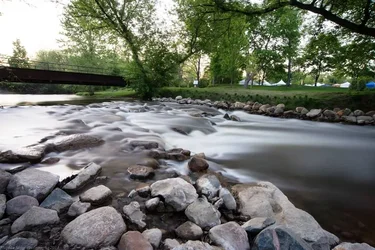
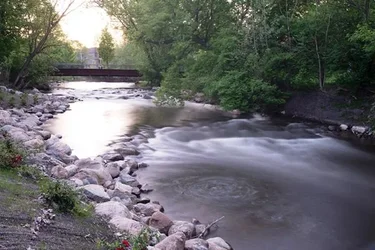
Hey guys. Just got an ND and Canon 10-22 the other day, and for now I've really just been playing around with trying to really couple the effects of the uwa with the long exposure from the ND filter. Next time I wanna be closer to the water (i was scared of getting the camera wet), so I guess I'll just have to get the tripod wet instead. I like the colors and feel you get from it being underexposed, but I'm not sure if it's annoying to not be able to differentiate the stuff in the foreground.

Anyways, tips and comments appreciated. Also any tips on what to do in Photoshop or Lightroom would also be appreciated (i didn't do any processing on this).

LXKxVQu


Sent from my HTC One using Tapatalk
 
ND filters should change the finished image's exposure.... all it does is allow you to change shutter speeds and/or apertures to more suit your purpose if you're unable to change the light itself.

If all you want to do is intentionally underexpose, you can always lower your ISO and/or close your aperture down.
 
ND filters should change the finished image's exposure.... all it does is allow you to change shutter speeds and/or apertures to more suit your purpose if you're unable to change the light itself.

If all you want to do is intentionally underexpose, you can always lower your ISO and/or close your aperture down.

I wanted to fog / glass over the water, but I'm not sure if the effect was as apparent as I wanted. This was already at my lowest I so, longest shutter (any longer and I'd need to use bulb) and a decently closed aperture (f14 I believe). Next time I'm gonna stop it down a little more and use a remote trigger to do like a 45 second exposure or something. And get closer to the water.

Sent from my HTC One using Tapatalk
 
If all you do is increase the shutter time, you'll overexpose the image instead of underexposing it.
 
Hence why I plan on stopping it down a little more. Hopefully the added exposure will smooth out the water more. I wonder if I can get the sunset to reflect near perfectly off the water because that'd be cool.

Sent from my HTC One using Tapatalk
 
What stop of filter are you using?

Your sun is gonna be a big white blob, mostly likely.
 
10 stop b&w

Sent from my HTC One using Tapatalk
 
That'll slow the shutter down for sure. But the sun won't be a nice clean orb in the reflection.
 
I would suggest multiple exposures and blending them together in post.

There is no way to get the sun not blown out and still have background detail in a single exposure.
 
You are learning exactly what I'm currently learning.
I just got B&W 0.3, 0.6, 1.8 & 3.0 ND filters.
I also realized last friday in the evening, that darkness does the same thing lol .. yes, I *knew* that before but never actually tried it much.

I'm finding the more turbulent the water flow is the more "misty" you can make it look. If you are just taking a photo of normal water flow over a barrier such as rocks then you get this below .. no matter if you are using a closed aperture, a 30 second or 4 minute exposure. I took a wide variety of them and there wasn't much difference from the 4 minute to the 30 second one as the water flow was fairly consistent.

Next time, I'm going out right after a rain storm to get this stream much more turbulent so I can get more splashes to create a more misty effect .. at least that's what I'm thinking. Today would have been a good day now that I think of it .. we had heavy downpours lol .. maybe next time.

$10381989_10203505724019400_1598766262887179842_n.webp

you can loose certain things like the vortex up front which totally disappears if you use a 4 minute exposure (with ND 3.0) versus the ND 0.9. I never even noticed the vortex looking at it until the longer exposure shot.
$10381989_10203505724059401_3621409816383837017_n.webp
 
Oh I forgot to add, when I was doing exposures greater than 30 seconds during the day
my cameras d600 and d7000 do *NOT* have a viewfinder shutter, which will close it.

I lost many hours of photos from a purple haze in the exposure from light coming in the viewfinder.
So either use something to cover your eyepiece or close the shutter (if you have that feature).

I was using my 3.0 during the day and had some good shots. But in the LCD I could see purple stuff. I didn't figure it out until I got home and started processing the stuff. My old cameras had eyepiece shutters .. my new ones don't :(
I just used the strap to cover it. I'm going to make my own cover as I use a different eyepiece than the standard one. nikon provides an eyepiece cover which you use to replace the existing one .. but I'm not going to go back and forth for that plus I use a different eyepiece anyways.
 

Create an account or login to comment

You must be a member in order to leave a comment

Create account

Create an account on our community. It's easy!

Log in

Already have an account? Log in here.

Back
Top Bottom