What's new

Tips to improve pictures like these.

Ballistics

Been spending a lot of time on here!
Joined
Jun 5, 2011
Messages
3,781
Reaction score
633
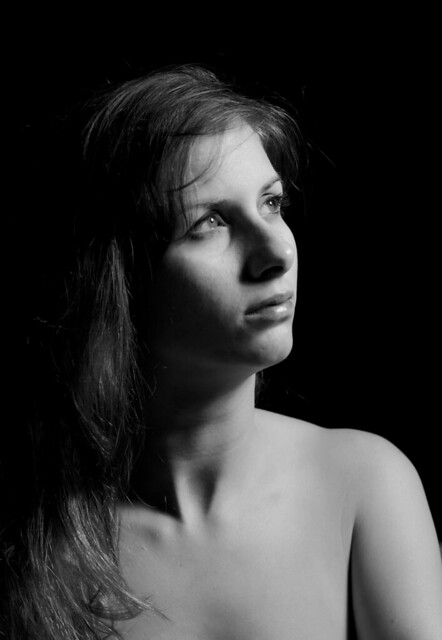
So, tonight I built myself a softbox out of crap around the house... hung up a black cloth and decided to try out a few things. More specifically, learning light, and then trying to make it B&W. The B&W conversion is not as easy as I thought. I tried to bring out her eyes and lips but I couldn't seem to do it. I didn't even try to remove the glare from her eyes, nose and lips. I feel like the crop is too long also, I think if I cut it to the crest of her shoulder it would look nicer. But I am currently trying to learn the technical side, before I get artsy. But hell, if you would like to C&C go for it. This is my wife btw.
6044114037_1429727338_z.jpg


http://www.flickr.com/photos/compressedmemories/6044114037/meta/in/photostream/ - Exif Data

Note: Some technical feedback would be great.
 
Last edited:
For a softbox, the shadows are a bit harsh. If you are going to have her in profile, consider moving the softbox a little closer to the camera axis.

As far as Black and White Conversions, if it's something you are really interested in, bite the bullet and buy Nik's Silver Efex. It's pricy, but it's worth it. Try the 15 day trial. You'll find a way to justify the price...
 
For a softbox, the shadows are a bit harsh. If you are going to have her in profile, consider moving the softbox a little closer to the camera axis.

As far as Black and White Conversions, if it's something you are really interested in, bite the bullet and buy Nik's Silver Efex. It's pricy, but it's worth it. Try the 15 day trial. You'll find a way to justify the price...

When I say I built a softbox, what I left out was, I built a softbox with out a diffuser panel lol. I left it off for the fact that the surface area was HUGE. So that explains the harsh shadows lol.

What do you mean by closer to the camera axis.
 
I mean instead of having the flash so far to the right, try moving it a bit closer to your camera. I was going to make an old-school BBC type graph, but the forum keeps formating it and getting rid of the spaces, so this is the best I can do.

What I mean by closer to the axis is, instead of having your flash and softbox at Point A creating harsh shadows, try moving it to Point B, which will create less shadows because of the facial features that you are photographing.

ccccccccccccccccccc Subject ccccccccccccccccccccccc
cccc cccccccccccccccccccccccccccccccccccccc cccc
cccccccc cccccccccccccccccccccccccccccccc ccc(point A)
ccccccccccccc cccccccccccccccccccc cccccc
cccccccccccccccccc cccccccccccc cc(Point B)
cccccccccccccccccc(Camera)

Oh, yeah, rip-stop nylon from your local fabric store makes an excellent diffuser. A white pillowcase or bedsheet will work in a pinch. So will cheese cloth, or a number of other readily available sources.
 
Last edited:
I mean instead of having the flash so far to the right, try moving it a bit closer to your camera. I was going to make an old-school BBC type graph, but the forum keeps formating it and getting rid of the spaces, so this is the best I can do.

What I mean by closer to the axis is, instead of having your flash and softbox at Point A creating harsh shadows, try moving it to Point B, which will create less shadows because of the facial features that you are photographing.

ccccccccccccccccccc Subject ccccccccccccccccccccccc
cccc cccccccccccccccccccccccccccccccccccccc cccc
cccccccc cccccccccccccccccccccccccccccccc ccc(point A)
ccccccccccccc cccccccccccccccccccc cccccc
cccccccccccccccccc cccccccccccc cc(Point B)
cccccccccccccccccc(Camera)

Oh, yeah, rip-stop nylon from your local fabric store makes an excellent diffuser. A white pillowcase or bedsheet will work in a pinch. So will cheese cloth, or a number of other readily available sources.

Ok I will give this a try tomorrow night. As for the diffuser, I just put it on. I am using tshirt cotton cloth I got from Joanns and It makes a giant difference.
 
Also, that software looks a bit intense. Whats the learning curve on that?
 
Also, that software looks a bit intense. Whats the learning curve on that?

The presets are quite good. Pretty much point and click. What used to take hours in photoshop is an action away from being able to give the client an entire album in color and B&W. Like I said, try the trial and use your own judgement.
 
Checking it out now. Thanks for the tip.
 
I am not a studio light person, so I won't speak to that.I do think it is composed well. I played around with crops, and don't see anything better in my eyes.
 
So, tonight I built myself a softbox out of crap around the house... hung up a black cloth and decided to try out a few things. More specifically, learning light, and then trying to make it B&W. The B&W conversion is not as easy as I thought. I tried to bring out her eyes and lips but I couldn't seem to do it. I didn't even try to remove the glare from her eyes, nose and lips. I feel like the crop is too long also, I think if I cut it to the crest of her shoulder it would look nicer. But I am currently trying to learn the technical side, before I get artsy. But hell, if you would like to C&C go for it. This is my wife btw.

6044114037_1429727338_z.jpg


Exif | 20110815 | Flickr - Photo Sharing! - Exif Data

Note: Some technical feedback would be great.

I like this... it looks like short lighting. With more lights you can do a lot more, but I like the lighting. Im not sure about the composition though...
 
How would you improve it, Sabrina?

6047583857_d401960599_z.jpg


Brightened up the muddy grey a bit. Cropped the bottom because there was too much skin and my eyes kept going down there.. and cut a little of the dead space at the top.
 
Looking at it compared to the OP's.. I think i should of left the dead space at the top.
 
I am not a studio light person, so I won't speak to that.I do think it is composed well. I played around with crops, and don't see anything better in my eyes.

I wasn't sure if you had received my PMs, because I sent 2 and there was no receipt. Not sure if you are a PM guy or not, but I appreciate you taking a look.
 
How would you improve it, Sabrina?

6047583857_d401960599_z.jpg


Brightened up the muddy grey a bit. Cropped the bottom because there was too much skin and my eyes kept going down there.. and cut a little of the dead space at the top.

I like the bottom cropped like that, but I do like the dead space at the top as well. What is it about the original brightness/color that you find unappealing. Sincere question, not being defensive.
 

Create an account or login to comment

You must be a member in order to leave a comment

Create account

Create an account on our community. It's easy!

Log in

Already have an account? Log in here.

New Topics

Back
Top Bottom