What's new

Tips to improve pictures like these.

How would you improve it, Sabrina?

6047583857_d401960599_z.jpg


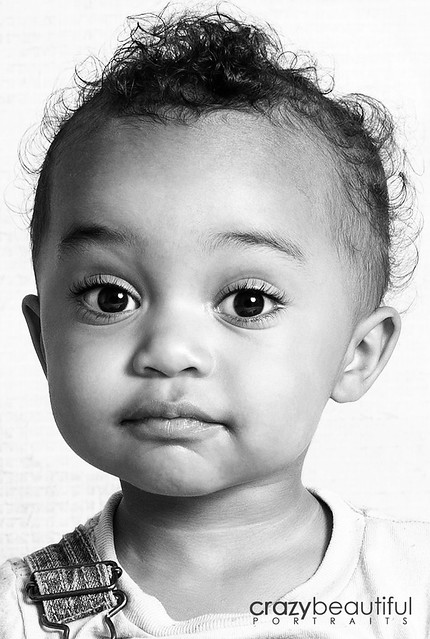
Brightened up the muddy grey a bit. Cropped the bottom because there was too much skin and my eyes kept going down there.. and cut a little of the dead space at the top.

I like the bottom cropped like that, but I do like the dead space at the top as well. What is it about the original brightness/color that you find unappealing. Sincere question, not being defensive.

It just looks too dull for my taste. In black and white pics, I like the "whites" to be bright without being blown
 
6047583857_d401960599_z.jpg


Brightened up the muddy grey a bit. Cropped the bottom because there was too much skin and my eyes kept going down there.. and cut a little of the dead space at the top.

I like the bottom cropped like that, but I do like the dead space at the top as well. What is it about the original brightness/color that you find unappealing. Sincere question, not being defensive.

It just looks too dull for my taste. In black and white pics, I like the "whites" to be bright without being blown

Does it make a difference if she is tan?
 
Start with a main light and a hair light. Annie Liebovitz said that whenever she needs wind, she uses multiple fans because wind never comes from a single direction. Even with the sun as a point source, it's rare to have all of the light in a frame coming from a single point.
 
I like the bottom cropped like that, but I do like the dead space at the top as well. What is it about the original brightness/color that you find unappealing. Sincere question, not being defensive.

It just looks too dull for my taste. In black and white pics, I like the "whites" to be bright without being blown
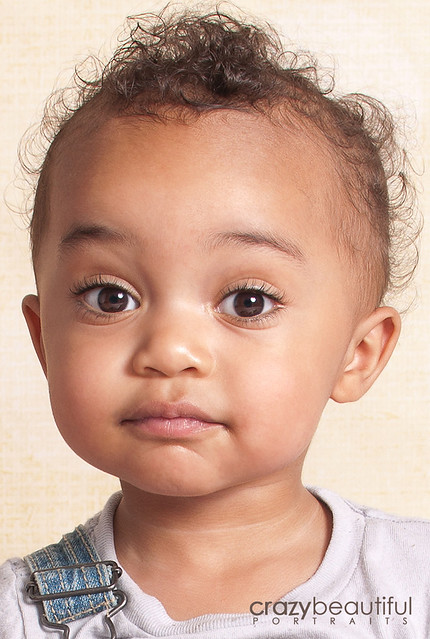
Does it make a difference if she is tan?

???
Its a black and white photo. Blue eyes, brown eyes, tan or pale skin... you are converting it to a black and white so it doesn't make a difference.
But I'm not sure what you are asking though... what exactly do you mean?
 
QUOTE=SabrinaO;2319748]
It just looks too dull for my taste. In black and white pics, I like the "whites" to be bright without being blown
Does it make a difference if she is tan?

It's a black and white photo, but there are different shades of black and white. In other words, to me, I feel like original color helps with contrast in post production. I don't know how to properly articulate it because this is my first time doing b&w. Am I losing you?
 
QUOTE=SabrinaO;2319748]
It just looks too dull for my taste. In black and white pics, I like the "whites" to be bright without being blown

Does it make a difference if she is tan?

It's a black and white photo, but there are different shades of black and white. In other words, to me, I feel like original color helps with contrast in post production. I don't know how to properly articulate it because this is my first time doing b&w. Am I losing you?

Its almost 11pm and my son didn't nap today so yes...lmao.
But anyways... when I convert to black and white, i want my blacks to be dark and my whites to be bright. It is a black and white photo, not a "black and grey", or "shades of grey" photo. When that happens... the conversion looks drab, muddy or underexposed. Im not saying there cant be any grey areas, but there should be nice bright pops of white, and deep blacks. Thats what I prefer anyways.
 
This needs some shaping light to give the back/side of the head a bare faintness of some shape from the black background. If that were present, however, the subject would be too far to the left and would not be composed well. Keep at it.
 
QUOTE=SabrinaO;2319748]
Does it make a difference if she is tan?

It's a black and white photo, but there are different shades of black and white. In other words, to me, I feel like original color helps with contrast in post production. I don't know how to properly articulate it because this is my first time doing b&w. Am I losing you?

Its almost 11pm and my son didn't nap today so yes...lmao.
But anyways... when I convert to black and white, i want my blacks to be dark and my whites to be bright. It is a black and white photo, not a "black and grey", or "shades of grey" photo. When that happens... the conversion looks drab, muddy or underexposed. Im not saying there cant be any grey areas, but there should be nice bright pops of white, and deep blacks. Thats what I prefer anyways.

Ok I think I know how to explain it. In a color photo, you obviously have blue, red, green, etc. In a black and white photo, depending on the hue of the original image, determines the shade in the conversion. In other words, a dark blue coat, wouldn't be the same shade as the red in a stop sign. Just like a black person would have a darker shade of in the conversion as opposed to a white person. So do you get what I mean by asking if having a tan matters now? If not you, does anyone? lol.
 
QUOTE=SabrinaO;2319748]

It's a black and white photo, but there are different shades of black and white. In other words, to me, I feel like original color helps with contrast in post production. I don't know how to properly articulate it because this is my first time doing b&w. Am I losing you?

Its almost 11pm and my son didn't nap today so yes...lmao.
But anyways... when I convert to black and white, i want my blacks to be dark and my whites to be bright. It is a black and white photo, not a "black and grey", or "shades of grey" photo. When that happens... the conversion looks drab, muddy or underexposed. Im not saying there cant be any grey areas, but there should be nice bright pops of white, and deep blacks. Thats what I prefer anyways.

Ok I think I know how to explain it. In a color photo, you obviously have blue, red, green, etc. In a black and white photo, depending on the hue of the original image, determines the shade in the conversion. In other words, a dark blue coat, wouldn't be the same shade as the red in a stop sign. Just like a black person would have a darker shade of in the conversion as opposed to a white person. So do you get what I mean by asking if having a tan matters now? If not you, does anyone? lol.

I know what you mean now...

Here is a quick edit of my son. I think as long as you get their skin tones looking as natural as possible in a BW conversion then you're good. Dont make a black person look bright, or a white person look dark.

6047825349_a342cfe8e2_z.jpg

6047825351_f446c1ef1d_z.jpg
 
I took a bunch of pictures tonight but instead of using the 50mm I used the kit lens and all the pictures are OOF and super soft. All crap. Not happy. I will say though, bringing the light closer to the camera definitely made a difference, and also the diffuser made a big difference as well.
 

Create an account or login to comment

You must be a member in order to leave a comment

Create account

Create an account on our community. It's easy!

Log in

Already have an account? Log in here.

New Topics

Back
Top Bottom