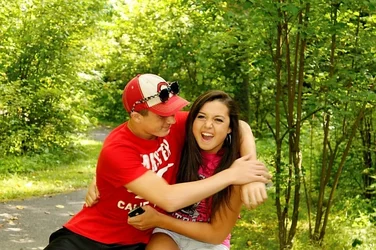
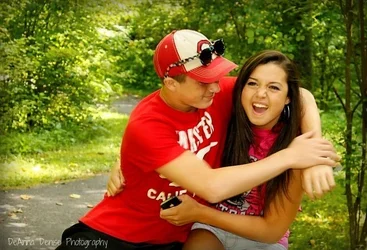
Hi all! I am a newbie here and havent had a lot of time to experience with my camera. I have been reading alot on the Exposure Triangle and still cant seem to get the hang of it. So today out on our family outing I tried playing around with it and still cant get it to look right. Can someone please give me some advice on what I may be doing wrong. I have enclosed the SOOC shot and the one I was playing around with and editing in PicMonkey (I have yet to invest in a editing program). (Hope it was okay *rule wise* to include it like this)
Canon Rebel 3t
ISO 200
Aperture 6.3
Shutter Speed 1/50
Assuming you're very new to the world of photography, it's not a bad effort at all. I have to commend you first and foremost for taking your camera off full auto and studying the exposure triangle... Here's the recommendations I can give...
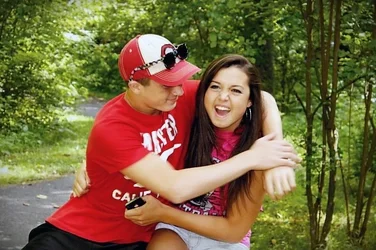
1. Your subject are backlit, meaning the background is uncomfortably brighter than the subject... This is fine if you're trying to capture silhouette, but it's typically not a good thing for faces... In bright sunlight, a reflector would be best to reflect nice natural light onto the subjects to even out the exposure... In this case, you seem to be in a shady wooded area, so a fill flash would've done the trick. You can also fix minor backlighting issues with your RAW editor, assuming you're shooting in RAW. By the way, if you're not shooting in RAW, then you're crippling your editing capabilities. Start shooting in RAW... Today... Right now...

2. Your shutter speed was too slow. You can tell that the fella in the photo was moving, because you can see motion blur in his hands and his right arm. ISO 200 is technically just fine for outdoor shade on an otherwise bright day, but with your camera you would do fine shooting at ISO 400, which would allow you a shutter speed twice as fast (1/100 sec). You could even set you camera to ISO 800 and quadruple your shutter speed to 1/200 sec, which would all but eliminate the motion blur in this photo and still allow you to use a fill flash. The main risk you take with raising the ISO too high is graininess in your photos. With a Canon t3, that shouldn't be a problem in the daytime until you get to ISO 1600 and higher, or if you plan on enlarging your photo to poster size and beyond.
3. Your photo was over-saturated, which caused the background to become a harsh, almost neon green. This is easily fixed in post-production, as long as you're aware of it.
4. Your white balance was off, which led to a yellowish tinge throughout the whole photo. Do yourself a favor and buy an 18% grey exposure card, or 'grey card' as it's commonly called, and learn how to set custom white balance. You'll be amazed at how much easier your life will be, especially when shooting under adverse lighting conditions.
5. Your subjects were placed all to the right of center for no apparent reason. Perhaps you were trying to follow the rule of thirds, but even then, there's nothing interesting to look at on the empty space on the left of the photo.
6. The vignette was a poor choice. When tastefully done, a vignette can draw the eyes to the subject at the center of the photo. In this case, the subject was off center, so the vignette just brought unnecessary tension.
7. I think the "Deanna Denise Photography" watermark is a bad idea. I know that you're proud of your efforts, and rightfully so, but truthfully I don't see any good reason for the watermark. I couldn't imagine that you'd think anyone would steal this photo and try to claim it as their own. I doubt you would try to sell this photo. It's an amateur photo... I'm not saying that as an insult, because we all start by taking amateur photos. However, once you publish a photo with your name on it, that photo represents your work to complete strangers, for better or worse. This photo could give a discerning potential customer the impression that you're an amateur trying to present yourself as a professional. I hope you believe me when I tell you that. I think you should reconsider putting your name on your photographs (with a watermark) until you're 100% sure that you're ready to stand behind every photo that you publish.
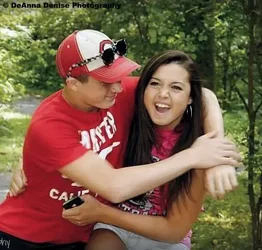
I edited the photo to correct all the discrepancies that I mentioned, with the obvious exception of the motion blur. I'm going to post two versions... One with a vignette and one without. I'd like to hear what you think...
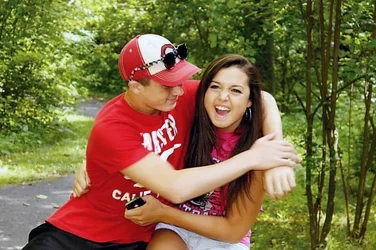
These are just my opinions... Nothing personal... Thanks for sharing! Keep on snapping!