What's new

To convert or not.

ronlane

What's next?
Joined
Aug 3, 2012
Messages
10,224
Reaction score
4,962
Location
Mustang Oklahoma
Can others edit my Photos
Photos OK to edit
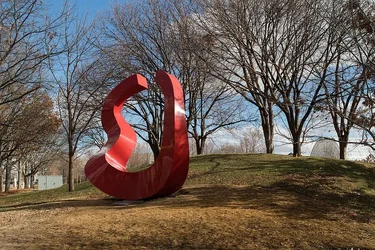
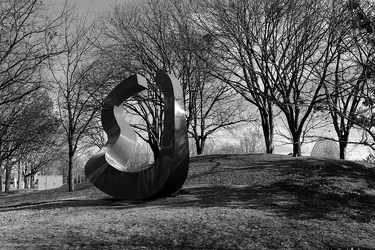
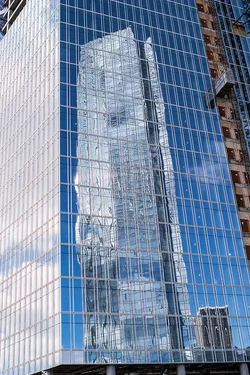
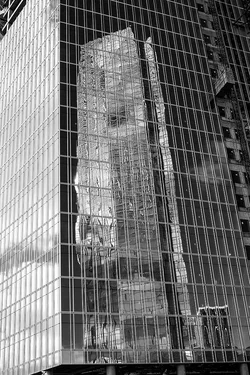
Met up with a friend downtown for an impromptu photowalk, well until his battery died on him. Here are three of the images that I captured and I guess I was in a b&w mood when I was processing them. But kept the original color copy to look at them as well.

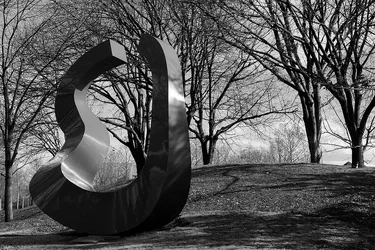
1) I've shot this piece of art before, but I keep trying to find the right angle and time of year to showcase it.
31522519874_a4fb963fa9_c.webp 31522535114_cf31b0f7dd_c.webp

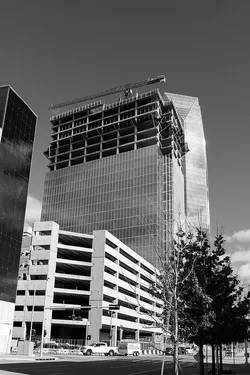
2) This is one of the new construction high-rise buildings going up in OKC. It is next door to the tallest building in Oklahoma and I thought the reflection looked cool.
31522525194_0c60cd4fe9_c.webp 31522538304_a6a580bf1a_c.webp

3) Here is those same buildings from the other side.
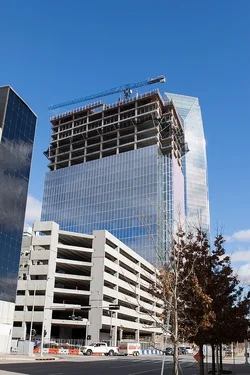
32244686571_e977317505_c.webp 31522529304_a99e10de75_c.webp
 
The second for sure works better in b&w. The glass and reflection are a strong graphical pattern, but in the color version, I'm distracted by the color change of the line on the right of the photo. In b&w, that distraction goes away and instead becomes an additional graphical element that complements the reflection.

I feel the first one should be converted and cropped, and again, you can create a stronger sense of graphics. There are reflections on the sculpture that I didn't even notice in the color version, but that become interesting patterns in the black and white. I'd crop it fairly tightly around the sculpture, too, to get rid of the electrical box and greenhouse in the background, and to keep the image centered on the curves of the sculpture, its reflections, and the shadows of the trees.

The third one...I'm sorry, I'm not really feeling either version. :(
 
Agree with limr on #2 but all of them scream for a tilt-shift lens. Wouldn't it be nice to have unlimited funds.
 
The second for sure works better in b&w. The glass and reflection are a strong graphical pattern, but in the color version, I'm distracted by the color change of the line on the right of the photo. In b&w, that distraction goes away and instead becomes an additional graphical element that complements the reflection.

I feel the first one should be converted and cropped, and again, you can create a stronger sense of graphics. There are reflections on the sculpture that I didn't even notice in the color version, but that become interesting patterns in the black and white. I'd crop it fairly tightly around the sculpture, too, to get rid of the electrical box and greenhouse in the background, and to keep the image centered on the curves of the sculpture, its reflections, and the shadows of the trees.

The third one...I'm sorry, I'm not really feeling either version. :(

Thank you @limr, I appreciate the C&C and I see what you are saying in all three cases. I figured that no one would like the third one. It was more of a test shot for me to get started but sometimes, I just never know about them. I'll take it out. Honestly, I didn't notice the reflections in the sculpture either, that will give me something to go back and exploit in the future, it may be just want this one needs.

Agree with limr on #2 but all of them scream for a tilt-shift lens. Wouldn't it be nice to have unlimited funds.

Thanks @Rick50. I've never had the chance to shoot a TS lens, but it would be nice to have unlimited funds for sure. Although, it would make street photography very hard carrying around 50 lenses and 4-5 bodies, lol.
 
Agree with @limr. Ron, you use LR, right? Can you try to adjust the image's aspect without using a TS lens? Would you lose too much of the image to cropping by doing that?
 
Agree with @limr. Ron, you use LR, right? Can you try to adjust the image's aspect without using a TS lens? Would you lose too much of the image to cropping by doing that?

I did use LR and PS on this one. I did not try to adjust it. I barely cropped this one and that was because I straightened just a hair to get the corner of the building vertical. I had the grid on in my viewfinder and tried to get it as straight as I could. I will play with it in LR when I get a chance.
 
Agree with limr on #2 but all of them scream for a tilt-shift lens. Wouldn't it be nice to have unlimited funds.
Why would this scream tilt shift from a low angle? I don't ever recall seeing a tilt shift shot from a low angle. I thought they were supposed to be used looking down, or from a high vantage point?
 
Agree with limr on #2 but all of them scream for a tilt-shift lens. Wouldn't it be nice to have unlimited funds.


You can get a SAmyang/Rokinon for about half the price of a Canon. Not quite as high a quality, but still better than average. I have the 24mm and they are fun, would use it more if I were shooting more architectural stuff, and building interiors. btw Adobe PS Elements does a REALLY good job correcting perspective distortion and it goes on sale pretty regularly at under $100. And just as full PS it integrates perfectly with LR
 
Agree with limr on #2 but all of them scream for a tilt-shift lens. Wouldn't it be nice to have unlimited funds.
Why would this scream tilt shift from a low angle? I don't ever recall seeing a tilt shift shot from a low angle. I thought they were supposed to be used looking down, or from a high vantage point?


Nope, think about it tall buildings, vaulted ceilings... you don't look down on those, at least not the ceilings.
 
Agree with @limr. Ron, you use LR, right? Can you try to adjust the image's aspect without using a TS lens? Would you lose too much of the image to cropping by doing that?

I did use LR and PS on this one. I did not try to adjust it. I barely cropped this one and that was because I straightened just a hair to get the corner of the building vertical. I had the grid on in my viewfinder and tried to get it as straight as I could. I will play with it in LR when I get a chance.


here is a before and after using PS Elements transform tool If memory serves I believe this was done on a 16mm w/crop sensor camera. The 1st is SOOC just converted to BW is all. One of these days I am going to re-shoot this old house using the T-S lens.

Pay particular attention to the first large tree to the left of the house. in the corrected photo you will notice a distinct lean to the left. This is a result of the correction to the left side of the house. the further out you go from the center line the more perspective correction affects the photo hence the value of a T-S lens.
270A5394web-combine.webp
 
Last edited:
Elements 15 (the latest version) has a lens correction 'filter' that works a lot better than the transform tool.
 
I prefer all of them in full color. Shot #3 is not that appealing because the tree bases ar cropped off, and there is plenty of space above the building; cropping off the "feet" of the closest, for-scale objects really hurt #3. Maybe that was lost in the software correction for the keystoning of the buildings? I dunno...none of these appeal much to me in B&W.
 
Thanks @Derrel. No, the tree bases being cut off was user error. Actually wasn't even looking at them when I took the shot, my focus was on the building construction.
 
Thank you all for your input on these images. All the suggestions and input helped me to get better and try new things. That being said, on image #2, I could not get the perspective correct without cutting in to the image too much, so I will need to go back and try that one again.

On #1, did go in and crop it down to remove the distractions. I also want to go back and shoot this one again as well. Here is the b&w version, which I decided I liked best.

31522535114_e6fbae77a1_c.webp
 

Create an account or login to comment

You must be a member in order to leave a comment

Create account

Create an account on our community. It's easy!

Log in

Already have an account? Log in here.

New Topics

Back
Top Bottom