What's new

Too much crop (and that darn dot!)

padrepaul77

TPF Noob!
Joined
Jan 28, 2009
Messages
155
Reaction score
2
Location
Twin Cities, MN
Can others edit my Photos
Photos OK to edit
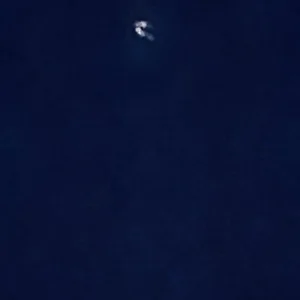
I cropped it down to eliminate the blemished part, but it doesn't solve my original problem of having so many issues getting rid of that darn spot.

I'm attaching the original and the cropped one. The original has that darn black dot up in the upper left, and it must be something in the sky; I checked the images just before it and there is no pixel problem on the camera or lens issue.

What kind of person stays up until 1:30 obsessing over a picture? :o) Hopefully I'm in the right place.

Take care,
Paul

 

Attachments

  • $Fun on the Swings cropped resize.webp
    $Fun on the Swings cropped resize.webp
    110.6 KB · Views: 184
  • $Swings resized.webp
    $Swings resized.webp
    45.2 KB · Views: 150
Paul,
That little speck is a tiny,tiny bit of dust on top of your camera sensor's filter array...it's not actually on the sensor as many people commonly refer to it, but on the thin protective array that's a millimeter or two in front of the sensor.

One or two clicks with the clone stamp tool can remove it. Welcome to the world of d-slr's and dust spots!
 
Swingsresized1.jpg
Swingsresized2.jpg


i hope this helps u out a little atleast... :)
 
Paul,
That little speck is a tiny,tiny bit of dust on top of your camera sensor's filter array...it's not actually on the sensor as many people commonly refer to it, but on the thin protective array that's a millimeter or two in front of the sensor.

One or two clicks with the clone stamp tool can remove it. Welcome to the world of d-slr's and dust spots!

Thanks. Sounds like I just use the stamp and go over it a time or two then...still getting used to that tool.
 
Paul,
That little speck is a tiny,tiny bit of dust on top of your camera sensor's filter array...it's not actually on the sensor as many people commonly refer to it, but on the thin protective array that's a millimeter or two in front of the sensor.

One or two clicks with the clone stamp tool can remove it. Welcome to the world of d-slr's and dust spots!

Padre,

I think he's right but to confirm, check a picture taken with a different lens. I just might be a speck of dirt on the lens. If you have only one lens, clean it with a blower or canned air.

DON'T EVER use canned air on the sensor filter!
 

Create an account or login to comment

You must be a member in order to leave a comment

Create account

Create an account on our community. It's easy!

Log in

Already have an account? Log in here.

Back
Top Bottom