What's new

Under processed?

OLaA

No longer a newbie, moving up!
Joined
Aug 5, 2012
Messages
259
Reaction score
48
Location
Sacramento, CA
Can others edit my Photos
Photos NOT OK to edit
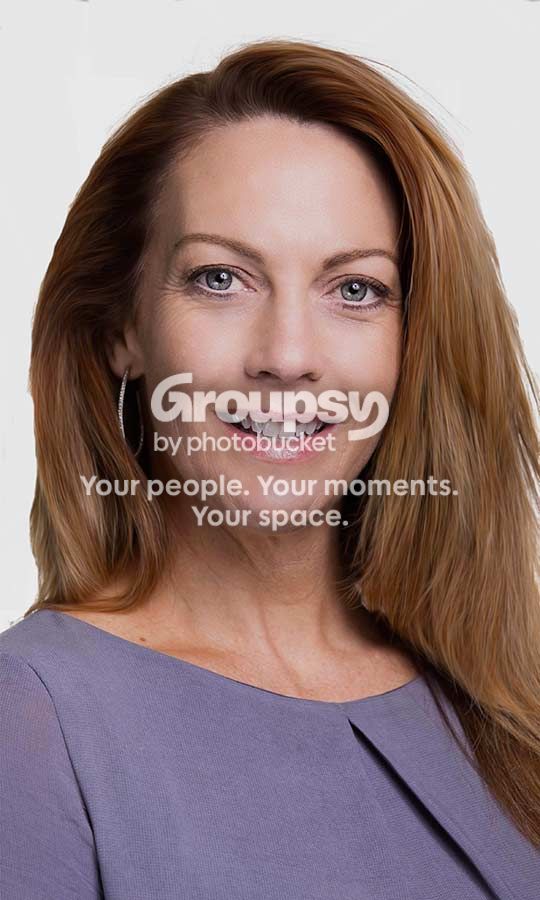
Took a few head shots last week. Was sending out proofs and got the complaint from the lady pictured below that she had not been "photoshopped". I explained that since these are to be on business cards and website profile shots it would be out of place for a heavy photoshopped beauty style image. She was not rude or demanding at all, but I feel like she was a little let down which sucks.

So I ask was I too light handed in touching up this photograph or is there more I could/should do?

Original:

$BethOriginal.webp
Edit:
$Beth.webp
 
I would have softened the light more to reduce the contrast in the lines on her face, and maybe run it through a very light shop. I think the shadow to highlight ratio is a little strong... which may be what she is not liking. But that's me...

maybe warm it a bit too...
 
I looked at the original sized shots...I think the lighting pattern reveals too much skin texture, and has too clearly delineated a shadow pattern on her chin for a woman of her age. In today's world, many women see loads and loads of magazine images where there is a TON, as in a day or two's worth, of heavy Photoshop work done on simple shots like this one...expectations these days are very unrealistic I think.

I would probably have gone with a really flat, soft lighting setup that revealed very little skin texture. Looking at these, I can see the skin's true character pretty clearly, what with your modern lens, and high-rez digital camera's resolution and acuity. At the very least, I would suggest using a large soft brush with low pressure and low opacity, and gently smoothing out some of the skin texture and lines on the cheeks, around the mouth,m and on the chest and neck areas. Even for business card use.

Same with the crow's feet around the eyes...I'm not saying totally,totally eliminate them, but DO soften them a bit. If you totally 'Shop them out, then she'll not look like who she is, but I do think that reducing the look of the wrinkled skin would make her like these more.
 
Good tips guys. I will definitely be putting a little extra effort before I submit the finals to her employer. Obviously the best option would be a reshoot but just not possible in this case. It was one those 1 hour sessions at a corporate location to shoot 30 sum odd individuals. I tried to pick something that would be flattering for both men and woman as adjusting lighting between shots just was not an option on the time being billed and they declined to coordinate men and women coming in separate waves.

Thanks for tips Derrel and Charlie. I'll try and put some more effort into it tonight. It will be a challenge of trying to meet her expectations and keeping the processing from employee to employee uniform.
 
Ironically I think the original looks much better than the edit.
Was retouching part of the agreement in doing these shots?
 
I think there is way too much of her dress.
It is essentially formless.
Her hair is a total mess and her skin too harsh looking


OOPS, sorry.
But my comments still stand PLUS, you'll get more and better help if you allow editing.
 
Last edited:
I think there is way too much of her dress.
It is essentially formless.
Her hair is a total mess and her skin too harsh looking

Your observations are vary good but the OP has their profile marked as images NOT ok to edit.
 
Last edited by a moderator:
Ironically I think the original looks much better than the edit.
Was retouching part of the agreement in doing these shots?

Minor adjustments is what is to be expected. I do minor touch ups as a bonus. I normally wouldn't spend the time on the photo for this type of job, but she sounded like a nice woman that was disappointed so I don't mind working a little off the clock to try and satisfy her.

I think there is way too much of her dress.
It is essentially formless.
Her hair is a total mess and her skin too harsh looking

BethOriginalllll222.jpg~original


Appreciate the feedback. Not sure if I would take the same approach. It will probably be a similar crop once it gets to graphic.
 
I put this through Portrait Professional and came up with a pretty fair result in about 5 minutes of adjusting sliders. With the PP program you can go OTT and create an unrecognisable plastic Barbie or you can keep the changes subtle and just hint at 5 years younger or a good pro make-up job... and it's fast.

Getting the balance right is hard with a subject like this, she's a good looking woman in her prime but you need to give her candle light rather than a spot light (I appreciate the restrictions you were working under). In post work I aim to minimise the effects of a few extra years but keep the results credible. If an average person who knows the subject can look at it and say "WOW! Nice Photoshop job!" I failed.

P.S. I really like Traveler's crop.
 
Id go in and remove some of the wrinkles from the face. Not all of them, but some.
 

Create an account or login to comment

You must be a member in order to leave a comment

Create account

Create an account on our community. It's easy!

Log in

Already have an account? Log in here.

Back
Top Bottom