What's new

Underexposure with kit lens when shot through viewfinder

preahkumpii

TPF Noob!
Joined
Mar 19, 2013
Messages
15
Reaction score
0
Can others edit my Photos
Photos OK to edit
Hello,

I am a new DSLR user. I have a Nikon 5100 with a kit lens. When I shoot through the viewfinder eyepiece with the kit lens, the photos are underexposed. I can compensate by pushing up the exposure compensation to +1.0 and the pics are normally exposed. However, when I shoot using the Live View with the same lens, the photos are normally exposed. I have two other lenses which expose normally whether using the viewfinder or Live View. Does anyone have any idea why this is happening when I shoot through the viewfinder with just this lens? Thanks for the help.

Adam
 
Camera and lens settings when shooting with LV and view finder? Sample pix with exif data?
 
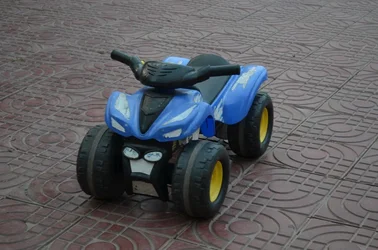
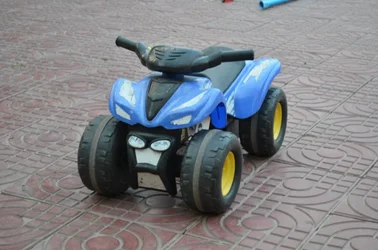
Pic 01.jpg is with the kit lens shot through the viewfinder. Pic 02.jpg is with the same lens and settings shot through the Live View.
01.jpg
$01.webp
02.jpg
$02.webp
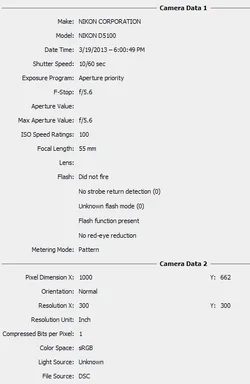
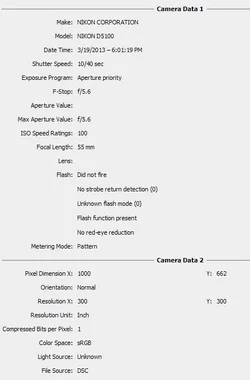
Exif data:
01
$exif01.webp
02
$exif02.webp

Adam
 
By the way, I am using aperture priority, so the shutter speed is selected automatically. The camera just picks a shutter speed that is faster when shooting through the viewfinder.
 
Looks like the camera is metering on bring blue and dark black, changing your speed.
 
Any suggestions to a novice as to how to fix it? If its the metering, why wouldn't the other lenses do the same?
 
@2WheelPhoto, Agreed ;). I would like to know why this happens though, and why with only this lens.
 
Did you test with a tripod ?
 
Just looked at exif they are different exposure settings, user error yet again trying to blame camera
 
Yes, exactly the same shot with same lighting in aperture mode. The viewfinder mode sets the shutter speed faster than the Live View mode.
 
You are using pattern mode metering... which takes in the whole scene and calculates the exposure. I am assuming the other lenses are wider, tighter, different lens coatings, different brands, or a number of other things. Try Spot metering.. much more accurate. Read your manual if you need help with that.

I would also bet you are not covering the eyepiece of the viewfinder when you are shooting using the liveview monitor, and light coming into the viewfinder can sometimes affect exposure, especially if there is a light source behind the camera. This would see more LIGHT.. causing a HIGHER shutter speed! ;)

http://digital-photography-school.com/cover-your-eyepiece
 
Last edited:
@gsgary, I know there are different exposures. In Aperture Priority Mode the camera is setting the shutter speed. I am wanting to know why the exposures are different. Thanks for the help. :meh:
 
@gsgary, I know there are different exposures. In Aperture Priority Mode the camera is setting the shutter speed. I am wanting to know why the exposures are different. Thanks for the help. :meh:

Cgipson has given you the most probable explanation.

I recommend researching every terms you didn't understand in his post and raise your photo vocabulary a little bit.
 
@gsgary, I know there are different exposures. In Aperture Priority Mode the camera is setting the shutter speed. I am wanting to know why the exposures are different. Thanks for the help. :meh:

Have you looked at the exif for each shot ? they are different shutter speeds its not rocket science, only way to do this in AV mode is on a tripod so camera cannot move
 

Create an account or login to comment

You must be a member in order to leave a comment

Create account

Create an account on our community. It's easy!

Log in

Already have an account? Log in here.

Back
Top Bottom