What's new

What causes that? Can we correct it?

MiFleur

No longer a newbie, moving up!
Joined
Jan 3, 2013
Messages
885
Reaction score
206
Location
Colebrook, NH
Can others edit my Photos
Photos OK to edit
$130615_8352 copy.webp

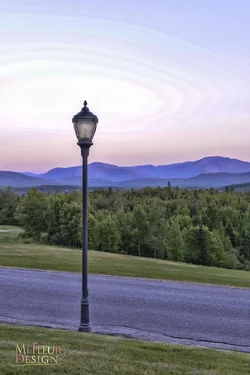
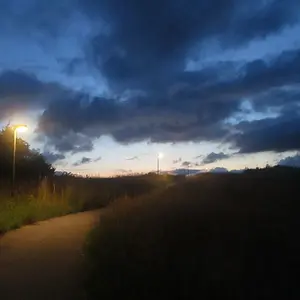
I took this photo at sunset, and it is the first time I see the phenomenon, see the circles around the light?
Can someone explain what is going on?
How would you correct that? Not that I want to save the picture but I would like to know for future use.
 
Moire - It's often caused by low image quality/resolution, either because the image has been reduced for web display or not shot at a high enough resolution. It's often seen in fabrics and such. I'm not sure I've seen it in clouds before.
 
Thanks Tiredon
This was orginally taken with a nikon d600 in raw, but the ISO was high, can a high ISO produce some moire?
That shot was not low quality nor low resolution.... I am baffled!
 
It's not moire...it's called "posterization". You've shifted the data values too far from its original placement in the image..it often occurs when images are heavily tweaked in post.
 
That shot was not low quality nor low resolution.... I am baffled!
Likely a result of resizing for the web. Is it visible on the full size version?

edit
Or what Derrel said, lol.
 
I had similar things happen to a few of my images (not to this extent though) when I converted my images from 16 bit to 8 bit in post. It also occurred in the sky area of the images for me when it happened.
 
It's not moire...it's called "posterization". You've shifted the data values too far from its original placement in the image..it often occurs when images are heavily tweaked in post.

Thank You Derrel


It's also sometimes called 'banding'.

Here you go:
Image Posterization
Bit Depth

Thank You for the info


That shot was not low quality nor low resolution.... I am baffled!
Likely a result of resizing for the web. Is it visible on the full size version?

edit
Or what Derrel said, lol.

The large size jpeg still shows some of the lines but they are barely visible.
 
To correct it, I would select the entire area and gaussian blur it with a fairly large blur radius. Or add noise and then blur it.

You're seeing large areas that are almost -- but not quite -- the same value, so blurring should not lose any data. If you take an area that's all the same color, and blur it, it's still all the same color, eh?
 
Another fix technique is to select the area and add some digital noise.
 
Last edited:

Create an account or login to comment

You must be a member in order to leave a comment

Create account

Create an account on our community. It's easy!

Log in

Already have an account? Log in here.

Back
Top Bottom