What's new

What is the preferred method?

duhast

TPF Noob!
Joined
Mar 5, 2013
Messages
240
Reaction score
39
Location
SoCal
Can others edit my Photos
Photos OK to edit
I was a photo major 40 years ago and have now started learning DSLR with my new T3i.

What is the preferred method of shooting B&W, setting the camera to monochrome and using the various filters (yellow, red, green, etc.), or doing it all in post?
 
post.. much more control!
 
Shoot in RAW, do all your key post-processing (WB, cropping, exposure, selective edits) in something like Lightroom, export as .tif, and then use one of the many conversion methods (or software such as NiK Silver Effex Pro) to convert it.
 
The preferred method is the same as color photography: understand light, metering and exposure. I'm not an expert in B&W. It requires more knowledge of how colors translate into gray tones and how filters affect those tones, something Ansel Adams mastered. I would recommend some B&W software like Nik or OnOne. You can just as easily shoot a color RAW and convert to BW; then you get the best of both. If you're shooting color, you have to get that right before you convert to BW. You can't have bad white balance or color accuracy and just go into BW. Either way, shoot RAW and post process. Post processing is a requirement, not an option. Adams didn't go from camera to print. He was a master in the darkroom. Now the darkroom is digital and there's where you enhance a perfect capture.
 
Here's a quick example of what Sparky describes in his video.

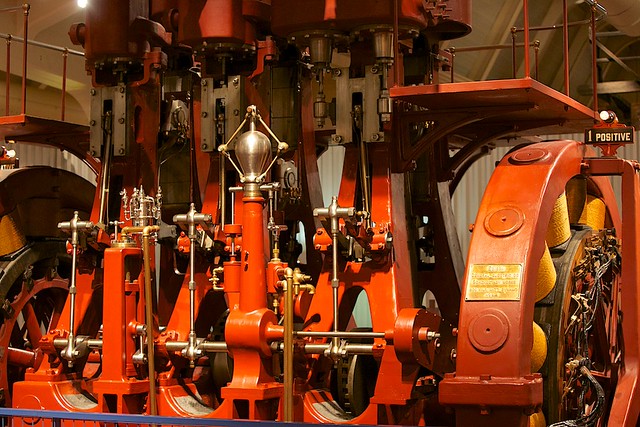
#1 Here's the original color image:


B&W Conversion Example - Original Color by Tim Campbell1, on Flickr

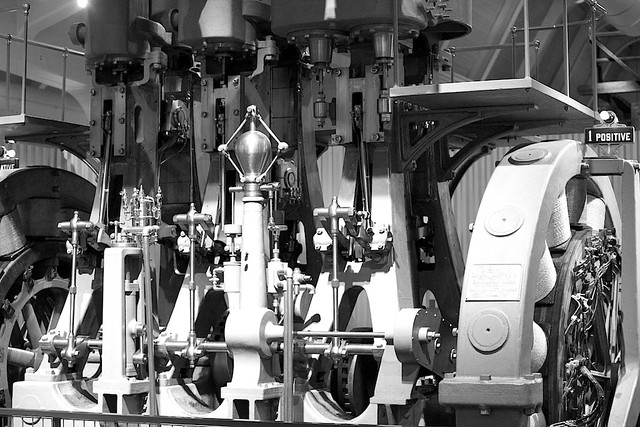
#2 Here's what happens if I use the 'red' filter to do the conversion (100% red, 0% green, 0% blue) - not very attractive for this particular image.


B&W Conversion Example - Red Filter by Tim Campbell1, on Flickr


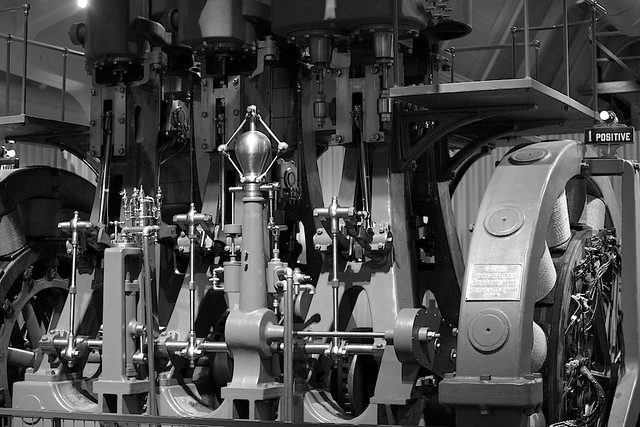
#3 Here's a fairly neutral conversion -- which is really 30% red, 59% green, and 11% blue. Our eyes are actually MORE sensitive to green (by a lot).


B&W Conversion Example - Straight Conversion by Tim Campbell1, on Flickr

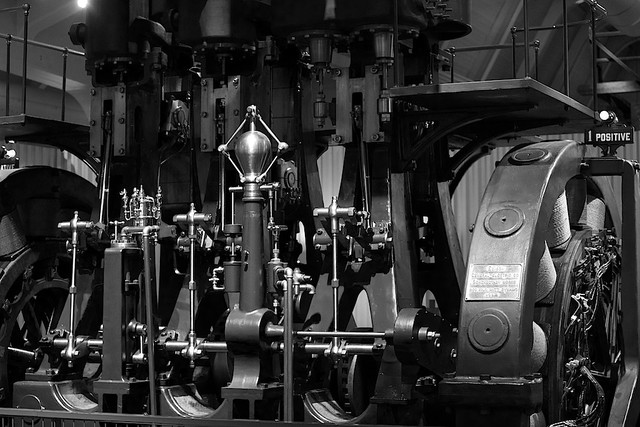
#4 Here's what happens if I use the 'green' filter to do the conversion (0% red, 100% green, 0% blue).


B&W Conversion Example - Green Filter by Tim Campbell1, on Flickr

The bottom line here is BECAUSE this was shot in color and converted in post, we can control the conversion process. Different B&W scenes will look better with different filter settings (there's no "best" setting). Had this been an outdoor scene with lots of green foliage, the "green" filter would have rendered a very different look.
 
Completely OT- Tim, is that genset at the Henry Ford museum?

Yep. I live just a mile or two away and have a membership. I often go there to take images. I was actually there to try to capture shots of the gothic steam engine, but couldn't resist taking quite a few other photos while I was there.
 
Actually, in college that's all i shot, B&W. Lots of lab and field time with gray cards, zone system, filters, 4x5 view cameras, all that stuff. I was even into cyanotypes for a bit, a couple of my pieces had 10 or 15 different contact exposures.

Part of what I am trying to do is sort of re-create my old 'creative thought process', trying to pre-visualize the image, thinking in B&W, deliberately shooting B&W rather than post processing something. Yes, I was planning in shooting RAW right off the bat.

I guess part of what I'm asking is if there is a quality difference between converting a RAW to B&W, and shooting in monochrome?
 
Actually, in college that's all i shot, B&W. Lots of lab and field time with gray cards, zone system, filters, 4x5 view cameras, all that stuff. I was even into cyanotypes for a bit, a couple of my pieces had 10 or 15 different contact exposures.

Part of what I am trying to do is sort of re-create my old 'creative thought process', trying to pre-visualize the image, thinking in B&W, deliberately shooting B&W rather than post processing something. Yes, I was planning in shooting RAW right off the bat.

I guess part of what I'm asking is if there is a quality difference between converting a RAW to B&W, and shooting in monochrome?

If you're going to shoot raw, you'll have a color file no matter what.

There's no difference in the image quality, in terms of optical and mechanical issues. The biggest difference is when you shoot in B&W/monochrome, you get ONE result with limited editing ability (image out of camera is JPEG, not a raw file!) At least with the raw file, you can alter the file to the results you desire..... and without spending a fortune on all those colored filters.


OK, after watching the vid it seems to me that yes, it is about control. Would I be correct in saying that the control the computer gives is even beyond that of, say, Ansel Adams and his mastery of the zone system? More manipulation is possible with digital than with film and chemicals?
 
Last edited by a moderator:
If you're really into B&W then you might also want to check out Nik Silver Efex software. It's sort of the gold-standard in B&W processing and offers more control than most editing & adjustment software.
 
OK, after watching the vid it seems to me that yes, it is about control. Would I be correct in saying that the control the computer gives is even beyond that of, say, Ansel Adams and his mastery of the zone system? More manipulation is possible with digital than with film and chemicals?

The video is about using filters for film and it's digital equivelant in post-processing... it has nothing to do with the zone system or exposure.

Ansel wasn't just a master of the zone system... he was a master of the entire photographic process. From choice of film, understanding light, proper exposure, developing the negative, right on through to the drying of the print. It was the process........ not just one step....... that he understood.

It's just with digital, you can quickly and easily (and far less expensively!) replicate just about any filter (both in color and intensity) that is used for B&W film by shooting raw and knowing the post process.
 
It's just with digital, you can quickly and easily...

Promise? It sure has been somewhat of a surprise so far (though I'm making progress).

(and far less expensively!) replicate just about any filter (both in color and intensity) that is used for B&W film by shooting raw and knowing the post process.
I understand what you mean after seeing your vid. As an example, my camera has only a red, orange, yellow, green, and blue filter, 5 choices, whereas 'post' has those 4 sliders...just for the filter issue. Lots more flexibility.

I've got a lot of work ahead, learning both the camera and Photoshop/whateverothersoftwareIget...
 
I did a quick comparison between a Monochrome camera and a color camera, both use a Truesense KAF-18500 CCD, one monochrome and the other has a standard Bayer Mosaic filter.

Needs to be viewed in "Flat" mode.

M Monochrom and M9 BW Conversion.: Leica Talk Forum: Digital Photography Review

I used Lightroom 4.3 with Silver Efex2 to convert the M9 color image to monochrome. The M Monochrom image is a straight export to JPEG from Lightroom- no post-processing. First lesson learned: default settings for "sharpening" in Lightroom produced very jagged edges in the color image converted to monochrome. Turning sharpening off produced the smoothest image. I've used dedicated Monochrome Digital cameras for 20 years now.

A camera with a "Foveon" sensor, meaning one made by Sigma- does not use a color mosaic filter. This offers advantages in doing conversions to monochrome: RGB information is collected from the same pixel, and is not interpolated as it is in a sensor using a Mosaic filter.
 

Create an account or login to comment

You must be a member in order to leave a comment

Create account

Create an account on our community. It's easy!

Log in

Already have an account? Log in here.

New Topics

Back
Top Bottom