What's new

What settings are needed?

LovingJewel88

TPF Noob!
Joined
Apr 6, 2013
Messages
4
Reaction score
0
Location
Louisiana
Can others edit my Photos
Photos NOT OK to edit
I was outside this morning taking pictures of my dog but the exposure was horrible...

Photo A:
Judupdate008_zps6bd62624.jpg


Photo B: (I changed settings)
Judupdate011_zps8eb3e464.jpg


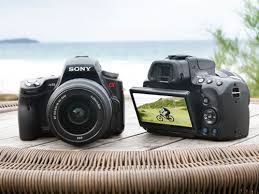
My camera is a Sony A33/A55

Looks like this:
images
 
We can't tell you what settings.
There is also more than one set of settings that you could select that would produce a proper exposure for the photo - and of course which one of those is correct depends upon what you want the photo to look like

That's the simple truth of the situation because only you were there with your camera in that light. What we can say is that you need to learn how exposure and metering works. Once you understand the simple basic theories of exposure you can then use that understanding to meter a scene and select settings best suited to that meter reading and the creative desire you have for the shot.

I would suggest reading the camera manual and also reading up on the topic of exposure and metering. The book "Understanding Exposure by Bryan Peterson" is a popular starting book for learning this theory; however its a theory so core to photography that any good introductory book or website will give you advice and guidance on it.


You can also reinforce helping to learn their theory yourself. First have a read through the comments and critique thread in my signature and start to consider the questions and posting style ideas that it presents to you. At the very basics learn to review your photos after you've taken them in the computer and look at the shutter speed, ISO and aperture in particular that you used - and show them up for photos for critique.
 
It looks to me like you got pretty much the "correct" exposure, that is, the exposure the camera thinks is about right.

Also, I think that exposure WAS about right.

What's going on is lens flare, you're pointing the camera almost directly at the sun, which creates, well, it can create a lot of things. Washed out areas of pure white is definitely one of them, though. I won't say that it's wrong, it's definitely an effect. If you want a more regular looking picture, shoot with the sun off to the side, at your shoulder. Either a little in front of your, or a little behind you, is pretty nice.
 
Yep always try to keep the sun at your back or extreme sides. Harsh Direct sunlight will cause flaring.
But also degrade colors and contrast. And give that washed out effect.

Even a hand raised and positioned to block sunlight from hitting the front element and/or a lens hood would help.
All my lenses have lens hoods for minimizing flare. And some angles even a hand raised is needed.
Otherwise I'm always thinking about where is the sun in relation to my subject when composing a shot.
.
 
I don't see the exposure settings, but the dog is over-exposed. The highlights on his head are blown out -- which was necessary to get detail on the shadow side of his body. In short... too much difference between a good exposure for what's in the "sun" vs what's in "shade".

I can see you're in full daylight sun -- based on the intensity of the shadow.

This calls for a "sunny 16" exposure: Sunny 16 rule - Wikipedia, the free encyclopedia

The baseline is ISO 100, f/16 and 1/100th sec. Or.... ANY EQUIVALENT exposure.

Since it's usually not preferable to shoot at f/16, suppose you wanted to shoot at... f/8. That's 2 full stops more open on aperture (f/16 -> f/11 -> f/8) which means you'd speed up the shutter by 2 full stops (1/100th -> 1/200th -> 1/400th). And that would be a great "exposure", but not a great shot.

The fierce difference between highlight and shadow will detract from the shot. This is one of the few cases where using your pop-up flash is actually a good idea. It wont be used as a primary or "key" light... it'll be "fill" light.

Your camera probably allows you to adjust "flash compensation" or "flash exposure compensation". Be careful not to confuse that with just "exposure compensation" which is different. Exposure compensation tells the camera you want to increase or decrease the whole exposure. "flash exposure compensation" (or simply "flash compensation") says you just want to alter the amount of the exposure which was contributed by your flash, but the standard ambient light exposure should remain the same.

This is one of those "salt to taste" things... I generally find that I like the "look" of my flash if I decrease it by about 2/3rds of a stop to 1 full stop.

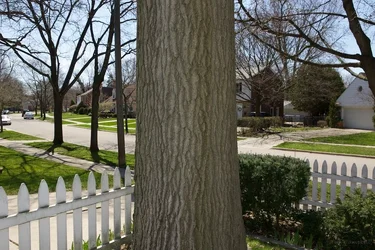
Have a look at these sample images (apologies... I don't have a dog and didn't have a person available to be my model, so I'm using an oak tree.) Note that for these images, the sun is behind the tree.... basically, like your photo, my camera is mostly shooting "into the sun" rather than with the sun at my back.

I "coincidentally" happen to have a sunny day (this is incredibly rare... we've had almost nothing but cloudy cold rainy weather lately... with a smattering of snow just to give us variety.)

I did NOT use the light meter ... neither the meter in my camera, nor did I use my hand-held Sekonic meter. I literally just followed the Sunny 16 rule and set my exposure to:

ISO 100 (plenty of light... there's absolutely no reason to use a higher ISO. Lower ISOs are always preferred because you get the least amount of "image noise" when using lowest ISOs)
f/8 (2 stops down from the Sunny 16 baseline)
1/400th (2 stops up from the Sunny 16 baseline)
These settings give me a Sunny-16 "equivalent" exposure.
Note this is mid-day sun. I'd tweak the exposure if I were shooting near sunset during the "golden hour".

Those above settings were used in ALL THREE images you see below. The ONLY difference is what I did with the flash.
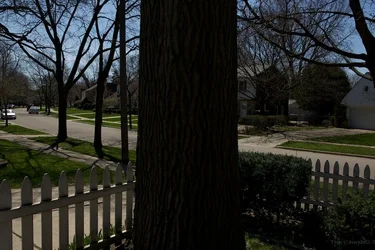
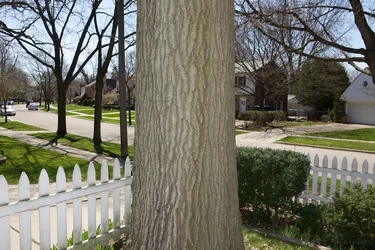
$VO3A0693.webp$VO3A0694.webp$VO3A0695.webp

In the first exposure, I'm not using a flash. Notice the tree is in silhouette.
In the second exposure, I AM using a flash, the flash is pointed straight ahead. Notice the tree and white picket fence is brightly lit... in fact it's a bit too bright. Here the flash is behaving as if it's the "key" light. We don't want the flash to be so obvious... so we'll tone it down a bit.
In the third exposure, I am still using a flash, but I've set the flash exposure compensation to -1 (down 1 stop). That means the flash will fire with "half" the power. This fills in the shadow and creates a more natural look ... without the harsh shadow and without the harsh sun.

I could have taken a 4th shot by increasing the exposure without flash until the tree is about as well lit as you see in the third shot, but then the background would be too bright (I've done demo shots before to show people what happens, but this time I skipped that shot because I wanted to show that once you know the "Sunny 16" rule, you don't even need your light meter. In fact... if the meter disagrees with these exposure settings... the meter is wrong (meters are often wrong... there are other threads here which discuss why you can't always trust a built-in meter.)

When I'm shooting a person, I might tweak things... sometimes I think it looks better at about -2/3rds rather than the full -1.

Play with your flash outdoors ... you may be quite pleasantly surprised to find out how nice it is to use a flash.

One final note... I am using a fairly powerful flash, so I can get coverage at greater distances. The built-in pop-up flash on a camera is small and not particularly powerful. It will generally provide adequate performance at distances up to about 10 feet... don't count on it to do much more. That's perfect for portrait distances which are typically less than 10', but if you tried to do this with a group shot of a dozen or so people, you'd probably have to back up 15 or more feet and then the built-in pop-up flash wouldn't have enough power.
 
Last edited:
You all have been very helpful. I am going to check settings and do some more pictures tomorrow. I have been shuffling through the sunny and shade settings. I don't use flash when its bright like that, is that a mistake?
 
You all have been very helpful. I am going to check settings and do some more pictures tomorrow. I have been shuffling through the sunny and shade settings. I don't use flash when its bright like that, is that a mistake?

Yes - not using flash in full sun is a mistake. Use your flash in the sun... but slightly reduce it's power. That was the main point of my post.
 
ISO 100 (plenty of light... there's absolutely no reason to use a higher ISO. Lower ISOs are always preferred because you get the least amount of "image noise" when using lowest ISOs)
f/8 (2 stops down from the Sunny 16 baseline)
1/400th (2 stops up from the Sunny 16 baseline)
These settings give me a Sunny-16 "equivalent" exposure.
Note this is mid-day sun. I'd tweak the exposure if I were shooting near sunset during the "golden hour".

Those above settings were used in ALL THREE images you see below. The ONLY difference is what I did with the flash.
Just a quick note... I'm not sure about the OP's Sony A33, but most DSLRs won't be able to use a shutter speed of 1/400 when using the flash as it exceeds the synch speed.

Also, according to the EXIF of the 3 images you posted, the first was actually shot at 1/500 whereas the 2 using flash were shot at 1/200.
 
ISO 100 (plenty of light... there's absolutely no reason to use a higher ISO. Lower ISOs are always preferred because you get the least amount of "image noise" when using lowest ISOs)
f/8 (2 stops down from the Sunny 16 baseline)
1/400th (2 stops up from the Sunny 16 baseline)
These settings give me a Sunny-16 "equivalent" exposure.
Note this is mid-day sun. I'd tweak the exposure if I were shooting near sunset during the "golden hour".

Those above settings were used in ALL THREE images you see below. The ONLY difference is what I did with the flash.

Just a quick note... I'm not sure about the OP's Sony A33, but most DSLRs won't be able to use a shutter speed of 1/400 when using the flash as it exceeds the synch speed.

Also, according to the EXIF of the 3 images you posted, the first was actually shot at 1/500 whereas the 2 using flash were shot at 1/200.

Good catch -- I double-checked it. I set the camera as indicated, but apparently moved the dial a click unknowingly. That altered the exposure by less than 1/3rd of a stop (which is small enough to escape notice). But the real problem was that the flash wasn't in high-speed sync mode and the camera automatically reduced the shutter to flash-sync speed since HSS mode wasn't enabled. This surprised me because I would have expected the shot to be ruined with banding from a partially opened shutter.

I'll have to re-take these when I get another sunny day -- it's raining for the next few days.

You can still see the difference between standard flash and flash at -1 compensation.
 
Here is a new one taken. I decided to just use Auto settings and then use the flash. I did not set the flash back any like it was suggested, I actually forgot. But This one does look better then my previous pictures of this dog.

(He makes a great model! HAHA)

935425_428787720550437_74022899_n.jpg
 

Create an account or login to comment

You must be a member in order to leave a comment

Create account

Create an account on our community. It's easy!

Log in

Already have an account? Log in here.

New Topics

Back
Top Bottom