Do not freak out about cleaning your sensor. If you have an iota of common sense, this is not difficult. It is however imperative that you use the right tools. My cameras are worth many thousands of dollars, and I don't hesitate. I clean mine quarterly, sometimes more frequently.
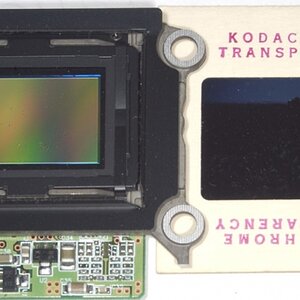
First off: although we all say sensor, the dust and moisture is actually on a piece of glass mounted right in front of the sensor. So already you're dealing with a surface you have some familiarity with. Do NOT clean it with your diamond ring, for instance, or a Brillo pad.
Check your sensor by photographing a white wall or the sky. Set it to a tight aperture (f/16 comes to mind) but don't worry about being in focus or camera shake. The smaller the aperture, the clearer the spots are visible.
There may be other companies and products, but I use the various components from
Visible Dust. I even own their magnifying loupe with the built-in light.
A: Take a close look under bright lights at your sensor. Use a magnifying glass or something if you can. Keep checking to see, but some small spots are difficult to catch with the naked eye. If you're MEGA-anal you could make an exposure between every step and then check it on a computer, but it's not worth it.
B: Use the blower, get rid of the lose stuff. Put the camera in clean mode (with full batteries) and use a blower on the sensor. Make sure you're holding the camera down so the stuff falls out. DON'T put the blower in the camera, just outside is good enough. This will clean 60% of all dirt.
C: Use the statically charged brush to wipe away any debris off the sensor. This usually gets another 25%. This step IS HIGHLY product specific. Their Arctic Butterfly is the only one I know of its kind, but there may be others. Do NOT use a different kind of brush (clean paint brush or make-up brush), you'll just add more dirt to the sensor.
D: use the appropriate liquid and swab to wipe your sensor. Put the liquid on the swab, let it soak in for about 15-20 seconds, and then give your sensor one good slow uninterrupted wipe. Don't push down on the glass too hard, but have a sensible amount of pressure. This will get the remaining 15% of really tough spots, which are usually moisture. Do NOT use Q-Tips or stuff like that.
E: You have a LOT of crap on your sensor right now, so go ahead and clean... but resign yourself to the fact that there may always be one or two. If that's all you got, accept them and get rid of them in Photoshop.
And don't change lenses with the camera in your lap. You may think you don't have dandruff... you'd be surprised how much liquid and solid biomass comes off you every moment. We're all Charlie Brown's friend Pigpen...
Two comments on moisture: do not go in and out of hot/cold places. I know Americans like to air condition their houses down to 70 degrees even when it's 115 degrees outside... you've seen what happens to a cold can of Coke when you take it out of the fridge and put it in a warmer space... moisture condenses on it. Well, the same thing could happen to your sensor if you walk out of a very AC house... and you make it even worse by changing lenses outside shortly thereafter. (The same works in reverse in winter, coming in from the cold.) Avoid it, try to acclimate your gear to temperature changes slowly.
The other problem, occasionally seen on new cameras, is a little too much lubricant for the shutter and mirror assembly.
Anyway, moisture spots need to be dealt with using a moist clean procedure. It's not a big deal. Just don't be a brute.