What's new

Why are my low ISO image soooo noisy??

Oh and one more detail - the middle ISO values (ie the ones that are not full stop changes) are somewhat debatable in use since they are software generated as opposed to real ISO values. So as mentioned above they are cases where the camera either adds light to a lower ISO or exposes at a higher ISO and then lowers the light levels. Sadly I'm not 100% sure of the technical details, but suffice to say many consider it best to keep ISO values to whole stop changes for the best noise performance; you can then use the shutter speed and aperture values to make smaller adjustments to exposure as needed.

I know you said that you aren't really sure of the technical details, but you seem bit more informed here than I do. So I have a question:

Since we're talking digital here, aren't ALL iso changes just in the software? It's not like you're taking the sensor out and replacing it with a new one to change the iso value. I don't really see how a full stop iso change would be any different than a third or half stop iso change. I'd definitely be curious to know more about how this works.
 
As far as I know full stop ISO changes are the result of changes in the way the sensor records the light - ie the sensitivity of the sensor to light itself; whilst the midstop values take this data and then basically apply added brightness to the file itself (most likely also with some noise reduction code being run over the shot as well).

So the midrange ISO values are more like you would be able to get if you simply used the full ISO below and then bumped up the exposure/brightness in editing. Of course then comes the debate on which is more powerful - in camera or out of camera noise reduction and that can be rather a quagmire of opinions on the net as to which is the possibly more powerful .
 
....aren't ALL iso changes just in the software? It's not like you're taking the sensor out and replacing it with a new one to change the iso value. ...
No.

The amplifier circuits on the image sensor have resistor ladders in them that change the amount of amplication that is applied to the signal. It's the sensitivity of the amplifer circuits that changes, not the sensitivity of the pixels (image sensor).
In other words, at a low ISO setting the amplifiers don't do much amplifying, but at high ISO settings they do a lot of amplifying. At high ISO settings most of the noise is thermal noise caused by heat generated because the amplifier circuits are working harder to boost the signal strength.

Software is only used for those ISO settings as Lo or Hi.

An image sensor chip has several electronic devices on it beyond the pixel array. In addition to the amplifiers, there is an A/D converter and it's controller.

An advantage of CMOS image sensor chips is the ancillary electronics are essentially right there at each pixel allowing it to use less power, which means less heat gets generated so there is less thermal noise than at equivelent CCD image sensor ISO settings.

Active pixel sensor - Wikipedia, the free encyclopedia

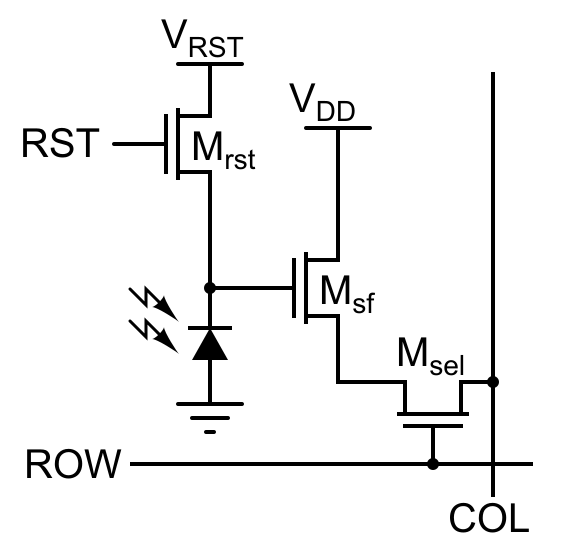
The standard CMOS APS pixel today consists of a photodetector (a pinned photodiode), a floating diffusion, a transfer gate, reset gate, selection gate and source-follower readout transistor—the so-called 4T cell. The pinned photodiode was originally used in interline transfer CCDs due to its low dark current and good blue response, and when coupled with the transfer gate, allows complete charge transfer from the pinned photo diode to the floating diffusion (which is further connected to the gate of the read-out transistor) eliminating lag. The use of intrapixel charge transfer can offer lower noise by enabling the use of correlated double sampling (CDS). The Noble 3T pixel is still often used since the fabrication requirements are easier. The 3T pixel comprises the same elements as the 4T pixel except the transfer gate and the pinned photo diode. The reset transistor, M[SUB]rst[/SUB], acts as a switch to reset the floating diffusion which acts in this case as the photo diode. When the reset transistor is turned on, the photodiode is effectively connected to the power supply, V[SUB]RST[/SUB], clearing all integrated charge. Since the reset transistor is n-type, the pixel operates in soft reset. The read-out transistor, M[SUB]sf[/SUB], acts as a buffer (specifically, a source follower), an amplifier which allows the pixel voltage to be observed without removing the accumulated charge. Its power supply, V[SUB]DD[/SUB], is typically tied to the power supply of the reset transistor. The select transistor, M[SUB]sel[/SUB], allows a single row of the pixel array to be read by the read-out electronics. Other innovations of the pixels such as 5T and 6T pixels also exist. By adding extra transistors, functions such as global shutter, as opposed to the more common rolling shutter, are possible. In order to increase the pixel densities, shared-row, four-ways and eight-ways shared read out, and other architectures can be employed. A variant of the 3T active pixel is the Foveon X3 sensor invented by Dick Merrill. In this device, three photodiodes are stacked on top of each other using planar fabrication techniques, each photodiode having its own 3T circuit. Each successive layer acts as a filter for the layer below it shifting the spectrum of absorbed light in successive layers. By deconvolving the response of each layered detector, red, green, and blue signals can be reconstructed.

 
Last edited:
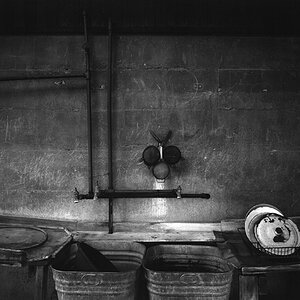
Anything that is underexposed in any camera will have a noise issue. I'd like to see a 100% crop of the wall that is at the top. I would guess it is completely noise free. However what you are looking at is a very underexposed shadow. I would also venture a guess that you have the Auto Lighting Optimizer on and are shooting in jpeg. The optimizer will automatically brighten shadows for you-causing more noise problems.
The area you have cropped to is a pretty harsh shadow you are in there, so I am guessing that in post processing you are keeping that mid-tone shadow fairly high or even brightening/adding exposure to it.
You never want to underexpose anything at any ISO. When you are setting exposure you should be setting it to the point JUST below where something would blow out that you can't have happen. Don't forget that if you are using the highlight warnings to tell you where you have a blow out it will highlight if ONE color channel is blown. Often times one color being blown is proper. In the case of your green wall you may find that it registers the red channel blown if you raised exposure properly on it. SO, make sure you are thinking a bout that blinking highlight warning and what it's telling you too.
Your exposure on this one if this is SOOC could go up probably close to 2 stops in exposure.
When you reduce exposure a little or add black in post processing you help to hide or even eliminate noise. If you bump brightness at all you are running the risk of adding noise.


One more thing-I have heard arguments for and against the in-between ISO's. I have heard that they can be a headache as they aren't TRUE ISO's, but the camera boosting to the in between step, and I have heard the opposite as well. I have never bothered to test it myself. I always slightly over expose and have never had cause think there is any problem with those in-betweens.
Full ISO's (in case someone doesn't know) are 100, 200, 400, 800, 1600, 3200, 6400, 12800

so over exposing in camera would give it less noise, becasue I know over exposing in PP brings out the noise a lot more. I shoot RAW. ALWAYS.

soooo....why do the odd ISO#'s provide more noise?

I don't know as they actually do or not... I have heard it said that they do and I have heard it said that they don't. The theory is that they aren't true, full stops, therefore it's being boosted by other things in the camera. I haven't ever had a problem with them, and my brain tells me that it's probably myth, but I don't actually KNOW if it is myth or not.
 

Create an account or login to comment

You must be a member in order to leave a comment

Create account

Create an account on our community. It's easy!

Log in

Already have an account? Log in here.

Back
Top Bottom