What's new

Why are my low ISO image soooo noisy??

Emilymarie

TPF Noob!
Joined
Jun 6, 2010
Messages
182
Reaction score
0
Location
CA
Can others edit my Photos
Photos OK to edit
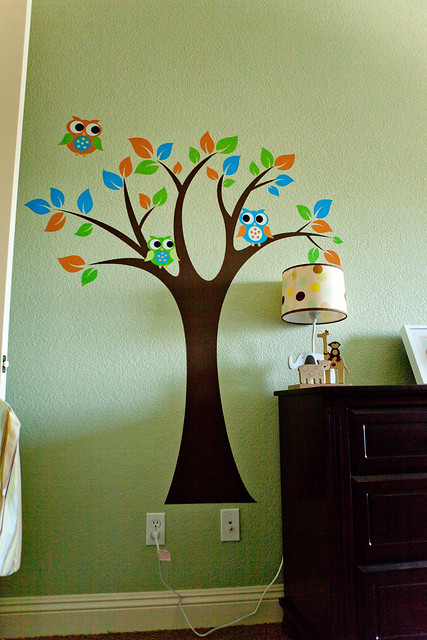
I thought the 5DMII handled it fairly well??

1/125
F2.8
ISO500

6268551988_87cb7b2028_z.jpg

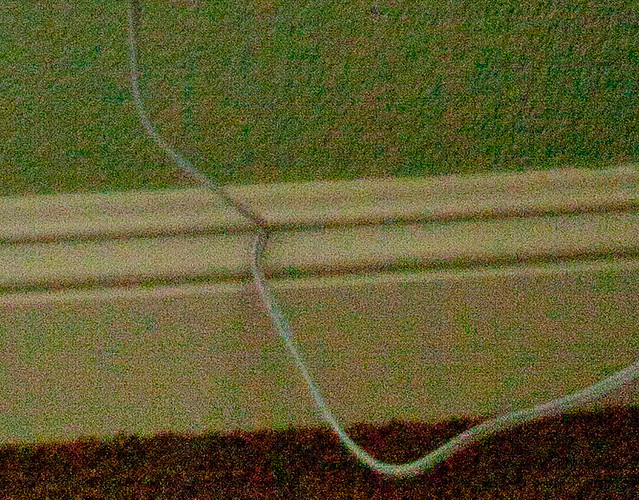
100% crop

6268552036_a03dd6dd9c_z.jpg
 
ISO 500 is not usually considered a low ISO value. I generally consider low values to be below 400, so ISO 50, ISO 100 and ISO 200. I would suggest that you might want to retake this image at one of these lower ISO values for comparison. HTH a bit.

Cheers,

WesternGuy
 
well this was taken at a clients home, all the windows we open so I had to make do.
 
well this was taken at a clients home, all the windows we open so I had to make do.

Making do and using ISO 500 is why you have noise, but don't worry, most editing packages, e.g., Lightroom, Photoshop have very good capabilities to edit out the noise. As well, you can buy plugins for both that will help you deal with images, such as this one, that have higher noise. For example, Dfine 2.0 from Nik software, Topaz DeNoise, and Noise Ninja to name a few. I am sure that there are others that I am not familiar with.

I will admit, that I am a bit surprised, as you were, with the noise in this image, given that it is from a Mark II. I have the 5D Classic and in recent outing at the Albuquerque Hot Air Balloon Festival, I had to use some fairly high ISOs (a few at 1600 and a couple at 3200) for shooting the balloons that took off in the early morning when it was still very dark. From the first view, these images seemed tpo show very little noise in them and I was quite pleased with the results from my camera. I know this does not help, and I did wonder about the lens, but when I saw that it was 24-70mm f2.8, I knew that this was probably not a contributor. So, I guess I am at a bit of a loss to "explain" why you have this noise from your Mk. II, except to say that I guess that is just the way it is.

Have you ever had any other situations using "high" ISO where noise has been a problem with this camera?

Cheers,

WesternGuy
 
was this brightened up in software like photoshop or lightroom or is this pretty much sooc? i've got a 5d mk II and have never had this much noise with a properly exposed photo taken with that iso.
 
It helps if you understand how digital photographs work. Most of the image data (the best signal to noise ratio, SNR) is in the brightest stop in the scene.

Each subsequent stop of brightness in the scene has 1/2 as much image data as the previous brighter stop.

Your cropped area there is at least 4 stops darker than the brightest stop in the scene or 16 times less image data. (low SNR)

If you're going to have clients, it helps to have a well grounded technical understanding of how digital photography works.
http://www.adobe.com/digitalimag/pdfs/linear_gamma.pdf or better yet, get the entire book - Real World Camera Raw with Adobe Photoshop CS5
 
Keith's technical explanation aside, on a high-end body like a 5DII, I would not expect anywhere near this amount of noise, and given that the camera is a 5DII, I would submit that 500 can be considered a low ISO. I have shot similar scenes with my D700 at significantly higher ISOs without noise like that. Could you post a 100% crop of the area that includes all of the lamp shade and a little wall on each side?
 
Providing additional light (flash, reflector, etc).. is always a good idea! (you could have killed that shadow from the dresser.. or move the dresser!) Why didn't you also have the room lights on... might be difficult to fix the white balance, but you could have shot at a lower ISO. Or use a tripod?
 
Providing additional light (flash, reflector, etc).. is always a good idea! (you could have killed that shadow from the dresser.. or move the dresser!) Why didn't you also have the room lights on... might be difficult to fix the white balance, but you could have shot at a lower ISO. Or use a tripod?
That's true..... My thing is why so noisy with this body????
 
It's so noisy with that camera because you, the photographer, made some poor decisions.

The darker parts of an image always have more noise than the brighter parts, regardless the camera used.
 
Anything that is underexposed in any camera will have a noise issue. I'd like to see a 100% crop of the wall that is at the top. I would guess it is completely noise free. However what you are looking at is a very underexposed shadow. I would also venture a guess that you have the Auto Lighting Optimizer on and are shooting in jpeg. The optimizer will automatically brighten shadows for you-causing more noise problems.
The area you have cropped to is a pretty harsh shadow you are in there, so I am guessing that in post processing you are keeping that mid-tone shadow fairly high or even brightening/adding exposure to it.
You never want to underexpose anything at any ISO. When you are setting exposure you should be setting it to the point JUST below where something would blow out that you can't have happen. Don't forget that if you are using the highlight warnings to tell you where you have a blow out it will highlight if ONE color channel is blown. Often times one color being blown is proper. In the case of your green wall you may find that it registers the red channel blown if you raised exposure properly on it. SO, make sure you are thinking a bout that blinking highlight warning and what it's telling you too.
Your exposure on this one if this is SOOC could go up probably close to 2 stops in exposure.
When you reduce exposure a little or add black in post processing you help to hide or even eliminate noise. If you bump brightness at all you are running the risk of adding noise.


One more thing-I have heard arguments for and against the in-between ISO's. I have heard that they can be a headache as they aren't TRUE ISO's, but the camera boosting to the in between step, and I have heard the opposite as well. I have never bothered to test it myself. I always slightly over expose and have never had cause think there is any problem with those in-betweens.
Full ISO's (in case someone doesn't know) are 100, 200, 400, 800, 1600, 3200, 6400, 12800

 
Anything that is underexposed in any camera will have a noise issue. I'd like to see a 100% crop of the wall that is at the top. I would guess it is completely noise free. However what you are looking at is a very underexposed shadow. I would also venture a guess that you have the Auto Lighting Optimizer on and are shooting in jpeg. The optimizer will automatically brighten shadows for you-causing more noise problems.
The area you have cropped to is a pretty harsh shadow you are in there, so I am guessing that in post processing you are keeping that mid-tone shadow fairly high or even brightening/adding exposure to it.
You never want to underexpose anything at any ISO. When you are setting exposure you should be setting it to the point JUST below where something would blow out that you can't have happen. Don't forget that if you are using the highlight warnings to tell you where you have a blow out it will highlight if ONE color channel is blown. Often times one color being blown is proper. In the case of your green wall you may find that it registers the red channel blown if you raised exposure properly on it. SO, make sure you are thinking a bout that blinking highlight warning and what it's telling you too.
Your exposure on this one if this is SOOC could go up probably close to 2 stops in exposure.
When you reduce exposure a little or add black in post processing you help to hide or even eliminate noise. If you bump brightness at all you are running the risk of adding noise.


One more thing-I have heard arguments for and against the in-between ISO's. I have heard that they can be a headache as they aren't TRUE ISO's, but the camera boosting to the in between step, and I have heard the opposite as well. I have never bothered to test it myself. I always slightly over expose and have never had cause think there is any problem with those in-betweens.
Full ISO's (in case someone doesn't know) are 100, 200, 400, 800, 1600, 3200, 6400, 12800

so over exposing in camera would give it less noise, becasue I know over exposing in PP brings out the noise a lot more. I shoot RAW. ALWAYS.

soooo....why do the odd ISO#'s provide more noise?
 
Last edited:
Exactly - if you underexpose in the camera and then bump up the brightness/exposure in editing you reveal the higher concentration of noise in those darker areas; whilst if you expose well in the camera the noise isn't generated to be shown up. Note that overexposing in this manner should always be done without actually clipping the highlights (ie having areas fully overexpose) since fully overexposed details can't be saved (the camera only records white data, no details and no colours to restore). Though shooting RAW gives you a bit of a buffer its not much and best to avoid full overexposure.

If you want more details search on the "Expose to the Right" method since this method of overexposing to reduce noise is listed under that (so called because the aim of the method is to have as much light data as possible on the right side of the histogram - without hitting the furthest right side bar (ie overexposing with no details)).
 
thank you :hug::
 
Oh and one more detail - the middle ISO values (ie the ones that are not full stop changes) are somewhat debatable in use since they are software generated as opposed to real ISO values. So as mentioned above they are cases where the camera either adds light to a lower ISO or exposes at a higher ISO and then lowers the light levels. Sadly I'm not 100% sure of the technical details, but suffice to say many consider it best to keep ISO values to whole stop changes for the best noise performance; you can then use the shutter speed and aperture values to make smaller adjustments to exposure as needed.
 

Create an account or login to comment

You must be a member in order to leave a comment

Create account

Create an account on our community. It's easy!

Log in

Already have an account? Log in here.

Back
Top Bottom