What's new

Wife & Daughter

Josh66

Been spending a lot of time on here!
Joined
Oct 31, 2007
Messages
14,593
Reaction score
1,239
Location
Cedar Hill, Texas
Can others edit my Photos
Photos NOT OK to edit
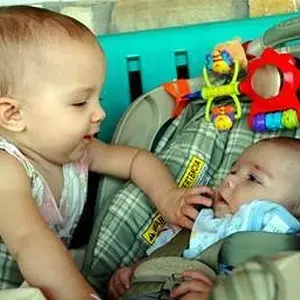
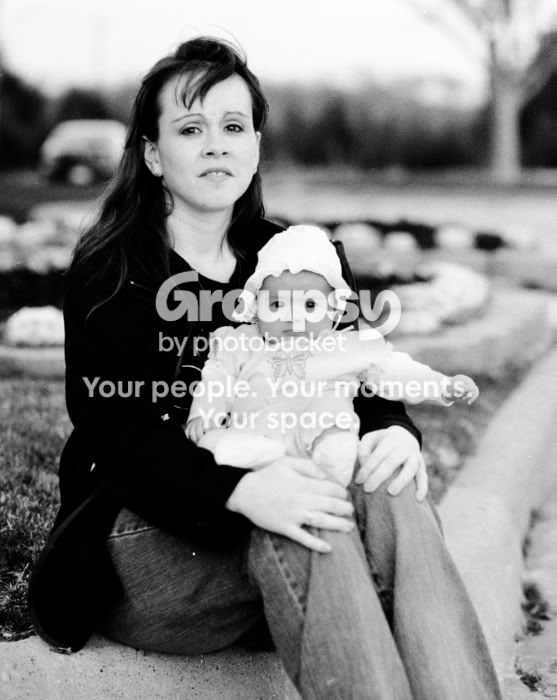
My wife & daughter.

My new scanner (Plustek 7300) came in today, this is my first scan. I think I'm getting the hang of the software...

This was Fuji Neopan SS 100, pretty sure I used my 85mm 1.8 and this looks to be either wide open or close to it. Taken in February this year (8 months ago), so I don't really remember all the details, and I didn't write them down.
TameraandSarah-resized.jpg
 
Last edited:
Any thoughts?

116 people looked at this - nobody has anything to say (good or bad)?
 
Don’t know any think about that model, but it seem to have done a good job. But it does seem a little soft. That could be from a few thinks other than the scan setting.
 
The softness is likely due to shooting at or near f/1.8, I don't think it's from the scanner.

At 100% the eyes are a little soft, so I might have missed the focus a little too...

There's a few dust spots that need to be fixed. I could do it in lightroom easily (except that lightroom doesn't support TIFFs..., WTF?!), or GIMP if I have to; don't have photoshop. The SilverFast software that came with the scanner can do it too, but I haven't quite figured that part out yet.

How can I avoid dust on future scans? Is there a good way to clean the negatives without risking scratching them? (I would rather have dust than scratches, although scratches might be easier to fix...)

EDIT- I think I got the thing with Lightroom and TIFFs straightened out... For some reason it won't import the greyscale ones, but color works fine. Not sure why...
 
Last edited:
Will the scanner save as jpg? Since it the first save and it the file is very large to start with there should be no perceived lose data. Then you can save as a tiff when PP
 
Last edited:
Yes, I can save as .tif, .jpg, .pdf, or .jpf.

Maybe that's what I'll have to start doing. Save the scan as a jpg then process it in lightroom.

I wonder why Lightroom won't recognize the TIFFs from the B&W scans though...?

I can only scan 24 bit color or 8 bit greyscale (is Lightroom not recognizing the B&Ws because they're only 8 bit?). I have to buy SilverFast HDR (soon, I hope) to scan 48 bit color and 16 bit greyscale. (Technically, I can do those scans now, I just can't do anything with the files.)
 

Create an account or login to comment

You must be a member in order to leave a comment

Create account

Create an account on our community. It's easy!

Log in

Already have an account? Log in here.

Back
Top Bottom