What's new

Woody

randyphotoforum

No longer a newbie, moving up!
Joined
Jan 28, 2014
Messages
295
Reaction score
243
Location
Charlotte
Can others edit my Photos
Photos NOT OK to edit
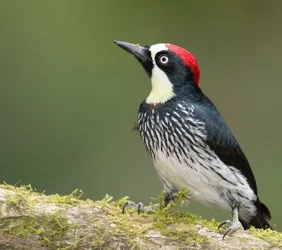
Shot in Costa Rica a few weeks ago

D4 + 500/4 + 1.7TC, 850mm, f/10,1/800,iso 1600, sb800 for fill


p1048206159-5.jpg
 

Attachments

  • $p1048206159-5.webp
    $p1048206159-5.webp
    161.2 KB · Views: 110
Last edited:
I just can't believe that a picture of a bird went unnoticed here ;)


bmp
 
Great focus, even the toe nails are sharp. Ed
 
Very nice, looks like a Acorn Woodpecker.
 
Awesome bird and shot!
 
Its a gorgeous shot in every respect. Love the perch and the background. The Woodpecker when viewed at the largest size is just beautiful !!. Excellent fine details and the colours are great to see.

All the best, extremely sharp shot, love it.

Danny.
 
Its a gorgeous shot in every respect. Love the perch and the background. The Woodpecker when viewed at the largest size is just beautiful !!. Excellent fine details and the colours are great to see.

All the best, extremely sharp shot, love it.

Danny.

thanks Danny

how do i post an image at a larger size ? (that is not the size of the image at the end of the URL I used here)
 
I think from your own PC you can't. What you can do though is click on what you have posted and a box with a larger image shows up and if you click on that again, a much larger image shows up.

From an external hosting site you can post larger images, the forum software still scales it down though to suit a page size for here. So from a hosting site I use image tags and that shows a larger image. Some here link the image and image tags from their flickr account. I'm not sure exactly how they do that though. Directly uploaded from your PC will always show a smaller image to start with as you have there.

All the best and sounds more complicated than it is from a hosting site.

Danny.

 
I think from your own PC you can't. What you can do though is click on what you have posted and a box with a larger image shows up and if you click on that again, a much larger image shows up.

From an external hosting site you can post larger images, the forum software still scales it down though to suit a page size for here. So from a hosting site I use image tags and that shows a larger image. Some here link the image and image tags from their flickr account. I'm not sure exactly how they do that though. Directly uploaded from your PC will always show a smaller image to start with as you have there.

All the best and sounds more complicated than it is from a hosting site.

Danny.

thanks Danny

I post from my zenfolio site ???

i edited the original post and added the image using html image tags, the image is larger but still not the size it was in ZF
 
thanks everyone for the nice comments
 
using the img tags with the URL from ZF works good enough and I suspect this site reduces everything anyway but allows for a click to get back to the original size which is alot better than what alot of forums do and that is just resize (down) the image


thanks
 

Create an account or login to comment

You must be a member in order to leave a comment

Create account

Create an account on our community. It's easy!

Log in

Already have an account? Log in here.

New Topics

Back
Top Bottom