What's new

Worried about costumer printing out photos

Casey carson

TPF Noob!
Joined
Jan 3, 2015
Messages
42
Reaction score
3
Can others edit my Photos
Photos OK to edit
so I just got done with a shoot today and they client said something about enlarging photo and it made me worry what the photo will look like enlarged. How can I make sure the pictures will be ok for enlargement. I use gimp for my editing program. Thank you!
 
Make them sign a contract.
 
How can I make sure the pictures will be ok for enlargement.

Shoot with a medium format camera.

Seriously... people get the idea that there's an infinite number of pixels in any image and they can enlarge to just any arbitrary size they want. If an image were vector data you could do that... unfortunately they're raster images and that means there's a point at which you start to see the pixels as you enlarge it further. If you want to enlarge something to a significantly bigger size and not notice the pixels when you inspect it closely, then you need more pixels in the original image data.

Billboards are an exception. They might be very low resolution, but as they are intended to be viewed from hundreds of yards away, they can get away with low resolution images (you can't get close enough for this to be a problem.)

If you're planning to hang an enormous gallery-sized print on the wall and people can inspect it in close detail, then you need a much higher resolution image AND given the physics of diffraction, it helps to have a physically larger sensor (hence medium format.)
 
you tell them, the customer, that there is a limit to how much you can enlarging, and give them a range at which the image will start to look bad. It's just the way it is.
 
I give my clients JPEG's in 3000x2500px @ 300 dpi. I've printed 20x30" canvases using the same files. There are a lot of factors when it comes to printing, so I hope that helps.
 
I give my clients JPEG's in 3000x2500px @ 300 dpi. I've printed 20x30" canvases using the same files. There are a lot of factors when it comes to printing, so I hope that helps.


Thank you! I'll make sure I have them set to this!
 
I give my clients JPEG's in 3000x2500px @ 300 dpi. I've printed 20x30" canvases using the same files. There are a lot of factors when it comes to printing, so I hope that helps.


Thank you! I'll make sure I have them set to this!
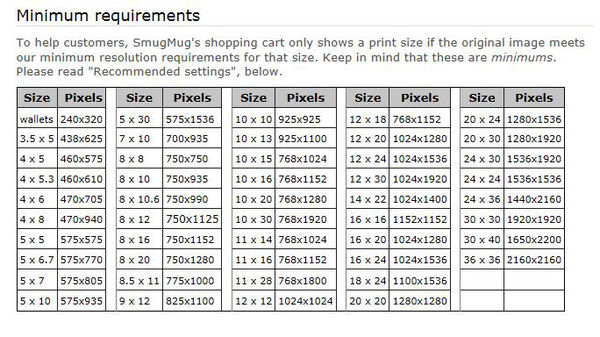
It's not quite that simple. As Vtec indicated, there are a LOT of factors involved in printing. Lack of control over the finished product is one of the reasons why you should always try to avoid giving away digital files. I know when I send a file to my lab, that the result will be top quality, that it won't begin to fade right away, and that the colours, density, etc will be true. That said, most modern digital cameras will produce files that will make satisfactory 11x14 prints with no problem at all, and very few 'print at home' clients will ever print larger than that.
 
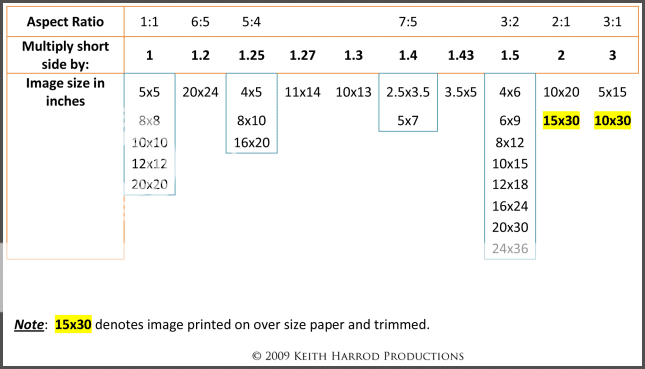
What aspect ratio enlargement do they want to make?
What aspect ratio photograph does you camera produce?
Most DSLR cameras make photos that have a 3:2 aspect ratio
Many P&S cameras make photos that have a 4:3 aspect ratio.

Aspect ratio is the length of the horizontal side of the print relative to the vertical side of the print.

An 8" x 10" print has an aspect ratio of 5:4 and is almost square. Square is a 1:1 aspect ratio since all side of the print are the same length.

A 16" x 24" print has an aspect ratio of 3:2.

Next lets look at the numbers posted above - 3000 x 2500 px @ 300 dpi.
First it's ppi not dpi.
Second the pixel dimensions (3000x2500 px) is the image resolution.
300 ppi is the print resolution.

Print size is determined by both the image resolution and the print resolution:
Second, by assigning a ppi value the print size is fixed.
3000 px / 300 ppi= 10"
2500 px / 300 ppi = 8.33"
Essentially an 8" x 10" print and a 5:4 aspect ratio.

With these 3 simple math equations you can solve for each of the 3 values needed to determine print size
Pixels / ppi = inches
Inches x ppi = pixels
Pixels / inches = ppi

To make a 3:2 aspect 16 x 24 from the same 3000 x 2500 px photo, 500 pixels have to be cropped from the short side of the photo and a different ppi value has to be assigned. Below is how I calculates that 500 px need to be cropped away.

First we figure out the ppi by using the appropriate formula from above by starting with the long of the photo - 3000 px / 24 inches = 125 ppi.
Next we need to determine how many pixels we need on the short side to make a 3:2 aspect ratio print. We already have the 3 part (short side) of 3:2 - 3000 px.
3 divided by 2 = 1.5 meaning the long side is 1.5 times longer than the short side so 3000 / 1.5 = 2000 px we need for the short side to make a 16" x 24" print.

The up shot of all the above is that if your costume client (customer?) is wanting to make an enlargement and you want to be sure the customer will wind up with a quality printed enlargement you need to learn more about print making.

AspectRatioChartv2-1.png
 
You can't control what the client does, even if you only provide prints they can scan it and do what they want. The best thing is to offer to provide copies at a reasonable cost and make something from it.
 
It really depends on the size they intend to enlarge to, and the intended viewing distance, as has been mentioned.

If they're going to do the enlarging, I wouldn't worry about it, other than to provide them an uncompressed full size image. That assumes that they know what they're doing and would know how to work with such an image though. If they don't, then it's time to have an honest chat with them about the reality of enlarging photos, viewing distances, etc.
 
Thank you!!
 
I asked how big she was going to print it and she said 11x17
 
What aspect ratio enlargement do they want to make?
What aspect ratio photograph does you camera produce?
Most DSLR cameras make photos that have a 3:2 aspect ratio
Many P&S cameras make photos that have a 4:3 aspect ratio.

Aspect ratio is the length of the horizontal side of the print relative to the vertical side of the print.

An 8" x 10" print has an aspect ratio of 5:4 and is almost square. Square is a 1:1 aspect ratio since all side of the print are the same length.

A 16" x 24" print has an aspect ratio of 3:2.

Next lets look at the numbers posted above - 3000 x 2500 px @ 300 dpi.
First it's ppi not dpi.
Second the pixel dimensions (3000x2500 px) is the image resolution.
300 ppi is the print resolution.

Print size is determined by both the image resolution and the print resolution:
Second, by assigning a ppi value the print size is fixed.
3000 px / 300 ppi= 10"
2500 px / 300 ppi = 8.33"
Essentially an 8" x 10" print and a 5:4 aspect ratio.

With these 3 simple math equations you can solve for each of the 3 values needed to determine print size
Pixels / ppi = inches
Inches x ppi = pixels
Pixels / inches = ppi

To make a 3:2 aspect 16 x 24 from the same 3000 x 2500 px photo, 500 pixels have to be cropped from the short side of the photo and a different ppi value has to be assigned. Below is how I calculates that 500 px need to be cropped away.

First we figure out the ppi by using the appropriate formula from above by starting with the long of the photo - 3000 px / 24 inches = 125 ppi.
Next we need to determine how many pixels we need on the short side to make a 3:2 aspect ratio print. We already have the 3 part (short side) of 3:2 - 3000 px.
3 divided by 2 = 1.5 meaning the long side is 1.5 times longer than the short side so 3000 / 1.5 = 2000 px we need for the short side to make a 16" x 24" print.

The up shot of all the above is that if your costume client (customer?) is wanting to make an enlargement and you want to be sure the customer will wind up with a quality printed enlargement you need to learn more about print making.

AspectRatioChartv2-1.png
Yes customer (my bad)
 

Create an account or login to comment

You must be a member in order to leave a comment

Create account

Create an account on our community. It's easy!

Log in

Already have an account? Log in here.

New Topics

Back
Top Bottom