What's new

2nd monitor/video cards

coastalconn

Been spending a lot of time on here!
Joined
Mar 24, 2012
Messages
3,594
Reaction score
3,636
Location
Old Saybrook, CT
Can others edit my Photos
Photos NOT OK to edit
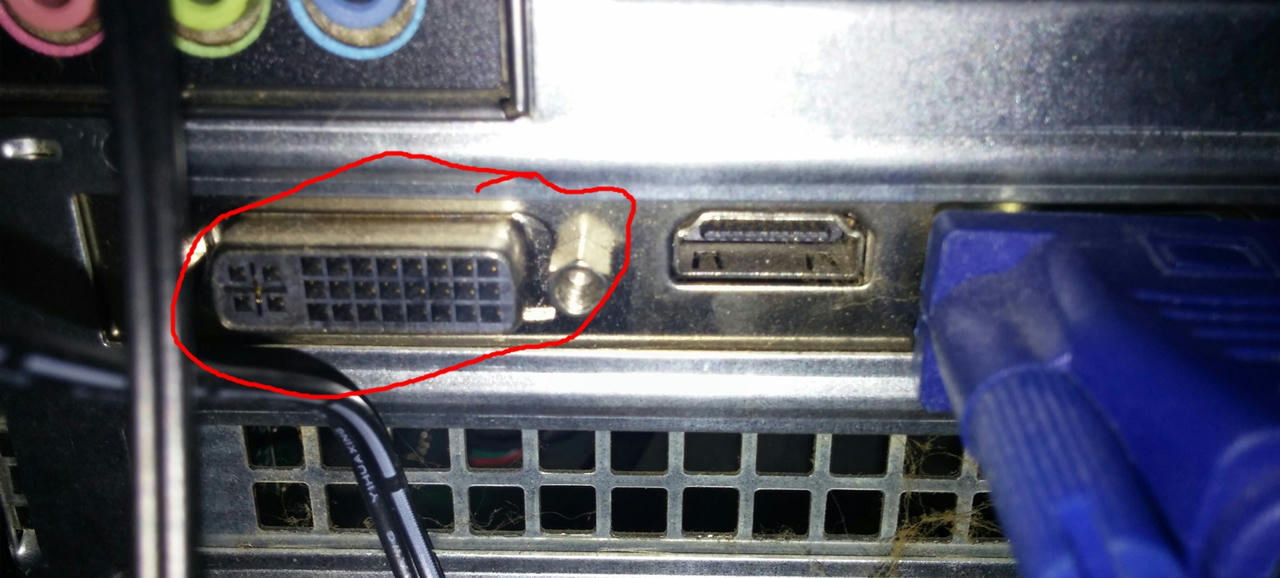
Looking for the tech experts on this one. I'm looking to add a 27" monitor. I've been looking at the big boys that are 2560x1440. They all seem to need DVI-D which I think I have, but I'm not quite sure. I have a Dell inspiron 660 that appears to have VGA, HDMI and DVI on one card. I think it is an integrated Nvidia chipset though. I think I would probably have to add a second video card. I would like to have the full image on the big screen and all the setting on my 23" monitor, is that all doable.. ?
 
shouldn't need a new card, just plug one into each of the inputs, use a converter where needed.
 
Not every off-the-shelf card can support two monitors.

Or three monitors. I want to run a 3rd monitor but can't because of card restrictions. I have to get another then crossfire them.
 
I run win8/7, The software side I can configure. Is it worth getting one of these Korean 27" 2560x1440 displays (they seem to get very good reviews) over a normal 27" 1920x1080? I've been looking through amazon and ebay. Here's a typical one on the bay. I would think I would want glossy over matte? Qnix QX2710 LED Evolution ll SE Matte 27" 2560x1440 Samsung PLS WQHD PC Monitor | eBay They mostly use samsung panels and cost about 1/2 the price of "brand" names..

As you can tell I'm slightly confused..

Judging by the wiki link, I have a DVI-I which wouldn't work with the DVI-D that supports the higher resoltuion? All the high end models need DVI-D and I don't thin adapters work at the higher resoltuion because the DVI-D has a dual bandwidth? So if I do need a video card, I could probably go the cheaper route since i'm not looking for 3d rendering? I don't want to upgrade my power supply also because it could into a very pricey project.. Any thoughts?
 
As an eBay Associate we earn from qualifying purchases.
Or three monitors. I want to run a 3rd monitor but can't because of card restrictions. I have to get another then crossfire them.[/QUOTE] You don't need a crossfire setup to run 3 monitors, 1 lone Sapphire 7770 will run 4 monitors easily. SAPPHIRE 100358FLEX Radeon HD 7770 GHz Edition 1GB 128-bit GDDR5 PCI Express 3.0 x16 CrossFireX Support Video Card - Newegg.com[/QUOTE]

I know, but it's a lot cheaper to get a matching 6970 that I'm running now than a 7770.

But, I will upgrade at the end of next year because my current components will be 4 years old. I'll be upgrading RAM, CPU, and Grfx card.
 

Create an account or login to comment

You must be a member in order to leave a comment

Create account

Create an account on our community. It's easy!

Log in

Already have an account? Log in here.

New Topics

Back
Top Bottom