What's new

a moment of innocence

SoonerBJJ

No longer a newbie, moving up!
Joined
Oct 5, 2009
Messages
437
Reaction score
54
Location
Texas
Can others edit my Photos
Photos NOT OK to edit
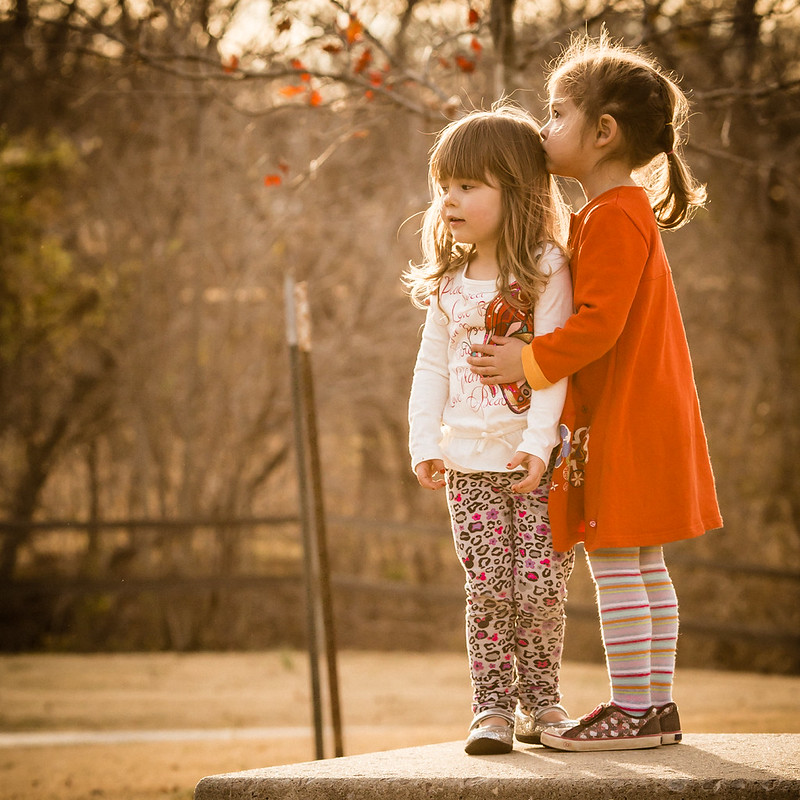
This is a complete stranger my daughter befriended at the park. I was watching them play from a distance when I was fortunate enough to capture this spontaneous act of kindness.

I wish they hadn't been standing by that post, but I'm not into removing entire elements from my images. I did some local contrast adjustment to minimize its impact. And, I'm not totally satisfied with the processing but not sure where else to go with it. The scene was very cool and flat so I livened it up just a bit.

Not technically perfect by any stretch but I feel the content speaks volumes. We could all learn something from the acts of children.

8291724666_e569858d10_c.jpg
 
This is a beautiful image and the message is wonderful. If you did not have that your images are not OK to edit I could fix it for you.
 
Thanks, Mully. For whatever reason I prefer to only edit my own images, but I will take any advice you're willing to share. This is a close crop of a larger image as I was at quite a distance, even with the 135mm. I can't decide if a close crop has more emotional impact than more open. I'll get an example up later. Thanks again.
 
Very sweet but the post is very distracting IMO. It could easily be cloned out though ;)
 
Agree with the post and vignette comments. It is a bit yellow/warm but that's an easy fix in PS.

LOVE the square crop!
 
Thanks for the comments.

@Lew, did you mean it looks to be rotated clockwise? I rotated back CCW 1.2 degrees so the bottom edge of the table is perfectly parallel with the lower border. That had the simultaneous effect of rotating the post so that it isn't so vertical. Somehow that seems to lessen its visual impact, or perhaps that's wishful thinking. ;) Maybe I should overcome my aversion to removing features from my images and learn how to do a good clone job on the post.

I've also lessened the vignette and cooled off the WB just a bit. I think both actions improved the image. I'll get a revision posted later.
 
8291724666_bf168e5d76_c.jpg


Differences are subtle but an improvement, I believe.
 
You still have that T post there that detracts from the image
 
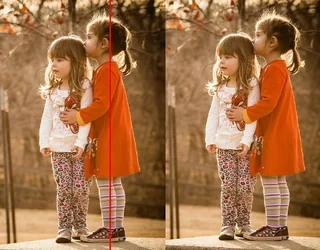
It wasn't the post (because who knows if that's vertical) but the little girl who looks to me like she's leaning forward. (on left)
Rotating a bit clockwise and she looks upright (ignoring the post and the platform)

$8291724666_e569858d10dual.webp
 
Okay, gotcha. The little girl in red actually was leaning slightly forward while my daughter (on left) was standing upright. By rotating CW it looks as if my daughter is leaning into her. That is arguably a more sentimental image but not what actually occurred. By rotating clockwise the bottom edge of the table is even more tilted relative to the lower border. Pick your poison, I suppose.

And, re: the post. I agree that it is distracting and I made some effort to clone it out in LR but couldn't get a satisfactory result. If I really want it to go away looks as if I'll need to brush up on my PS clone skills.
 
Removing the post might be problematic. It's an echoed shape filling in that negative space a bit, right now
 
Edit so that the post becomes part of the fence in the background and that way the fence won't loose integrity.
 
That post could be cloned in Lr no problem. Or you could send to retouch.com they are very affordable
 

Create an account or login to comment

You must be a member in order to leave a comment

Create account

Create an account on our community. It's easy!

Log in

Already have an account? Log in here.

New Topics

Back
Top Bottom