What's new

An exercise in some serious editing *update on P2*

LCLimages

No longer a newbie, moving up!
Joined
Mar 27, 2014
Messages
354
Reaction score
311
Location
Missouri
Can others edit my Photos
Photos OK to edit
I shot this over the summer. I liked her expression but clipped the bottom of the frame - toes, feet, etc. Spent a while (long while) yesterday messing with it to see what I could create. I don't usually post SOOC images but here's what I started with:
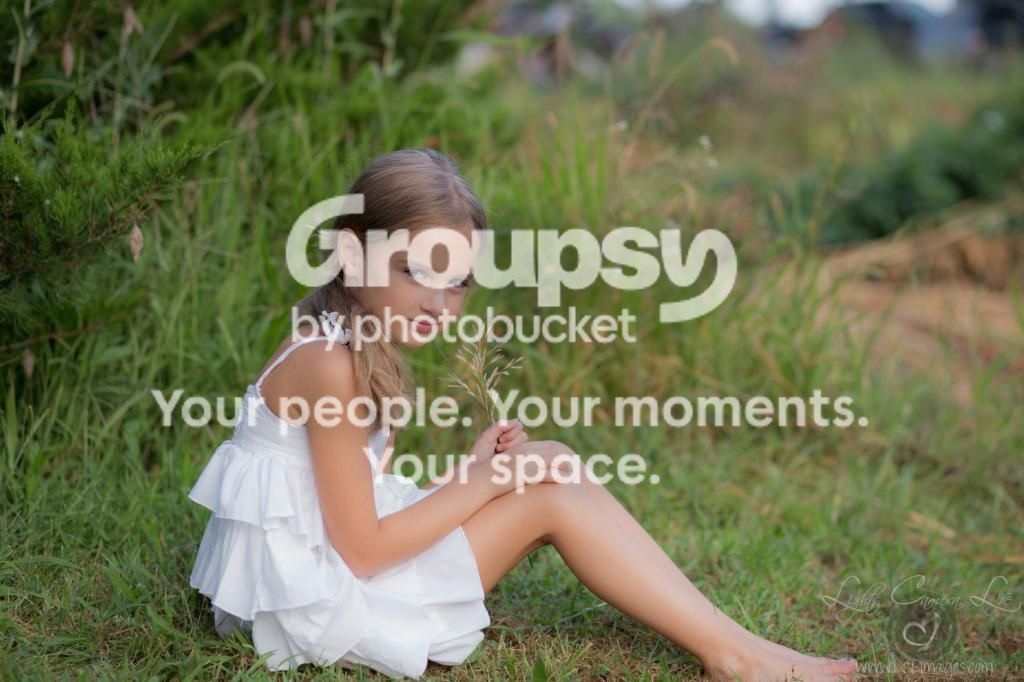


So anyways, I didn't like the right corner of the frame and obviously had to create something on the bottom. I stole some feet and the bottom of her dress from another shot of her, some grass growing by a gravel road in front of her, and then I thought why not a pond? I wanted to try to make it look like she was sitting in this little spot back in by some bushes, but omg. I tried. I tried to plant a little bush there, tried to steal some branches from another shot of mine, flowers, NOTHING looked right. So I ended up copying the left side of the frame and flipping it. Then it looked too identical and obvious, so I tried to clone/heal a few spots to blend it better. Wound up throwing some haze in there to imply a soft setting light source and hide the "i totally cut and pasted that" look.

This is waaaay more photoshopography than I ususally do :lol: I like it, but I don't think the right side of the frame looks quite right yet, and if I didn't stop when I did I'd have been up all night. Thoughts? Pick it apart if you want.

IMG_1816-2-3
 
Ah, very nice!
 
Looks good for what you were working with. I'd probably work on the foreground blur a little more, but the grass you added is excellent.
 
I think the biggest issue I have is how blurry the edge grass is, but then how "sharp" her reflection is in contrast. It doesn't make.. *sense,* ya know? Keep at it! Definitely got potential.

Jake
 
Yes! I know what you mean. I don't think I can sharpen the foreground grass, it was OOF in the shot I took it from. I'm thinking I'll have to work more on her reflection. I've made 4 different displacement maps for photoshop and not one of them was achieving the effect I wanted.
 
I went into this thread thinking, "oh boy, here we go..." but this is actually pretty good!

It's a great start, but I would definitely work more on the reflection. Personally, I would have been happy with the feet and dress and just cropped before the lake part.

The main thing that bothers me is the right side of the frame. That part looks obviously shopped. I would go back to the location and take some shots that would work better, or scour the internet for a good stock photo. Or leave it as it was in the original.

That's my 2 cents - keep it up, and post results! :)
 
Great job on adding the foot and grass. What draws my eye is the grass to the right of her face is OOF while the grass on the right side frame is more in focus.
 
Nicely done!

I have very very limited editing skill so I would have resorted to cropping. I maintained your aspect ratio which is foreign to me.

IMG_1816_zps49b931cb.webp
 
I thought something about the foot/toes looked off - it's too small in proportion (must be those art classes where I learned to measure proportion in figure drawing).

The haze to me looks worse in the brightened image, seems to be a distraction now. I'd maybe like some brightening or warming it a little but this seems too much.

Mostly the reflection looks off; look at her arm, it's chopped and shifted forward, and the leg just looks - warped. I don't know, if it had been framed higher obviously you probably would have nailed it, not sure if I'd do much other than crop the top and right side to put the rest of her not so far from the edges of the frame and try to adjust the balance in the composition.
 
cool. if I didn't like it I probably would have just cropped as mentioned above or retaken the shot if it was that important. But I see how this could be good practice for someone getting more into editing.
 
I thought something about the foot/toes looked off - it's too small in proportion (must be those art classes where I learned to measure proportion in figure drawing).

The haze to me looks worse in the brightened image, seems to be a distraction now. I'd maybe like some brightening or warming it a little but this seems too much.

Mostly the reflection looks off; look at her arm, it's chopped and shifted forward, and the leg just looks - warped. I don't know, if it had been framed higher obviously you probably would have nailed it, not sure if I'd do much other than crop the top and right side to put the rest of her not so far from the edges of the frame and try to adjust the balance in the composition.

The reflection is intentionally distorted because it's supposed to be water ripples. But I totally see what you mean about her arm being chopped funny.

This is my daughter and just for fun so it's not important as in for a client, but I'm definitely still working on it. I have about 5 versions of it saved so far :lol: I will keep posting as I keep working on it.
 
Here's one where I tried to just extend the grassy hill that was already there. Doesn't look quite right yet to me.

 
Could you line her arm back up and find some sort of ripple overlay or something like she threw a stone in? There has to be sonehing like the available!
 
Could you line her arm back up and find some sort of ripple overlay or something like she threw a stone in? There has to be sonehing like the available!

The last one I just posted her arm is lined back up. I've been creating displacement maps and using them in photoshops Distort filter but haven't quite found one that's right yet. I'm going to create another one now that looks more like circles instead of lines, like you mentioned a stone ripple. Thanks!!
 
Better job than I could do, so I can't really lend much expertise.

If this were mine, I would have left the original elements in the background; maybe crop in a little at the top and left to keep your aspect ratio. Adding the water was a nice touch, but I'm not a big fan of "half" reflections, so I think I'd have left the reflection off completely, just cropped in so that you see just enough of the water to know it's there (well, okay, it really WASN'T there, but…yeah…).
 

Create an account or login to comment

You must be a member in order to leave a comment

Create account

Create an account on our community. It's easy!

Log in

Already have an account? Log in here.

Back
Top Bottom