What's new

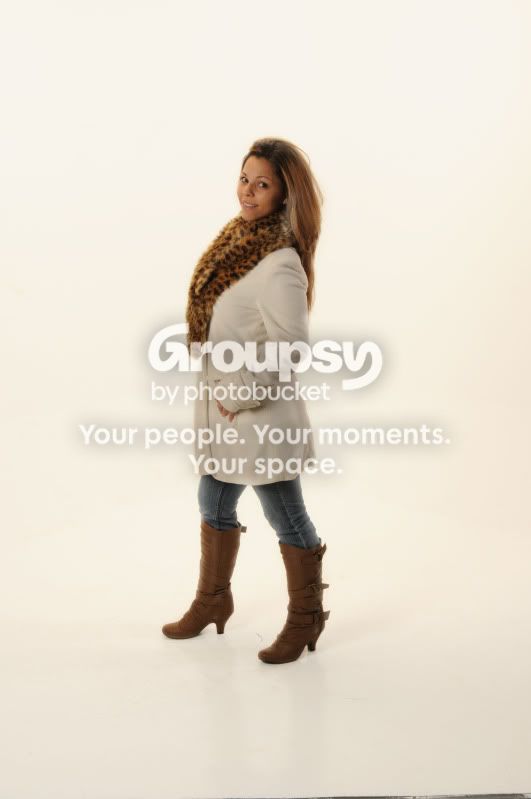
another friend

Nice pic, had you posed her with the opposite leg up less waist may be showing, and probably more legs/boots. And the boots may not appear to blend into each other as such.
 
I probably did it wrong but here is my attempt......
1.jpg
 
Hey there, heres just a quick method i did, which is a 5-min job, but you can go into much more detail with it :)

1. Open image in PS
2. Use a levels adjustment layer and drag your middle slider to the right
3. Mask out the model on your adjustment layer, so the background becomes bleached white
4. Then apply a curves adjustment creating a point in the center of the line and moving it up.
5. Again, mask out the model on the curves layer

You are done :)

p.s i do have an image to show you, however i am new and not quite sure how to upload an image XD

Ok, so when I open the image and add the adjustment levels layer, it becomes completely black. Is that right? if so, how do i do number 3?

Oh dear, my mistake, that should read: 2. Use a levels adjustment layer and drag your middle slider to the LEFT.

So sorry about that :)
 
Once I Slide the middle slider to the left, how do I Mask out the model exactly? im a bit confused on that part.
 
I like the edit by ryan.
 
Once I Slide the middle slider to the left, how do I Mask out the model exactly? im a bit confused on that part.

On your layers palette, you will see your levels layer, simply click on the mask (white square) and then grab a black brush and paint over your model.
 

Create an account or login to comment

You must be a member in order to leave a comment

Create account

Create an account on our community. It's easy!

Log in

Already have an account? Log in here.

Back
Top Bottom