What's new

Beginner's Portrait!

ArtFreak

TPF Noob!
Joined
Dec 30, 2013
Messages
58
Reaction score
10
Location
United States of America.
Can others edit my Photos
Photos OK to edit
I have been a member of this forum for a few months now, hiding in the shadows and enjoying all of the spectacular works that you people come up with! I have seen a ton of amazing stuff on here. I have decided that it is time to be brave and put some of my photos on here as well. I definitely want constructive criticism and any helpful ideas you might have to better my photography. I have seen some members go a little overboard though, so please remember I am just getting into photography for real (I've been playing with point and shoots for years but just got my first DSLR in January). The only editing software I have is the ViewNX2 that came free with my Nikon. It doesn't have a ton of options, just very basic RAW processing really. Because of this I might not be able to implement some photoshop suggestions right away but would still enjoy hearing them as I am planning to invest in some better software soon. So I'd love to hear all opinions, just no soul crushing please! :lmao:

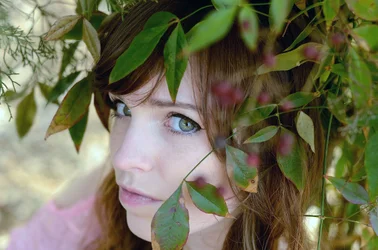
My photo was too large to upload to the forum and I didn't want to chop it up so here is it's link on Flickr:

https://www.flickr.com/photos/119178817@N08/13544860835/
 
I like it. I like the idea of it.. the green eyes are really beautiful (or eye since we can really only see one) lol. I think maybe the framing could use work though.. the eye is the focus here and I think the image would be a lot more interesting if it wasn't smack center, and feels a bit tightly cropped to me on the bottom at the chin there. WB is definitely off.. I struggle with this too and with all the green around her its no surprise to see a very green cast to the skin.

I recommend lightroom for editing.. the price is great and 99% of the time I can do any edits I need to do in LR without having to work in PS at all. :)

Welcome!
 
^ ditto what she said. Really, it's a very nice shot especially for a "beginner."

As far as editing software goes, I also use Lightroom 5 and the price is indeed great for all it can do. Also check out Photoshop Elements... 12 is the latest version. As far as I'm concerned, it does everything I need Photoshop to do at around $150 instead of $700 or whatever ridiculous price PS is going for these days. There's not a thing I haven't found PSE able to do. I know there's not a Curves adjustment and I've heard complaints about that but between LR5 and PSE12, I've been just fine. And I've been at this for years. Just my opinion, YMMV as always. I'd recommend both of these to you, as one who is just starting out. If your budget grows later on and you feel the need to get crazier later on, then you can.

Psst... check out Amazon for those. Quite often their price for the digital download is $20-30 below Adobe's price.
 
I'm still very much a beginner but instead of photoshop I've been using Lightroom 5 along with Perfect Photo Suite 8, which has an option to buy and have it integrated with lightroom 5. I like it a lot, price was reasonable and now I can work with layers.

photoshop right now seems to be a monthly subscription, and I'd much rather buy a program and not be looking at a monthly fee.

I liked the photo a lot, it did seem a little bit green, but again, I'm a beginner with less than a year playing with the camera and only recently bought the photo editing software and very much a rookie.
 
Lovely photos. I'd think about the framing, I like the foliage framing a subject but sometimes I think it's a fine line if something covers maybe a little too much, or if a slightly different angle or perspective would be better; sometimes moving a step or two can be enough to give you a somewhat different image.

I do events/sports and scenery more than posed portraits and do minimal editing but either way I find getting a proper exposure is key especially if you're in mixed or dappled light etc. Looks like you're on the right track, I'd just keep honing your skills and learning and practicing.
 
I think it needs some of the "green" removed from the "yellows", using selective color in Photoshop, or a HSL adjustment in Lightroom. Her skin-tones, which fall in the "yellows" family, are tinged with a lot of green, due to the close proximity to all the foliage. The sclera (whites of the eye) shows excessive green as well. When making photos underneath heavy green foliage, there actually **is** a lot of "green light", and the human brain can filter it out, mentally, but the camera-eye is unflinching and shows the excessive greenish cast pretty strongly.
 
In my opinion, this image is really great, but I haven't really got a lot of experience with portraits. I might change some colours but other than that I think you did a good job!

Lovely photo stream, I really like the photo with the candles! :D
 
Here it is with a one-click adjustment from an old version of PS (PS 8 aka Photoshop CS), using the automatic Auto-COLOR correction. $13544860835_8b8b4cf2e4_o-AUTO COLOR.webp
 
Nice correction Derrel. Question, why wouldn't you warm it up just a little bit now?
 
Not a bad start. :)

I think you need to drop the framing a little bit, and maybe a hair to the left.

Your white balance is also very green...

You need to find a good spot between yours which is too green and Derrel's, which is too cool, IMO.

I think the image itself deserves to be "warm", but there is a definite green tint happening in your version. :sillysmi:
 
Nice correction Derrel. Question, why wouldn't you warm it up just a little bit now?

I probably would. I just wanted to show that a one-click process could easily make a massive color adjustment and rectify the strong color cast.
 
Nice correction Derrel. Question, why wouldn't you warm it up just a little bit now?

I probably would. I just wanted to show that a one-click process could easily make a massive color adjustment and rectify the strong color cast.

Good, I figured that you'd want to a little bit, she just seems too white to me. I'm on the right track with what I saw, Yeah!!
 

Create an account or login to comment

You must be a member in order to leave a comment

Create account

Create an account on our community. It's easy!

Log in

Already have an account? Log in here.

Back
Top Bottom