What's new

Black and white conversion C&C please

Rafal

TPF Noob!
Joined
Jun 28, 2011
Messages
52
Reaction score
1
Location
Chicago
Can others edit my Photos
Photos OK to edit
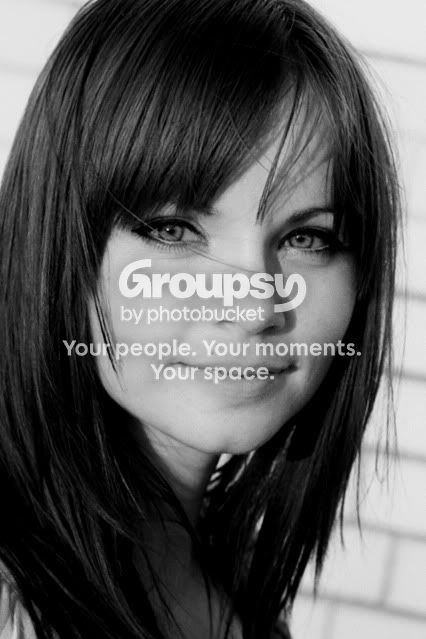
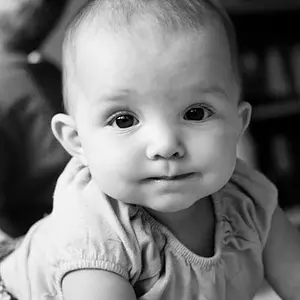
Hi everyone, so I finally convinced my wife to pose a little for me so I could practice and I picked this photo. Is the shadow annoying? Also how is my B&W conversion?
Any constructive critisism is welcome..

1.
IMG_0138c.jpg


2.
IMG_0138a.jpg
 
Yes, shadow is annoying.
BW looks crappy, no contrast. Add a bit contrast, boost red channel a bit.

Lighting isn't the best one, doesn't correspond with the pose.
I'm in iPod now and can't link anything, If u want PM me and I'll remember to send u a link to portrait lighting.
GL
 
Shadow is not interesting so kind of distracting, did a crop and slight tilt to give it a different look. Beautiful wife , tell her not to be shy about posing.
-
IMG_0138ccopy.jpg

-
Shoot well, Joe
 
Yes, shadow is annoying.
BW looks crappy, no contrast. Add a bit contrast, boost red channel a bit.

Lighting isn't the best one, doesn't correspond with the pose.
I'm in iPod now and can't link anything, If u want PM me and I'll remember to send u a link to portrait lighting.
GL

I'm loosing a lot of contrast and sharpness when I convert it from RAW to JPG and then when I resize it to 1024 and save for web. What I did was first I adjusted the contrast, sharpness etc. convert it to JPG then I changed the image size to 1024 , adjusted the sharpness again and saved it for web. Could that be the problem?
 
Shadow is not interesting so kind of distracting, did a crop and slight tilt to give it a different look. Beautiful wife , tell her not to be shy about posing.
-
IMG_0138ccopy.jpg

-
Shoot well, Joe

Wow, love the edit! The crop looks great but the tilt made it so much more interesting!

hahaha now she is screaming that she wants your version of the photo and she says thank you for the compliment

When would you use my composition? what kind of background would work for that? I take it plain backgrounds such as this don't work..
 
How are you actually doing the colour-> monochrome conversion?
I don't have photoshop yet , right now all I'm using is the software that came with the camera "digital photo professional" it lets me change the picture style to monochrome, adjust sharpness, contrast etc.
 
Get GIMP (it's free). Study some tutorials on using it. You will thank yourself later. Your wife is lovely! I hate the shadow, and definitely think you could find a better B&W conversion. Check out using the channel mixer to create a B&W conversion, it's one of many many ways to manipulate a B&W.
 
Get GIMP (it's free). Study some tutorials on using it. You will thank yourself later. Your wife is lovely! I hate the shadow, and definitely think you could find a better B&W conversion. Check out using the channel mixer to create a B&W conversion, it's one of many many ways to manipulate a B&W.

I did get the GIMP but for some reason it doesn't recognize my RAW files :(
 
I'm no pro but I happen to like your B&W. My focus is being pulled at her eyes which I think is the strong point. Hypnotising
 
Used Photoshop with Alien Skin's Exposure 3 plugin to make it look like it was shot with Kodak T-MAX 100 film.

Also used another plugin called Topaz Detail to..... bring out a little bit more detail.

7UnRc.jpg
 
Used Photoshop with Alien Skin's Exposure 3 plugin to make it look like it was shot with Kodak T-MAX 100 film.

Also used another plugin called Topaz Detail to..... bring out a little bit more detail.

7UnRc.jpg

I'm amazed again! :) That brings me to another question. I know that GIMP is a good software but has its limits so I might as well start learning a software that I'll be using for years to come. Comparing Lightroom to Photoshop CS5, which one would you recommend? is spending the $400 extra worth it? I'm still not clear about additional capabilities that PS has, is it just the plugins that you can get ?
 
I prefer Photoshop but only because I've been using it for over a decade. If you work with large volumes of photos that don't require extensive retouching (like most photographers), I can see Lightroom being a better choice for it's photo management capabilities.
 

Create an account or login to comment

You must be a member in order to leave a comment

Create account

Create an account on our community. It's easy!

Log in

Already have an account? Log in here.

Back
Top Bottom