What's new

Bodacious First Shot - Taylor

DGMPhotography

Been spending a lot of time on here!
Joined
Mar 23, 2012
Messages
3,160
Reaction score
717
Can others edit my Photos
Photos OK to edit
I've just about finished my first shot from my shoot with Taylor.

I'm still trying to decide on a few things. First off, what crop should I go with?

If we can agree on that, I would also like to discuss background choice.

General C&C is welcome as well, but I would like to address the above topics.

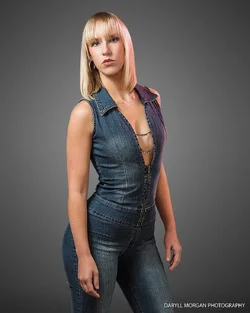
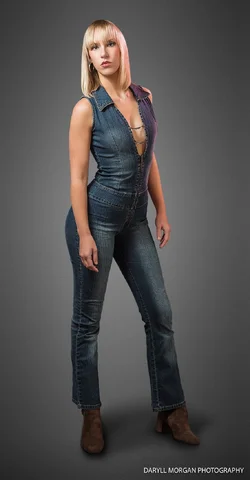
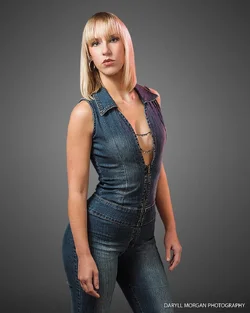
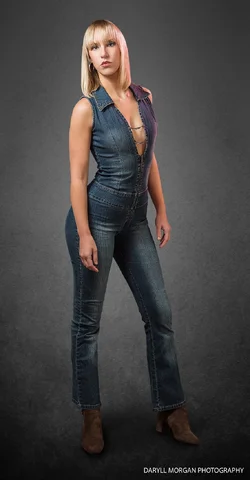
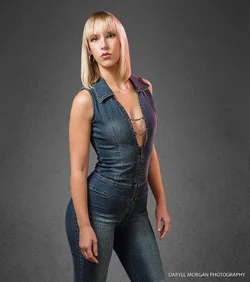
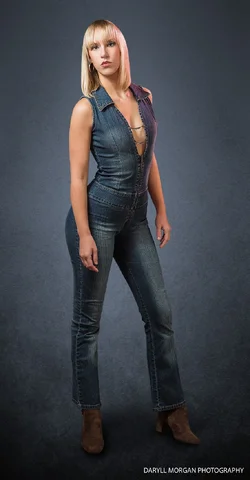
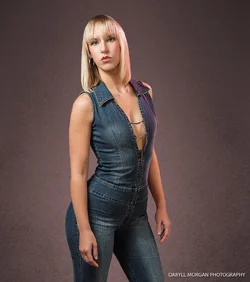
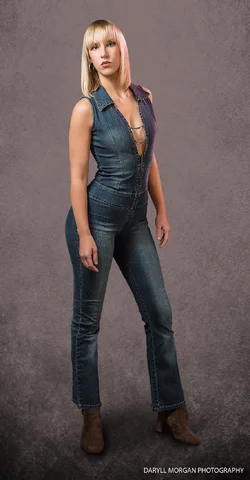
1. deciding crop - Daryll Morgan Photography-1.webp 2.deciding crop - Daryll Morgan Photography-2.webp
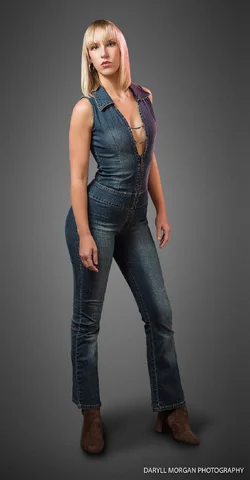
On one hand, I've never gotten a full-body shot that I've liked, but this one definitely has me reconsidering that. But on the other hand, I realize the closer crop bring more focus to her face. Thoughts?
 
I prefer the half-body version, for the additional on-screen size and detail that it carries with it. Her posture in #1 looks a bit off-kilter (foot positioning, camera-right) so I prefer shot #2.
 
I prefer the half-body version, for the additional on-screen size and detail that it carries with it. Her posture in #1 looks a bit off-kilter (foot positioning, camera-right) so I prefer shot #2.

I agree. Posture looks a bit off below the knee. If I went with the full-body version, I may want to rotate her foot a little bit.

But now I have another question. Are there any situations where a full body standing portrait makes sense? Now that I think of it, I haven't seen it very often.

And aside from that, what do you think of the shot?
 
FULL-BODY standing shots make a LOT of sense...you can literally "see the whole person", from head to toe! She has on a ver interesting denim jumpsuit, very stylized, very retro-chic...she has an attractive figure...literally showing her makes a lot of sense; yet at the same time, cropping this, and showing her more-clearly, in a more close-in crop, is also very appealing. As far as what I think of the shot: I like the slight bit of warming gel filter used on her, but at the same time, I think it might have been a good idea to have included a bit of that gelled light on that gray backdrop. Perhaps a bit of that warm, magenta-ish tone could be applied to the backdrop in post?
 
Hmm.. I just wonder in what case the full-body shot would be better than a cropped shot.

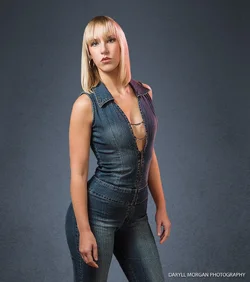
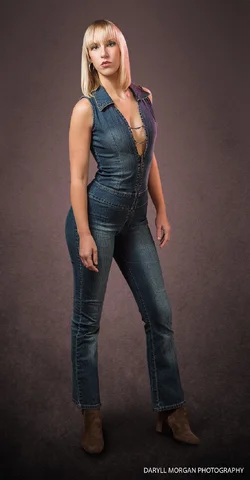
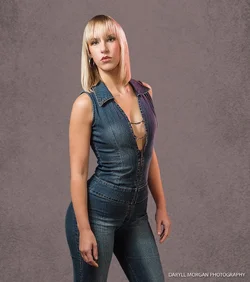
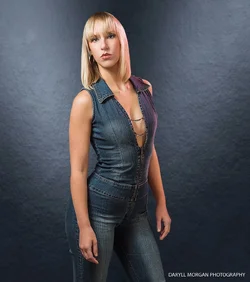
As for the background, it's a composite as-is, so adding some color isn't a problem :) which I suppose brings me to the second point of my post. What background should I go with? I've got a few options I've worked on so far (and I'll try the color addition as well).

1.
deciding crop - Daryll Morgan Photography-1.webp deciding crop - Daryll Morgan Photography-2.webp
2.
bg options - Daryll Morgan Photography-2.webp bg options crop - Daryll Morgan Photography-2.webp
3.
bg options - Daryll Morgan Photography-3.webp bg options crop - Daryll Morgan Photography-3.webp
4.
bg options - Daryll Morgan Photography-4.webp bg options crop - Daryll Morgan Photography-4.webp
5.
bg options - Daryll Morgan Photography-5.webp bg options crop - Daryll Morgan Photography-5.webp
 

Attachments

  • bg options crop - Daryll Morgan Photography-1.webp
    bg options crop - Daryll Morgan Photography-1.webp
    192 KB · Views: 286
Beautiful lighting, and I really like the pose. I think the half body looks best; the full body looks a bit awkward. Her hair looks clean and really stylish, and overall the general processing of the image is very good. I don't care for the face retouching though; any detail of her skin looks wiped away, giving her a fake cartoonish look. As far as backgrounds go, I think #4 harmonizes best with her clothing and compliments the pink lighting really well, and the warm tones add a generally healthy look to her. 3 is decent as well, but I think the less contrasting tones between her skin and the background of 4 looks better, and the pink light looks a bit out of place with the cooler tones in 3.
 
Last edited:
On one hand, I've never gotten a full-body shot that I've liked, but this one definitely has me reconsidering that. But on the other hand, I realize the closer crop bring more focus to her face. Thoughts?
Maybe you should have posed your model differently. That pose does not flatter her shape, and her legs are oddly placed.

For a full-body shot, the legs should be more interesting than what is shown here. A more artful pose might help, and then lower your camera. Having your lens at about her neck level automatically puts more emphasis on her face, even if you frame to include her feet. Furthermore, the light fall-off is working against a full-body shot. You should plan out your shot(s) even before the model shows up so can be ready with the proper lighting.

As for the background color, use whatever color you want, as long as the color of the background is complimentary to the model, her attire, and the overall theme of the shot.
 
I've just about finished my first shot from my shoot with Taylor.
Now I have a question about that statement. "..finished my first shot.." Are you talking about doing a lot of time-consuming editing to only one (the first) shot? If that is the case, my question is "Why?"

How far off was it before you started? What all do you have to work on? Are your edits something that could have (should have) been done when you took the shot? Are you planning to do a similar amount of editing to every shot? How many shots and how much time? Are you incorporating this methodology into your business model? Have you considered the possibility that you might need to learn photography instead of Photoshop?

Food for thought.
 
I've just about finished my first shot from my shoot with Taylor.
Now I have a question about that statement. "..finished my first shot.." Are you talking about doing a lot of time-consuming editing to only one (the first) shot? If that is the case, my question is "Why?"

How far off was it before you started? What all do you have to work on? Are your edits something that could have (should have) been done when you took the shot? Are you planning to do a similar amount of editing to every shot? How many shots and how much time? Are you incorporating this methodology into your business model? Have you considered the possibility that you might need to learn photography instead of Photoshop?

Food for thought.

Masking someone out from a background takes a lot of time, if you want to do it right. And I would expect any self respecting photographer to spend time in post. As for your other comments, I, and others here, really like the pose for the most part. But your comments about the full-body shot and how it could be more interesting do have some truth to them. As I was lighting this shot, I realized the need for a v-flat. Something I've been wanting to add to my arsenal for awhile.

Beautiful lighting, and I really like the pose. I think the half body looks best; the full body looks a bit awkward. Her hair looks clean and really stylish, and overall the general processing of the image is very good. I don't care for the face retouching though; any detail of her skin looks wiped away, giving her a fake cartoonish look. As far as backgrounds go, I think #4 harmonizes best with her clothing and compliments the pink lighting really well, and the warm tones add a generally healthy look to her. 3 is decent as well, but I think the less contrasting tones between her skin and the background of 4 looks better, and the pink light looks a bit out of place with the cooler tones in 3.

Thanks, Dan. I think #4 is best, too. Thanks for your feedback. As for the face retouching.. I don't think I can ever make you happy in that haha. I actually didn't do much here, aside from a couple of blemishes and darkening her eyes.
 
Why are the pics so small? You can not blow them up to inspect them at this size. Hard to critique something small.

No one else here has seemed to have a problem critiquing at this size. I upload my images at 1700x1700 which is more than enough.

And it's about the largest I can get without exceeding TPF's upload limit.
 
I prefer the square aspect ratio, half-body shots, and find that 2,3,and 4 all have something to offer in one way or another. I have a slightly opposite opinion on #3 than Dan O. has above; whereas he mentions the contrast of her skin tones against the backdrop in #3 as a slight minus point, I like #3's wardrobe/background color agreement! And I like the way her skin contrasts with the backdrop in #3 as well.

As far as a V-flat...Home Depot's home insulation sheets, the BIG ones in the roughly 4 x 8 foot size at $12.99 or so each, the foil-colored ones that are about 1-inch thick, those make good, inexpensive V-flats, and you can PAINT one side, or both; they come in silver-colored finish, but they will take paint, white, or black, to make a reflector, or a subtractive panel in black. They will easily tape together, or you can use wire or zip-ties to make a V-flat outta' these.

V-flats make good reflectors for full-length standing shots, and also disperse the burst of an electronic flash pretty nicely, AND can shield the camera lens from stray light from said flash!

Here is a fantastic V-flat FAQ from famous people-photographer Sue Bryce. https://suebryceeducation.com/blog/polyboards-v-flats-faq/
 
Last edited:
Masking someone out from a background takes a lot of time,

I guess I'm confused. Even with the new refine edge tools in PS it is a job and takes time to do it right. So why are you finding the need to mask? I've always been a believer in work smarter not harder. Pre-planning is something that could save you a tremendous amount of time. If you know you're going "not" going to use the background, going with a chroma key background will save you time later in the masking. Even better, pre-planning your background for the final shot would prevent masking at all.
 
Masking someone out from a background takes a lot of time,

I guess I'm confused. Even with the new refine edge tools in PS it is a job and takes time to do it right. So why are you finding the need to mask? I've always been a believer in work smarter not harder. Pre-planning is something that could save you a tremendous amount of time. If you know you're going "not" going to use the background, going with a chroma key background will save you time later in the masking. Even better, pre-planning your background for the final shot would prevent masking at all.
Masking out the background opens the image up to many different options as to what you could use for a background. It also saves one from having to buy a number of expensive backdrops. Yes it takes time, but I think that time is worthwhile for what you get.
 

Create an account or login to comment

You must be a member in order to leave a comment

Create account

Create an account on our community. It's easy!

Log in

Already have an account? Log in here.

Back
Top Bottom