What's new

c&c excuse my first time

marineangel

TPF Noob!
Joined
Nov 13, 2014
Messages
23
Reaction score
5
Can others edit my Photos
Photos OK to edit
i have gone through a lot of forums and read enough to know that I am mindblown by how much I need to learn. right now I would like to know if I really have a photographers eye. Everyone always says wow and I can see error error error. I'm pretty sure I know a wow photo when I see one. here are a couple of my faves with very little editing. most likely shot on auto with my rebel t3 75-250mm. 3.2f
My laptop is not very cooperative and I am not sure about the best way to upload these and hope file size is not too large. just a couple to get me started on real criticism
 

Attachments

  • ash.webp
    ash.webp
    890.6 KB · Views: 235
  • IMG_6002.webp
    IMG_6002.webp
    499 KB · Views: 218
  • IMG_20141027_203634.webp
    IMG_20141027_203634.webp
    516 KB · Views: 232
  • IMG_0057.webp
    IMG_0057.webp
    806 KB · Views: 226
Actually, four photos is pushing the concept of on-line critique. I much prefer spending time on one photo, and I'll generally only spend time on something that piques my interest.

So here is a really fast rundown:

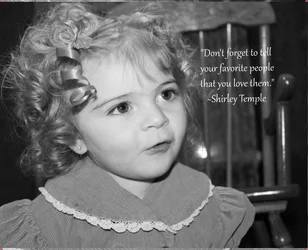
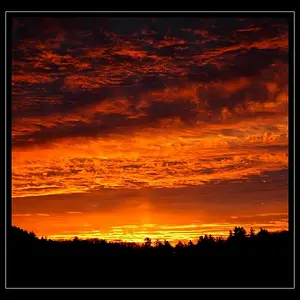
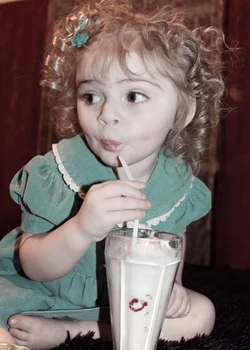
#1 pose cute, timing good, but needs her foot/leg to be out of the frame or posed better. The built-in flash has spoiled it.
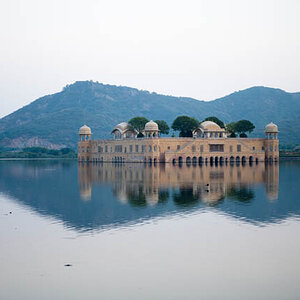
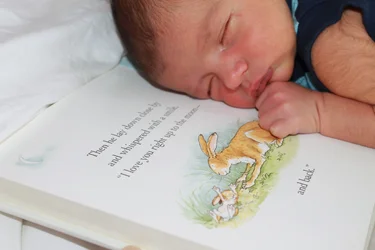
#2 Cute pose, great idea, fairly good light.
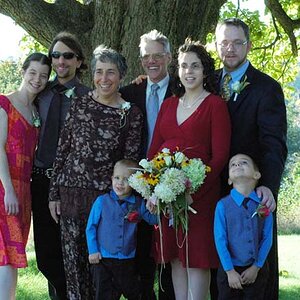
#3 horizontal frame for what is essentially a vertical subject. Light is too strong.
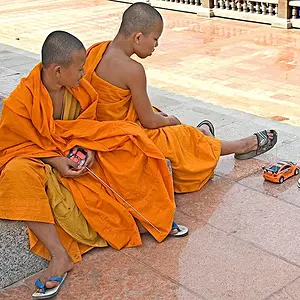
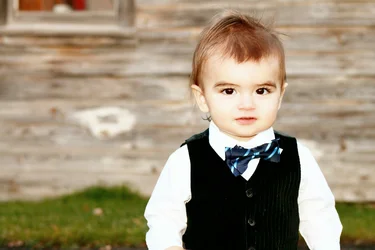
#4 very cute, but might have been a little better with more blur on the background.
 
i have gone through a lot of forums and read enough to know that I am mindblown by how much I need to learn. right now I would like to know if I really have a photographers eye. Everyone always says wow and I can see error error error. I'm pretty sure I know a wow photo when I see one. here are a couple of my faves with very little editing. most likely shot on auto with my rebel t3 75-250mm. 3.2f
My laptop is not very cooperative and I am not sure about the best way to upload these and hope file size is not too large. just a couple to get me started on real criticism

The great Dorothea Lange (she's the photographer who shot the iconic photo of the Okie mother holding her child during the dustbowl period in the US....just google "Dorothea Lange on google images and I bet it's the first picture you see) once said: "A camera is a tool to teach you how to see without a camera." Don't worry about whether or not you have a "good eye." As you study photography and practice and do C&C, you LEARN how to see. You will start to look for leading lines, for triangles, for DoF, for mood, for problems (pole coming out of the back of the head, litter in the foreground, shadow and light blotches on the skin, etc.). You'll learn how to compose a shot...why one angle is "blah" and a slightly different angle of the exact same setting is "Wunderbar!".

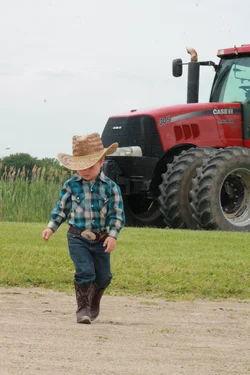
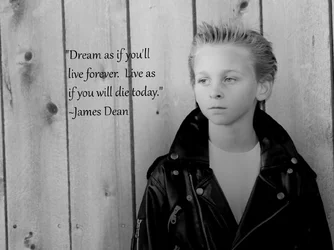
As to your photos...there are all things that I'd fix or want to tweak on each photo, but each one of them shows promise and patience and the ability to anticipate to capture the right moment. First photo, her fast is overblown but it looks natural and expressive and unforced...like you were truly a fly on the wall. Second photo (baby and book) is cute but I think it would be so much better if the crop wasn't as close (so we saw more of the book and the infant). Also, that's a photo that screams out for soft light and some bokeh or a narrow DoF. Third photo is a nice portrait. I like that the little bugger is off-center in the picture. Not sure how I feel about the "eye" (rock formation behind him)...it catches my attention, draws me away from the subject but also makes the picture memorable. Fourth photo looks the most like a snapshot to me. Cut to family but his feet are cut off, the tractor is a bit too distracting and his face is hidden.
 
I so a ppreci be more shadowsate the feedback. It's sends me in a million more directions with questions and my interpretation. First off I must've had the uploaded image too long for the tractor pic.#4 His feet aren't cut off in mine. I think that not having the background blurred made the picture. I realize it's not a portrait. There are others from that shoot where he tipped his hat and the background is blurred. I just thought that picture had something the others didn't. I would love to know how to enhance to look more like a photograph instead of a snapshot. My editing skills are very minimal and as they progress is that something that is even possible?
#3 is my most recent and I have learned that DoF is critical in portrait photography by trial and error. I liked him off center because the window in the top left corner balanced it. I vaguely remember noticing the eye in the background and disregarding it where I agree it is a complete distraction. Level adjustment is beyond my vocabulary right now. Is that the brightness, tint , color, etc"slider"?
#2 I felt since the focus was on the book cropping most of the baby didn't take away from it. That is a completely unedited photo and will go back to it one day with the effects you suggested.
#1
I felt it needed more background. Need explained how the flash ruined it. Her face washed out? Should there be more shadows? Are shadows always a bad thing? I don't think I fully understand highlights and shadows.
Yes four is too many at once. My oh my! :)
Your critique is so much appreciated. Thank you thank you
 
The feet aren't cut off actually. The attachment preview doesn't show the whole picture. Clicking on the picture will reveal the entire frame.
 
They all look very cliche "point and shoot camera" would be good to see what you can capture with a decent camera :)
This kind of comment really does not help anyone except the person who posted it feels good at having an expensive camera.

Ignore comments like that and enjoy your photography by taking pics of your favourite subjects whether that be ducks or dinosaur bones ( I like desert landscapes ). There are a gazillion pics on the internet to compare yours to. Search for pics of your subject matter and see if you can work out how they did it or post a link to an example on TPF and someone will show you exactly how it was done.

Post processing will take as long as it takes. Whats the rush? There are a lot of free software packages that can process pictures so you do not have to rush out and purchase Lightroom and Photoshop.

boy1.webp

When you have so many pixels to play with dont be afraid to crop the crap out of it. Took your pic and cropped it then copied the pic as a new layer and blurred the whole pic on the top layer. Rubbed out the blur on the boy and saved as JPG.

Here is the software I used to do the edit. Yes it is eons old.

boy2.webp


The main thing is to enjoy what you do with photography.
 
Last edited:
Marineangel; please don't take all comments as Gospel. You don't need to try to do everything as others do. When we make a suggestion, it might be because we have actually seen photographs that used that to good advantage, and sometimes we are just guessing because we haven't seen anything exactly the same anyway.

Balancing a composition is generally desired, but balancing a human's face with a blurred background object might not be the best solution. As your artistic eye develops experience, you will no doubt generate more balance along with proportion, line, texture, color, light & dark, etc.

In #1, the flash was very near to the lens, (built into the camera) so the light and shadow mix that is "good modeling" was washed out.

So here is your assignment for the week: Study light and modeling so you will recognize the various types of portrait lighting and can see the differences.

Start with these:

How to Direct Light on a Model During a Fashion Photography Session – PictureCorrect
Portrait Lighting Essentials | DigitalPhotoPro.com
10 Lighting Facts That Will Improve Your Photography | Popular Photography Magazine
Fashion: Three Simple Natural Lighting Techniques | Portrait Photography | ApogeePhoto.com
Introduction to Portrait Lighting
6 Portrait Lighting Patterns Every Photographer Should Know

Yeah, that's almost too many, LOL!

It won't take you long to read through these, and there are more, but just do these and get back to us.
 
They all look very cliche "point and shoot camera" would be good to see what you can capture with a decent camera :)
This kind of comment really does not help anyone except the person who posted it feels good at having an expensive camera.

Ignore comments like that and enjoy your photography by taking pics of your favourite subjects whether that be ducks or dinosaur bones ( I like desert landscapes ). There are a gazillion pics on the internet to compare yours to. Search for pics of your subject matter and see if you can work out how they did it or post a link to an example on TPF and someone will show you exactly how it was done.

Post processing will take as long as it takes. Whats the rush? There are a lot of free software packages that can process pictures so you do not have to rush out and purchase Lightroom and Photoshop.

The main thing is to enjoy what you do with photography.
Thanks although I appreciate that comment Cuz it got the ball rolling on this thread ;)
I have photoshop elements 8 and have spent hours trial and error learning to use it. In hindsight I would spend that time on tutorials. I joined this forum because I wanted advice on a new camera. Now my mind is blown. I think my next step in learning is editing and lingo...lol. maybe if I learn more of what my camera has to offer I will know better what I want to upgrade to.
As far as photos go I think knowing your audience is important. Although I try to think out of the box most people want "cliche" portraits. I don't take anything to heart. I am excited to have real criticism
 
Although I try to think out of the box most people want "cliche" portraits.

I think that in order to "break the rules" one should at least know the rules he or she is breaking, and have legitimate reasons for breaking them.

I have seen the rules broken here many times and some examples have been very successful, although it is rare.
 
I think often it seems like friends/family are being supportive and may not be the best way of figuring out where your skill level is with something.

I wouldn't worry so much about editing - I've sometimes printed directly off the media card, other times I have to brighten etc. But I've been a photographer a long time and shoot film too and don't need to do a lot of editing - to me it should be more to enhance a photo than to have to fix mistakes a lot. Get good pictures to work with first, and as you go along learn how to edit and how to get good enough photos so there won't be a reason to have to edit a lot (so if you want to edit it can be to do something creative).

The first one looks off (color and quality, and framing could have been better). I actually like the little cowboy and to me the background in that one is part of the picture, I'd rather see it more in focus than too much out of focus in this case.

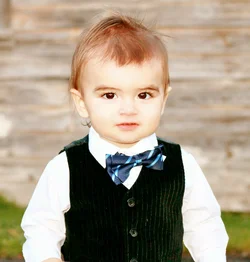
You seem to have some good ideas, like the boy in the bowtie, but the technical aspects is what I'd suggest working on. Learn to get proper exposures consistently, and nice sharp well focused images, and learn to frame shots seeing everything in the viewfinder (what's along the sides of the frame and in the corners so subjects/objects aren't cut off or barely in the frame). Think about your vantage point and how the background looks and/or how it changes as you take a step or two and see how it looks best.

I think it's necessary to learn how to use the 'tools' properly for whatever you want to do, and get lots and lots of practice.
 
i have gone through a lot of forums and read enough to know that I am mindblown by how much I need to learn. right now I would like to know if I really have a photographers eye. Everyone always says wow and I can see error error error. I'm pretty sure I know a wow photo when I see one. here are a couple of my faves with very little editing. most likely shot on auto with my rebel t3 75-250mm. 3.2f
My laptop is not very cooperative and I am not sure about the best way to upload these and hope file size is not too large. just a couple to get me started on real criticism
Pic 1 was obviously taken candidly all you can really do is crop it to be more appealing as stated by others. Maybe remove the bottom to cut off the feet may look better.
Pic 2 Baby's head is cut off in future you would include all of the baby's head with a wider shot or just cut off part of the book instead.
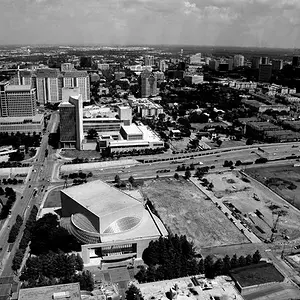
Pic 3 needs to be cropped for portrait instead of landscape
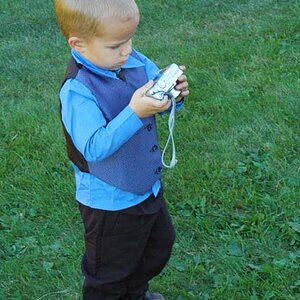
Pic 4 Blurring the background would have made this pic better, (this can still be achieved in Photoshop)
 
ok Designer I read the majority of those articles on lighting. At first I thought "I am never going to see what I need to" and halfway through I started to recognize the shadows to see where the lightsource is coming from. Whether a diffusor or reflector is necessary will take time and I can see in pic #1 how the light drowned out necessary shadows that would have Given her face more dimension. I started looking at old photos and "wow" completely seeing them differently. This forum has been so great going through others c&c and gathering all the info from them is amazing. So I decided that I did a pretty good job on this guy who went onto canvas on my sisters wall. I always thought he had too much light, now I think a little but not overexposed. Am I thinking correctly here? The little girl with the milkshake also has her own shirly temple photo. this one made the wall. Can we talk about cutting off at joints or what not? I read a bit about that on another thread and didn't quite get it.
 

Attachments

  • nick.webp
    nick.webp
    135 KB · Views: 170
  • 16x20 wrap canvas test copy.webp
    16x20 wrap canvas test copy.webp
    358.9 KB · Views: 207

Create an account or login to comment

You must be a member in order to leave a comment

Create account

Create an account on our community. It's easy!

Log in

Already have an account? Log in here.

New Topics

Back
Top Bottom