What's new

C&C on post processing??

Sammie_Lou

TPF Noob!
Joined
Jun 15, 2011
Messages
394
Reaction score
59
Location
Farmington Hills, MI
Can others edit my Photos
Photos OK to edit
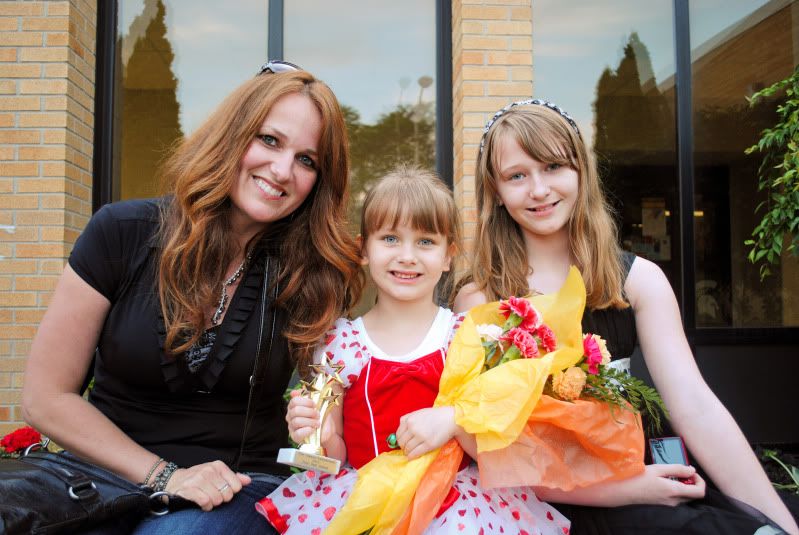
Can I ask for a little bit of C&C on these?? Not so much on the images themselves (I know they're just snapshots - they're ones I took literally a couple days after I got my camera), but on the PP for them?? It would be greatly appreciated. The first one is the original, the second one is the edited one...I just got PS Elements 10 today and have a lot of learning to do...
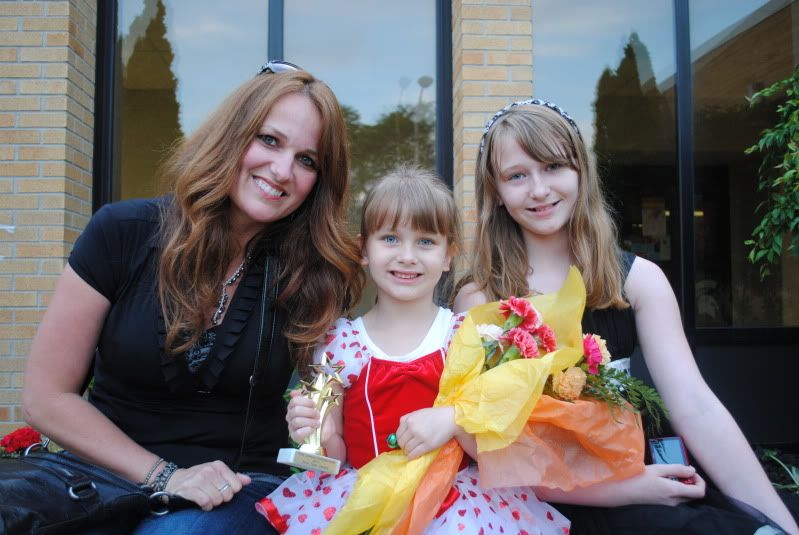
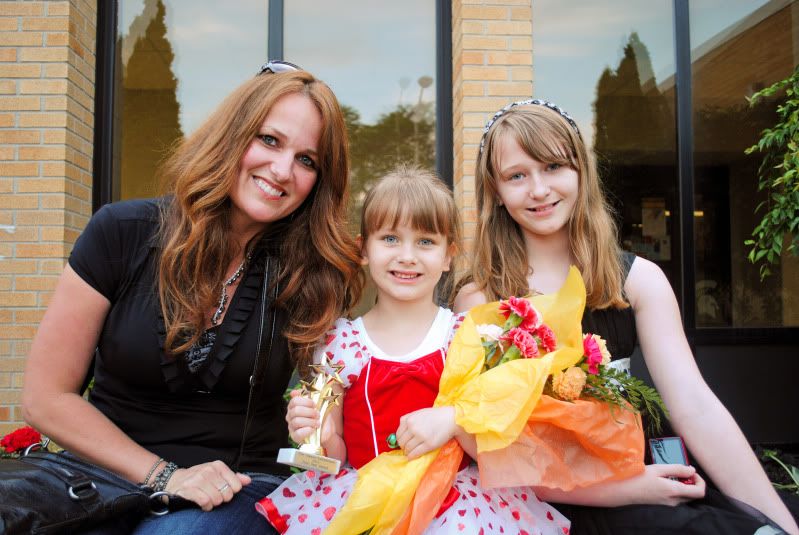
DSC_0127.jpg


DSC_0127-1.jpg
 
better. brighter. color more vibrant.
 
Anything you see there that I should work on?? Is it too yellow-y?? My baby sister (the one in the middle) is just so PALE that I feel like she looks like her skin is blown out in every picture.
 
If I may?
I'll offer this. Hopefully not in an offensive manner.
I think you're over saturated on number 2. This may be because you intentionally saturated, OR because you added too much contrast. Either of the two can give an over saturated effect.
The problem arises in this image due to the mothers skin tone compared to the two children. If it were me, I'd try to take a little bit of red out and balance the red between the mother and the children.
This can be done a number of ways in Lightroom. Whether or not perfection will come to pass, I cannot say. I jump these hurdles all the time and sometimes it works and ...........that's the best I can hope for
 
That was absolutely not offensive and just the kind of critique I was looking for. Thanks!

Does this look a little better?? What I did was use the quick selection tool on her arm and face and desaturate the reds a little in that area. She naturally DOES have more of a red/dark skin tone than my sisters (who are both Snow White pale), so I don't wanna make her too pale like them...

DSC_0127-2-1.jpg
 
Last edited:
Better. Think of it as a balancing act.
The skin tones between the three people are never going to be the same.
 
Your instincts are good. The original is way too blue. You're worried you had gone too yellow -- nope not yellow enough yet. The older sister's left arm is still blue enough to call 911.

Mom's makeup is a factor and it's interfering. To do a good job you'd have to treat Mom separately. Her makeup is red.

It's after midnight and I get to claim the two beer qualifier, but here's what I get for a quick run at it with the two girls skin-tone as a target. Lightspeed's lower saturation suggestion is on target as is his observation of skin-tone variance between Mom and the girls. When I compare, my take is even less blue still.

Joe

P.S. I held the contrast a tad lower as well given the subject -- maybe a tad much.

trophyt.jpg
 
Last edited:
From the original I was also going to suggest less red. Since the moms skin is so different, I would mask her out and white balance her separately.
 
Thanks, you guys! You gave me a lot to think about...I really like the crop. I can't wait to get off work and mess with it some more. =) I know they're just family snapshots, but I thought I'd like to do some sort of collage with the pics from my sister's dance recital for my step-mom for Christmas, so this has been a big help.
 
I keep going back and looking...BuS RiDeR, I really like your crop. lol
 
That was absolutely not offensive and just the kind of critique I was looking for. Thanks!

Does this look a little better?? What I did was use the quick selection tool on her arm and face and desaturate the reds a little in that area. She naturally DOES have more of a red/dark skin tone than my sisters (who are both Snow White pale), so I don't wanna make her too pale like them...

DSC_0127-2-1.jpg

I think this one is the best. id leave it like that. Little girl seems really proud of her throphy. I wouldnt crop that out.
 

Create an account or login to comment

You must be a member in order to leave a comment

Create account

Create an account on our community. It's easy!

Log in

Already have an account? Log in here.

Back
Top Bottom