What's new

C&C on this image would be great thanks

CorrieMichael

No longer a newbie, moving up!
Joined
Sep 28, 2012
Messages
447
Reaction score
166
Location
Canada
Can others edit my Photos
Photos OK to edit
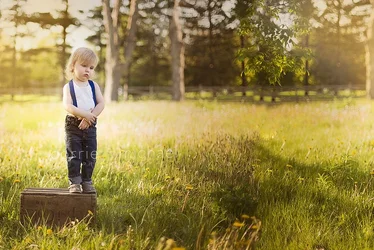
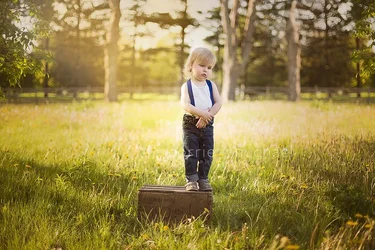
At tonight's photo shoot.......
Kian: "Mama.....me jump off......now?......Mama?"
Me: "Nope buddy, not yet................."
Kian: Commence cutest pouty face EVER!
C&C would be great
$IMG_6173wahspdilogoweb.webp
 
Hm.

My initial thought was "subject too small in the frame, subject dead center, landscape when portrait would probably work better"... but...

The dead-centering suggests stagnance, which this is... though, I only knew that because of your story about it. I wish you hadn't posted that, because it colors our interpretation.

The wider view makes the child small, which they are... and that ties in somewhat with the facial expression (and, again, the story... ugh)

I dunno. It's a cute moment. I think I would have moved the lens to the right, tilted it EVER so slightly to the left. That would imply forward motion, but resistance against progress at the same time, which might have given you the conflict you were looking for. It also would have shown the expanse of how far the child COULD go if they jumped off (keeping it zoomed out so the expanse seemed greater).

I think that would have worked better.
 
Ah the evil you can do with Photoshop...

$NEW.webp

Just a quick edit, but shows what I was thinking about.
 
Funny you say this I did crop it but we had an opposite vision......I cropped in from the left.....hated it and went back to only cropping in a teensy bit to put him a wee bit off centre.......that is how I liked it best playing around with it :P Thanks for your time to do the C&C :) I appreciate it
 
heh. NP.
 
I like manaheims edit. I don't think I've had our him quite so far to the left but yeah. Cute photo!
 
I think this is a fantastic image - brilliant lighting! I do agree though that some of the left side needs to go away; I like a crop which removes it just about up to, but no including the large tree in the background.
 
It looks very over-worked. Not fond of the weird background rendering that lens yielded. The heavy vignette and the color toning just look...contrived.
 
It looks very over-worked. Not fond of the weird background rendering that lens yielded. The heavy vignette and the color toning just look...contrived.

Honest to GOD I am not using a vignette lol!!!!
 
It looks very over-worked. Not fond of the weird background rendering that lens yielded. The heavy vignette and the color toning just look...contrived.

Honest to GOD I am not using a vignette lol!!!!
Are you by any chance using an FF lens w/ hood on a crop-body?
 
It looks very over-worked. Not fond of the weird background rendering that lens yielded. The heavy vignette and the color toning just look...contrived.

Honest to GOD I am not using a vignette lol!!!!
Are you by any chance using an FF lens w/ hood on a crop-body?

No I have a Canon 6D and I use this lens ALL the time.....sorry but I love this lens

Here is the link to the lens I have it is the EF 50mm 1.4 CANON EF 50MM/1.4 AF USM 2515A003
 
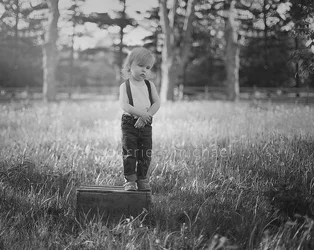
I like almost everything in this shot except the bright spot on the grass behind the boy. The white shirt, bright spots on his arms and blond hair seem to get lost in the bright grass. I tried to darken the grass but it just gets grey. Then I tried this. I darkened the grass a bit and added some branches behind his hair.
$IMG_6173wahspdilogoweb1.webp
 
Last edited:
It looks very over-worked. Not fond of the weird background rendering that lens yielded. The heavy vignette and the color toning just look...contrived.

Honest to GOD I am not using a vignette lol!!!!

Vignette as in light fall-off from the center. Vignette as in an image that has a very light center area, and three f/stops' worth of darkening at the does. Vignette. As in an optical defect that the lens exhibits. No implication on my part that it is deliberate, but just the simple fact that the lens suffers from a high degree of light fall-off which appears to be exacerbated by your processing or by your lack of employing of the built-in lens correction profile that Adobe has built specifically for hundreds of big-name lenses. It is also possible that your copy of Lightroom is set to add a fair degree of post-capture vignetting...

This is the second image you have posted this week in which multiple posters have commented negatively on the vignetting that your posted image has displayed. Perhaps the software is set to increase post-capture vignetting, because this is HEAVY, blatant, very obvious loss of illumination at the edges of the frame. This picture shows heavy vignetting, which is again, a shorthand word for illumination fall-off at the edges of the frame. Deliberate, accidental, or software-induced, the reason underlying the vignetting is immaterial. When the vignetting becomes the most-obvious issue in a picture, the degree of vignetting is probably too great.
 

Create an account or login to comment

You must be a member in order to leave a comment

Create account

Create an account on our community. It's easy!

Log in

Already have an account? Log in here.

New Topics

Back
Top Bottom