What's new

c&c please...photoshoot from yesterday

swmocity

TPF Noob!
Joined
May 3, 2008
Messages
469
Reaction score
0
Location
Houston
Can others edit my Photos
Photos OK to edit
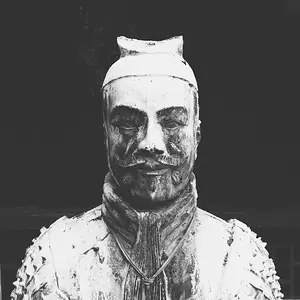
2956449357_a7b3fc70d0_o.jpg


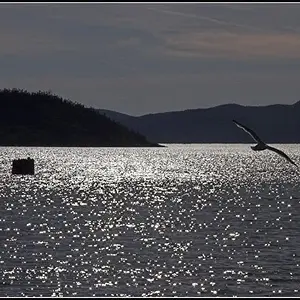
2956447229_525374fe0a_o.jpg


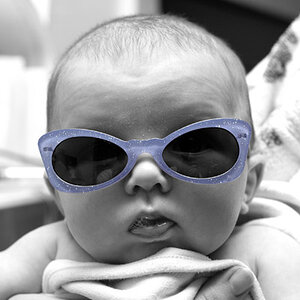
2957290102_321008930b_o.jpg


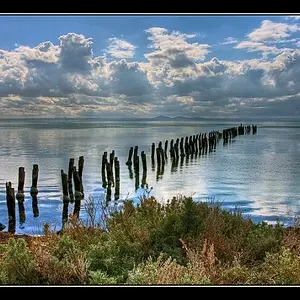
2956447563_be95091eea_o.jpg
 
C&C per req:

1. I'm assuming this was an ambient light exposure with a bright light image right. Unfortunately, it gives the subject a rather unpleasant appearance; rather "Phantom of the Opera". A diffuse fill-flash centre or image left would have helped greatly.

2. Much better expsoure here; still a bit harsh with the strong light image right. The empty area image left isn't helping. I would suggest cloning out the lights in the background as they're major distractions. Additionally, when posing, don't have elements leading out of the image such as her left arm. I think this image would be much stronger shot in portrait aspect with a tight bust crop.

3. Much more pleasing composition here, however the image is soft, and the subject is looking out of the image. While they don't have to look right down the lens, they should usually be looking in your direction.

4. Nice idea, and this is a case where having the subject not looking at the camera does work, however, the image needs to be levelled, and excess DoF has resulted in a sharp, distracting background.

Just my $00.02 worth - your mileage may vary.

~John

 
any tips on getting a level image?...thats a problem i have...and also #2 where u said it looked soft...what was the cause of that...if i sharpen it up in photoshop will that fix it?
 
any tips on getting a level image?...thats a problem i have...and also #2 where u said it looked soft...what was the cause of that...if i sharpen it up in photoshop will that fix it?

If I get an image that's not level (and I do that often), I usually fix it afterwords in whatever software I'm using.

#2 being soft, I think your focus spot was a little closer than what the subject was. I'm judging this by the left side of the picture. The bench to the extreme left seems to be sharper, whereas the bench should be sharper closer to her.
 
what sofware do u use...i tried using the straighten tool in photoshop...maybe im doing it wrong, because it looks the same to me
 
here is the ediy...


2958483999_76a052572a_o.jpg
 
what sofware do u use...i tried using the straighten tool in photoshop...maybe im doing it wrong, because it looks the same to me


In photoshop, I believe Control+R brings up the ruler. From there, you can more easily level the photograph. Those columns are very crooked. I would guess at least a 2 degree, clockwise rotration would be appropriate. If you want, I can give it a try after work tonight.

Another note that might be worth taking into consideration; perhaps you can ask your model to try on a different expression. Her expression in all the photos are a little plain and to be honest, a bit over used.

And that huge red signature... wait a minute, I think I've mentioned this before. Anways... that's just my 2 bit, newbie suggestions.
 
what was the cause of that...if i sharpen it up in photoshop will that fix it?

swmocity's EXIF data for image #3 said:
Auto exposure, Aperture-priority AE, 1/10 sec, f/2, ISO 1600,

Nothing to do with focus being off; it's camera shake. 1/100 of a second is generally about as low as you should go for portrait work. This will freeze any slight, unintended movement. Hand-holding below 1/30 of a second takes a great deal of practice.
 
That first one was creepy... you probably could have pushed it a bit and made it extremely creepy. Other than that, I generally agree with the comments already made.
 
I think your photos have good ideas behind them but your model doesn't seem into the photos. She's lifeless in all 4 shots - no expression.
 
Could a lens with image stabilization have helped?

Perhaps, but at those kinds of shutter speeds, you're going to get subject movement as well, blinks, hair blowing, etc, for which it will do nothing. Your best bet here would have been the use of fill light to increase the shutter speed.
 
Hey guys, I was just browsing the New York Public Library website for a school project and noticed they have some pretty cool new videos posted. One of them looks at the History of Photograpgy and takes you through where it began to where it is today. If you like this type of stuff I suggest you check it out!

http://www.nypl.org/news/treasures/
 
Hey guys, I was just browsing the New York Public Library website for a school project and noticed they have some pretty cool new videos posted. One of them looks at the History of Photograpgy and takes you through where it began to where it is today. If you like this type of stuff I suggest you check it out!

http://www.nypl.org/news/treasures/


LoL, how does this fit in with the topic:
"c&c please...photoshoot from yesterday"

I just thought that was an odd thing to read. Don't mind me greg. I'm just pokin' fun atcha.
 
Seems pretty fishy. You joined the website so that you first post could be about a video from the library, in a post that bears no resemblance or what you posted...?
 

Create an account or login to comment

You must be a member in order to leave a comment

Create account

Create an account on our community. It's easy!

Log in

Already have an account? Log in here.

Back
Top Bottom