What's new

canon 600d dust

mattsoutham

TPF Noob!
Joined
Mar 7, 2013
Messages
3
Reaction score
0
Location
UK
Hi

I have somehow got some dust or similar on my pictures (Ihave a canon 600d). I assumed this was on my sensor so have cleaned this with a blower and a wet swab but the dust is still there.

It seems pretty big and of purple colour. Does anyone have any ideas apart from take it to a shop I could try before spending out money?

$photo_dust.webp

Many thanks
Matt
 
Do you have a second lens? Try shooting through that and see. May be spots on your lens or even in it.
 
Try cleaning again, sometimes you have to clean a couple of times to get some dust free from the sensor. Also note that many times dust won't even show up in photos, it tends to be more of a problem with macro and landscape where small apertures are more frequently used - larger apertures tend to hide a significant amount of any present dust.
 
Thanks for the quick replies :-)

I have tried both the lenses I have and its still the same (in the exact same place etc)

I have cleaned the sensor 3 times now so am reluctant to keep trying incase I damage it. Can you think of anywhere else the dust could be?

Many thanks
Matt
 
Dirty sensor sometimes you have to clean it several times,put the lens on and shoot a pic of the sky at f16/22 and see what you get,if still showing spots clean it again.Are you cleaning it right,take one swipe then reverse the wand and swipe only once more in the oppisite direction.Try another pic at f16/22 again and keep at it always using a new pad on the wand.I looked at your picture I wish I could keep my sensors that clean,what f stop did you use? You need to use at least f16 or higher(22) to see how bad the dust spots really are.
 
Last edited:
Probably some inorganic dust. Have you tried the wet method of cleaning?

Here is my before. Look at all that specs:
$196664_10200504631524631_580423333_n.webp

After:
$16716_10200504631564632_2123915749_n.webp


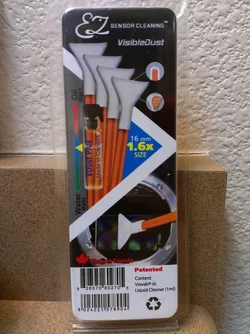
What I used:
$12592_10200504662925416_2142422843_n.webp
 
I have attached a photo taken at f16. Sorry its a bit dark its raining horribly so this in indoors against a white wall.
Most dust spots I have seen on peoples sensors appear to be grey. My couple are purple. Could this not be dust as I have now cleaned 3 times with a swap and it doesn't even seem to have moved.
I have one swab left, should I try again?

Many thanks
Matt
 

Attachments

  • $photo_dust2.webp
    $photo_dust2.webp
    16.3 KB · Views: 155
The surface you see inside the camera when the shutter is open is actually not the sensor. It's the low-pass & piezoelectric filter in front of the sensor (technically there's an IR filter BEHIND that filter, and then finally the sensor is behind that.) You never actually get to touch the real sensor (not without considerable disassembly of the camera.) However... as it is a pain and somewhat involved to disassemble and replace a scratched filter, you do want to take care not to scratch it.

1) Are you sure this is on the filter and not "stuck" pixels? Can you see it on the filter when you inspect it? You may want to pick up a sensor scope if you don't have one (you can find them at B&H, Adorama, Amazon, etc.) -- it's basically a giant magnifier that rests on the lens flange and it has lights on it. It gives you a highly magnified view of the sensor so that you can actually see the surface and determine what you're dealing with.

I'm looking at this sensor cleaning kit you've got in the photo. I've never seen it before.

2) You may want to pick up some Eclipse solution and Sensor Swabs (your camera has an APS-C sensor, so the "Type II" sensor swabs are the size you'd get.) They're made by "Photographic Solutions" and you can find them at most true camera stores (not big-box stores that merely sell cameras). You can also order them online... B&H, Adorama, Amazon, etc.

The solution is actually mostly methanol. It evaporates _very_ quickly and leaves virtually no residue. I never seen this NOT be able to clean whatever I find and I don't need to go back with a dry cloth to clean the residue... it doesn't leave any residue.

 
I'm looking at this sensor cleaning kit you've got in the photo. I've never seen it before.

Is that for the OP or me, since I'm the only one that posted a wet method cleaning kit? It was one of the most named ones when I was researching ways to clean the sensor. Ordered mine through B&H. =)
 
I have attached a photo taken at f16. Sorry its a bit dark its raining horribly so this in indoors against a white wall.
Most dust spots I have seen on peoples sensors appear to be grey. My couple are purple. Could this not be dust as I have now cleaned 3 times with a swap and it doesn't even seem to have moved.
I have one swab left, should I try again?

Many thanks
Matt

If the wet method isn't working, and you've tried 3 swabs already (mine just needed one swab). I'm not sure what else you can do yourself. It seems small enough and not too numerous to clone/spot heal out of pictures.
 
I'm looking at this sensor cleaning kit you've got in the photo. I've never seen it before.

Is that for the OP or me, since I'm the only one that posted a wet method cleaning kit? It was one of the most named ones when I was researching ways to clean the sensor. Ordered mine through B&H. =)

Oh I guess that was you. I thought the OP posted that. Sorry.
 
I'm looking at this sensor cleaning kit you've got in the photo. I've never seen it before.

Is that for the OP or me, since I'm the only one that posted a wet method cleaning kit? It was one of the most named ones when I was researching ways to clean the sensor. Ordered mine through B&H. =)

Oh I guess that was you. I thought the OP posted that. Sorry.

haha, no worries. Our pics looks very similar. Same white bathroom sink? j/k.

From the OP's last post, the wet method was tried already with no success. This has now become out of knowledge. Hopefully one of you more seasoned photogs know something else (unless it's what you posted earlier, dead pixels).
 

Create an account or login to comment

You must be a member in order to leave a comment

Create account

Create an account on our community. It's easy!

Log in

Already have an account? Log in here.

Back
Top Bottom