Abby Rose
TPF Noob!
- Joined
- Feb 17, 2010
- Messages
- 642
- Reaction score
- 2
- Location
- Michigan!
- Can others edit my Photos
- Photos OK to edit
yeah yeah. Stupid cat pictures. People hate them. I know.
Ok, well I've been goofing around with the canon 30D I got a while back. Still haven't taken many pictures with it, relative to my sony. I have one lens, 28-105 3.5-4.5. This was at 105mm, 4.5.
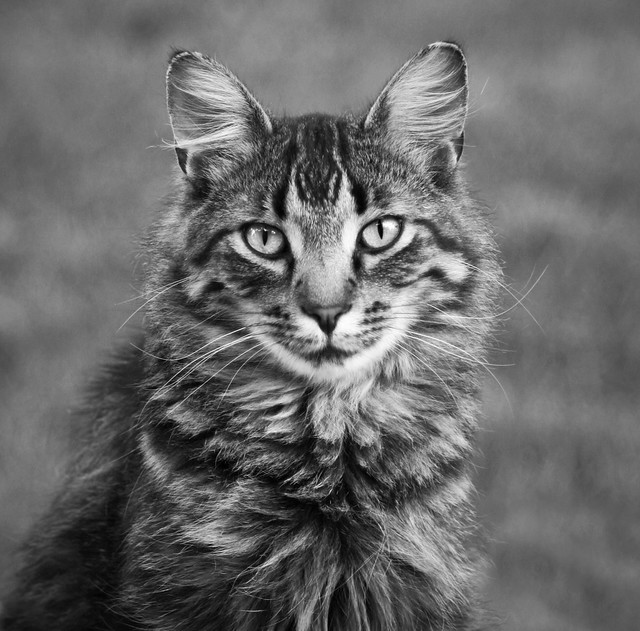
Something seems "wrong" here. I struggled with the crop, perhaps I could have come up with something better? I did bw because the color seemed kind of bland and I was in a black and white mood. The light was nothing special, either. It seemed ok to keep, though, but I may change my mind and get rid of it.
I do know that the nose is slightly oof. And I realize that it's pretty darn contrasty. Did I cross a line?
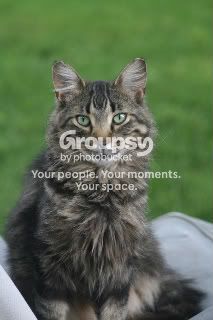
I'll post both the finished and the original so that you can see if something better could be done. Thanks!
finished:
original:
Ok, well I've been goofing around with the canon 30D I got a while back. Still haven't taken many pictures with it, relative to my sony. I have one lens, 28-105 3.5-4.5. This was at 105mm, 4.5.
Something seems "wrong" here. I struggled with the crop, perhaps I could have come up with something better? I did bw because the color seemed kind of bland and I was in a black and white mood. The light was nothing special, either. It seemed ok to keep, though, but I may change my mind and get rid of it.
I do know that the nose is slightly oof. And I realize that it's pretty darn contrasty. Did I cross a line?
I'll post both the finished and the original so that you can see if something better could be done. Thanks!
finished:
original:






![[No title]](/data/xfmg/thumbnail/39/39498-362f11d9bfd0d9e222faa85b38801745.jpg?1734173616)
![[No title]](/data/xfmg/thumbnail/36/36681-6b091a8cd7318d47018c823a2eff3185.jpg?1734169175)
![[No title]](/data/xfmg/thumbnail/32/32698-38e2346942223e17b43fb958f66064c1.jpg?1734162253)