What's new

Clean and crisp

Thayli

No longer a newbie, moving up!
Joined
Jun 13, 2012
Messages
146
Reaction score
48
Location
United States
Can others edit my Photos
Photos OK to edit
Came to the beginner section to ask a couple of questions about getting rid of the 'muddy' effect in portraits. I saw that another thread is current about the same muddy effect in landscapes, but the haze there seems to be caused by the time of day/enviromental, which shouldnt be the case in a studio setup. Basically, all my shots tend to look a bit blurry, but when you zoom in they are actually sharp(ish). When I look at pro work and some of the big guns here, their portraits are so clean and crisp and sharp its just stunning, and then I look back again at my own and its just..... bad.

Ive tried a little sharpening, but while it sharpens(duh) it dosent come close to the level of clarity that I see in others shots. And I'm jealous, I really am.

Dont get me wrong, my equipment is several streets and a couple of 5-figure numbers away from the rigs the big guns use, but is this the cause of the muddiness, or am I repeating some mistake over and over? I'm on an xti(400d), usually with the 50mm 1.8. The lens is more than capable of producing sharp clean images, and I guess therefore so should the camera, but its just never quite 'there', and I always say its just because I suck lol, but is this the whole story? Does the muddiness have anything to do with tonal range or anything like that? Perhaps I'm making a slight problem much worse while in PP? I find myself converting to black and white more and more often as I (maybe mistakenly) think that this reduces the muddiness/smudginess, this is what made me also think of tonal range.

I'm sorry about what is probably a stupid question, but whenever I search online for an answer I usually come up with 'focus better', but is that all it is? (And nobody here has ever mentioned that my focus is off, which they are usually pretty quick to do lol).

So, any ideas?
 
Thayli,

wondering, is there ever a time when the lens is sharp? Also, with portraits, the lens might be focusing, but how far or near to the subject are you? Most lens kinda have a sweetspot. I know it's the 50mm but still...
 
You wrote, "all my shots tend to look a bit blurry, but when you zoom in they are actually sharp(ish)".

Hmmm...you know, that is often a product of the image being re-sized to the display it's being seen on; when zoomed it so the image is at 100% pixel view, it looks "sharp", but when seen down-sized, looks blurred. I have no idea how you sharpen, but a normal thing to do is apply a very small-radius, high percentage sharpening to "raw" shots, meaning un-sharpened images. For example, open a .CR2 file and apply say a 300% sharpening amount, but at a very small radius, like say .2 pixel, at a threshold of 0. THAT, the initial or "post-capture" sharpening, is to correct for the gentle,gentle blurring that the camera's anti-aliasing filter has applied, to prevent moire effects.

When an image is shrunken down in size, it's best to do that in steps, not all at one time,in one large size reducing step. And after each size reduction, apply a gentle unsharp masking pass, say around ~half of that initial pass in percentage, say 100 to maybe 140 percent, but also at a small radius,like .2 or maybe .3 pixel.
 
You should post an example so we can see what you're talking about.
 
Usually when someone tells me an image looks "muddy" I immediately think of the histogram and suspect they are having issues with lighting, contrast, and color... and what they need is to learn to use the curves or levels adjustment... perhaps some color tweaking (saturation levels), etc.

Can you post an example of a "muddy" image that needs help?
 
Quick idea: how clean and grease-and haze-free is the rear lens element on that 50mm lens???? If the rear element of a lens has developed a film on it, from "whatever" source, it can produce a hazy-yet-underlying-sharp type of image. Without a sample image to go by, we're all interpreting your situation much the way to $10 carnival fortune tellers do...out of thin air, and based on a few very subtle clues you've given...
 
Y For example, open a .CR2 file and apply say a 300% sharpening amount, but at a very small radius, like say .2 pixel, at a threshold of 0. THAT, the initial or "post-capture" sharpening, is to correct for the gentle,gentle blurring that the camera's anti-aliasing filter has applied, to prevent moire effects.

Ok, now I just feel like an idiot. That is absolutely sterling advice, and after just testing it on a RAW I'm astounded I haven't read about this lol. I've never used sharpen that much as I just didn't get it/couldnt get it looking 'natural', but looking at the difference with you're settings is amazing. My only question is at what point do you sharpen? I open RAW's straight to photoshop, and didnt see any sharpen option in the initial RAW editor other than the 3rd page max %150. I then went fully into PS and filters>smart sharpen and plugged in the 300%/0.2 radious, but I didnt see any threshold setting. Regardless of whether I did it right or not the change is pretty clear(pun!) and I'm very interested in learning more.

Again, thanks very much for that, it was a trying to eat soup with a fork moment, and you handed me a spoon. I feel like an idiot, but im very grateful lol.


Thayli,

wondering, is there ever a time when the lens is sharp? Also, with portraits, the lens might be focusing, but how far or near to the subject are you? Most lens kinda have a sweetspot. I know it's the 50mm but still...

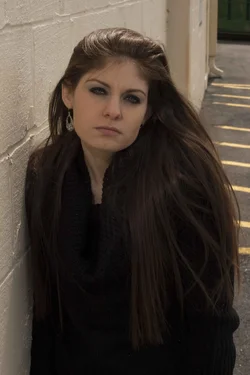
I'm usually 'fairly' sharp? I'm not entirely sure what to use as a reference lol

$1.webp$2.webp

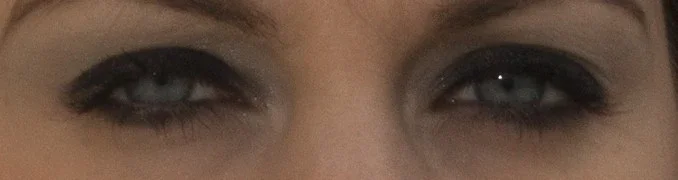
A completely horrific look into the sun please shot so dont be looking at it too much lol, and thats a zoom of the eyes until they become pixels. Its a 10mp camera. This is open CR2 and convert to '2' quality jpg for full pic, and best quality jpg for the eye shot. No editing. Is this appropriate sharpness or am I missing the mark?

Also, you mention sweet spot, but I foolishly thought that was just in aperture, not subject distance. So my next question obviously is what is the sweet spot on a nifty fifty? If it makes any difference I'm on APS-C.

Thanks very much guys, already very very helpful!
 
Lol, while I've been away playing with photoshop sharpening you have all been replying. One shot posted, let me know if you need more. (I actually thought u guys might be getting bored of seeing my one model over and over, who also would kill me for that last pic).


Usually when someone tells me an image looks "muddy" I immediately think of the histogram and suspect they are having issues with lighting, contrast, and color... and what they need is to learn to use the curves or levels adjustment... perhaps some color tweaking (saturation levels), etc.

Can you post an example of a "muddy" image that needs help?

This might be a part of it as well, as I tended to feel it was something 'tonal' that was wrong at the beginning.
 
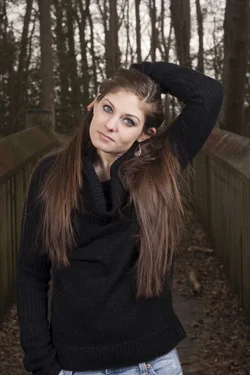
$3.webp

Another CR2 to jpg, quality '4'. No editing.
 
Quick idea: how clean and grease-and haze-free is the rear lens element on that 50mm lens???? If the rear element of a lens has developed a film on it, from "whatever" source, it can produce a hazy-yet-underlying-sharp type of image. Without a sample image to go by, we're all interpreting your situation much the way to $10 carnival fortune tellers do...out of thin air, and based on a few very subtle clues you've given...

Seems to be clean enough, although again im a noob at this so I dont really know what i'm looking for in the haze dept. There is a definite sparkle across the rear lens when held at an angle to daylight, and while there is some tiny dust particles ive never cleaned it in fear of smearing my only decent lens. I usually leave it on that camera all the time simply to try and keep it cleaner.
 
Obviously you need to sharpen in post. RAW files don't have sharpening applied from camera, but JPEGs do. The sharpness isn't bad, but I would hesitate to sell it to clients. The muddy look is because you have no light on the subject and are underexposed. Rule of thumb is a lens's sharpest point is 2 stops down from the widest aperture; some say 1, some 3. You have to play around with what sharpening you like. Some people sharpen only in CS, while others sharpen first in Lightroom. Some go to Nik Sharpen or Define. When shooting at a wide aperture like 1.8 to 2.8, you have to be careful about focusing and then recomposing. If you focus, and then hold and recompose just a little, you could change the focus plane enough to throw the subject out of focus. What many pros do is use the focus point selector and focus only on that point instead of recomposing. Or, go to manual if the subject is fairly static.
 
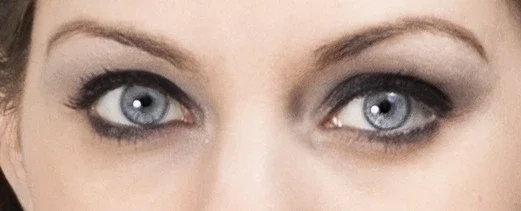
Still not there yet, but that sharpen trick has definitly been a massive step forward.

$4.webp$6.webp


Obviously you need to sharpen in post. RAW files don't have sharpening applied from camera, but JPEGs do. The sharpness isn't bad, but I would hesitate to sell it to clients. The muddy look is because you have no light on the subject and are underexposed. Rule of thumb is a lens's sharpest point is 2 stops down from the widest aperture; some say 1, some 3. You have to play around with what sharpening you like. Some people sharpen only in CS, while others sharpen first in Lightroom. Some go to Nik Sharpen or Define. When shooting at a wide aperture like 1.8 to 2.8, you have to be careful about focusing and then recomposing. If you focus, and then hold and recompose just a little, you could change the focus plane enough to throw the subject out of focus. What many pros do is use the focus point selector and focus only on that point instead of recomposing. Or, go to manual if the subject is fairly static.

What about the 2nd pic? I really should have posted that one first as its a better example being brighter. I dont need to worry about clients or anything either, only myself, however I still want images that I could sell quality-wise.
 
You aren't battling haze, or muddy. You are battling sharpness (acutance).
Tutorials ? Sharpness
Guide to Image Sharpening

And you are battling exposure issues in post #7.
Optimizing Exposure
ETTR
Exposing to the right - Wikipedia, the free encyclopedia

Do you know about the anti-aliasing (AA) filter, also known as a low-pass filter, that is in front of the image sensor in your camera?

Do you do sharpening in stages - capture (in ACR), local, ouput?
Do you know how to vary the amount, radius, detail, masking based on image edge frequency? Enhance local contrast using USM backwards? Do luminance sharpening? High-pass filter sharpening?
Real World Image Sharpening with Adobe Photoshop, Camera Raw, and Lightroom (2nd Edition)

Basically, it all boils down to photographer skill, and knowledge about camera/lens limitations and post processing.
 
Last edited:
You aren't battling haze, or muddy. You are battling sharpness (acutance).
Tutorials ? Sharpness
Guide to Image Sharpening

And you are battling exposure issues in post #7.
Optimizing Exposure
ETTR
Exposing to the right - Wikipedia, the free encyclopedia

Do you know about the anti-aliasing (AA) filter, also known as a low-pass filter, that is in front of the image sensor in your camera?

Do you do sharpening in stages - capture (in ACR), local, ouput?
Do you know how to vary the amount, radius, detail, masking based on image edge frequency? Enhance local contrast using USM backwards? Do luminance sharpening? High-pass filter sharpening?
Real World Image Sharpening with Adobe Photoshop, Camera Raw, and Lightroom (2nd Edition)

Basically, it all boils down to photographer skill, and knowledge about camera/lens limitations and post processing.

Exposures not quite as bad, I just chose a very poor example on #7, it was the first file in the first folder in my pictures lol. I was thinking about sharpness alone at that point so I figured any pic would do.

As far as the rest of your post, well you just destroyed about my next 4 days of leisure time while I study up lol.

Thanks for the help.
 
You aren't battling haze, or muddy. You are battling sharpness (acutance).
Tutorials ? Sharpness
Guide to Image Sharpening

And you are battling exposure issues in post #7.
Optimizing Exposure
ETTR
Exposing to the right - Wikipedia, the free encyclopedia

Do you know about the anti-aliasing (AA) filter, also known as a low-pass filter, that is in front of the image sensor in your camera?

Do you do sharpening in stages - capture (in ACR), local, ouput?
Do you know how to vary the amount, radius, detail, masking based on image edge frequency? Enhance local contrast using USM backwards? Do luminance sharpening? High-pass filter sharpening?
Real World Image Sharpening with Adobe Photoshop, Camera Raw, and Lightroom (2nd Edition)

Basically, it all boils down to photographer skill, and knowledge about camera/lens limitations and post processing.

Exposures not quite as bad, I just chose a very poor example on #7, it was the first file in the first folder in my pictures lol. I was thinking about sharpness alone at that point so I figured any pic would do.

As far as the rest of your post, well you just destroyed about my next 4 days of leisure time while I study up lol.

Thanks for the help.

...and after the 4 days of studying, it will take you 4 years (or more) to master all of it :)
 

Create an account or login to comment

You must be a member in order to leave a comment

Create account

Create an account on our community. It's easy!

Log in

Already have an account? Log in here.

New Topics

Back
Top Bottom