What's new

Clean and crisp

Seems to me that the image in post #7 is compressed to a high degree, and zooming in on it shows a loss of quality due to image compression. Similarly, the #4 level quality of the follow-up image also looks...well, highly-compressed. Sharpening needs to be tied to an output or display method. For example, an image that has been post-processed to be printed on a desktop inkjet printer needs MUCH MORE unsharp mask applied than one that will be sized down to 2,016 pixels wide and viewed on a 27 inch iMac computer's display.

Even a 10 megapixel d-slr can maker a good-looking image. It truly can. The keys are proper working methods, and good technique and understanding, applied consistently from capture through to the final stage. TODAY, for example, you learned something pretty valuable. The links KmH provided so graciously are a great start to getting a handle on sharpening of digital images.
 
Its moments like this that make me think I should have stuck to motorcycles. I fear I lack the delicacy for this kind of thing.

Thanks to everyones comments, especially for the links. (Ive read the sharpen tutorials and applied them already (along with some high-pass tutorials), but while the image looks amazing at first, when I zoom in to the eyes it looks as if there is actually less detail than before. So I'm going to have to do it again. And again. And again). Now since I understand that there is a whole world of sharpening that I didn't know about, I at least can search for myself as well. I truly am a space-cadet at times.

As a side note, I've been posting my pics up here for 3 months or so now, and I don't think anyone ever mentioned about the fact that I wasn't applying any sharpening at all to anything. Soon as I ask about cleaning images up a bit though suddenly everyone knows theres a bloody Narnia in the filter menu apart from me. :lol:


Anyway, thanks again guys, and I think I can safely say I've had my question answered.
 
Even a 10 megapixel d-slr can maker a good-looking image. It truly can.

This actually brought up some nostalgia for my oly e-20 which was a 5mp, but at times when I put on my very rose-tinted glasses I remember it being sharper than the 400d I use now. Im actually planning on doing some portraits with it tommorow night for old times sake. First time it will be used in about 3 years. (Not for sharpness, I prefer the feel of it to the little canon).
 
As a side note, I've been posting my pics up here for 3 months or so now, and I don't think anyone ever mentioned about the fact that I wasn't applying any sharpening at all to anything. Soon as I ask about cleaning images up a bit though suddenly everyone knows theres a bloody Narnia in the filter menu apart from me. :lol:


Anyway, thanks again guys, and I think I can safely say I've had my question answered.

Haha, thanks for the giggle!

You have described exactly how this place works, you get what you give. Post an image without any thought and ask "how`s this?" and unless it is brilliant you will get mediocre random responses, nobody has anything to guide them.

Post that same picture after you have critiqued it yourself and decided you want to improve X about it, and ask a question about X and you find Narnia ;)
 
Most professional work that is very 'sharp' that reminds me of the work you is done with reflectors, soft boxes, umbrellas and beauty dishes.

I suggest you buy a $30 reflector to get a nice exposure on her face. Also, shooting around 1.8 is very touchy with getting subjects in good focus. I would Select the eyes as the focus point and recompose like suggested here or at least shoot at 2.8 if you aren't already

 
Last edited by a moderator:
Most professional work that is very 'sharp' that reminds me of the work you is done with reflectors, soft boxes, umbrellas and beauty dishes.

I suggest you buy a $30 reflector to get a nice exposure on her face. Also, shooting around 1.8 is very touchy with getting subjects in good focus. I would Select the eyes as the focus point and recompose like suggested here or at least shoot at 2.8 if you aren't already


Proving how bad my photography really is lol, if you look closely at her eyes you might make out the two big shoot throughs that were on either side of her. But thanks for that little sand kick, only stung a bit.

(This is my humour by the way, so dont take it as a snidey comeback).

And I think I was at 5.6 or so... I cant remem.
 
Last edited by a moderator:
You're not that far off man, keep at it. I would rent a 5d mk2 and a 135 f2L for a few days and see how much you're image quality improves. There could be a little moisture in you're lenses or sensor, or you're body and lenses aren't calibrated quite perfect for each other to get the quality you want out of you're body.

Not saying you need to have this or that, but it will just give you a frame of reference to know the limitations of you're gear and how it works for you. When I first used my 28-70 2.8L, I realized how much my cheap lenses limited the image quality I was trying to get. Also happened when I upgraded from my Canon xt to the 1ds

Just keep shooting!
 
To me it looks like it's partly that the background is all gray and brown and she's wearing a black sweater. Was it a cloudy overcast day? or was she standing where it was more shady?

I think it might be partly due to the exposure making the photo dark. In the one you sharpened, her face looks brighter than the rest of the scene and gives it a somewhat artificial look I think so I don't know that the focus is the problem. The less light you have to work with can affect the sharpness of an image.

Try cleaning your lens... if you're seeing sparkle when you look at it in sunlight that could be dust maybe - a gunky rear element could be the problem as much as anything! - at least it might be worth cleaning and see if that helps. I use the small soft brushes that are made to be used to clean a lens (the softer the better). If I need to clean it more thoroughly I use lens cleaner and drop or spray a VERY SMALL amount on a microfiber cloth (NOT directly on the lens). I recently started using ROR (Residual Oil Remover) and so far have gotten nice results with that. Sometimes it can be the most simple thing that can solve a problem. Or not...LOL
 
Last edited:
You're not that far off man, keep at it. I would rent a 5d mk2 and a 135 f2L for a few days and see how much you're image quality improves. There could be a little moisture in you're lenses or sensor, or you're body and lenses aren't calibrated quite perfect for each other to get the quality you want out of you're body.

Not saying you need to have this or that, but it will just give you a frame of reference to know the limitations of you're gear and how it works for you. When I first used my 28-70 2.8L, I realized how much my cheap lenses limited the image quality I was trying to get. Also happened when I upgraded from my Canon xt to the 1ds

Just keep shooting!

I quite like the renting idea, but my wife would throw a heeby-jeeby fit lol. I def need to upgrade the camera but its going to be a long time away the way things stand now.

To me it looks like it's partly that the background is all gray and brown and she's wearing a black sweater. Was it a cloudy overcast day? or was she standing where it was more shady?

I think it might be partly due to the exposure making the photo dark. In the one you sharpened, her face looks brighter than the rest of the scene and gives it a somewhat artificial look I think so I don't know that the focus is the problem. The less light you have to work with can affect the sharpness of an image.

Try cleaning your lens...

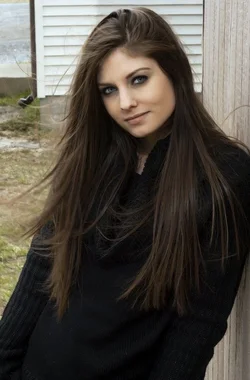
It was a very cloudy day, I actually only got that one shot (with the bridge behind) before it started raining and I had to pack up real fast. Not only cloudy, but we were in a forested area under the canopy as well. The wall leaning shot was on the way home and it had stopped raining (still cloudy, but a very bright midday sun kept popping out), and that was just a single handheld speedlite. The one posted was the first shot I did when we arrived, and we quickly switched to about 20ft away. (I really shouldnt have posted it but it was the first RAW i saw. This is probably a better example of what I did there:

$9.webp

I think I'll try cleaning the lens and see where I go from there, thanks for the suggestions guys.
 
Post #9 is sort of interesting because her sweater is very dark and she is rather light skinned so the good exposure on the sweater gives her, imo, a blanched look.
Reducing the exposure on her face makes her look a bit healthier I think altho the light oin the face is rather flat and unbalanced
(and it seems sharp enough)
But to really look at sharpness you need to not be so far away. The acid test for sharpness is hair and eyelashes and she's a bit small in the frame for that.

$llllllll.webp
 
Man that looks nice! I hate to be a pain, but could you possibly give a quick run down on what you did to that? As much or little detail as you want! The exposure does look much better, and her eyes and earings are so much sharper.

EDIT: Also, when you say reduce noise, are we talking the likes of noiseware, or a much more subtle application using tools instead of filters?
 
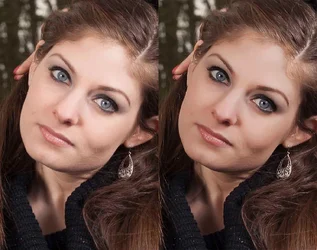
As long as I was fooling around I went a little further.
I don't think it was unsharp as much as it was sort of bland and overexposed.
I used noiseware but it didn't do very much but clean up some of the very light tones.
Then I selected her face with a feather well up in her hair line where her hair is very light and darkened that a bit and added contrast and saturation with two curves layers.
Then I added a shadow for her right cheekbone and lightened the shadow for her left cheekbone.
Then merged everything to a new layer, warmed it some to give it a little more luxurious look.
Darkened the background, added a bit of vibrance layer.
Cropped it and a bit of vignettes in the corner.

lew222.jpg
 
Last edited:
As long as I was fooling around I went a little further.
I don't think it was unsharp as much as it was sort of bland and overexposed.
I used noiseware but it didn't do very much but clean up some of the very light tones.
Then I selected her face with a feather well up in her hair line where her hair is very light and darkened that a bit and added contrast and saturation with two curves layers.
Then I added a shadow for her right cheekbone and lightened the shadow for her left cheekbone.
Then merged everything to a new layer, warmed it some to give it a little more luxurious look.
Darkened the background, added a bit of vibrance layer.
Cropped it and a bit of vignettes in the corner.

Fantastic. Its much appreciated, and certainly looks much 'realer'. Once I'm a bit better read on sharpness, curves is my next target as right now i'm more inclined to presets. I'm also a bit concerned about my workflow order, (which is why I asked for what you did).

Again, appreciated, and thanks for the time you spent (and everyone else who contributed to this choir-of-angels-going-aaaaAAAAAaaaahhhhh thread).
 

Create an account or login to comment

You must be a member in order to leave a comment

Create account

Create an account on our community. It's easy!

Log in

Already have an account? Log in here.

New Topics

Back
Top Bottom