What's new

computer geeks HELP!!!URGENT!lost data at work!

mmaria

Been spending a lot of time on here!
Joined
Sep 4, 2013
Messages
6,494
Reaction score
2,991
Location
Wonderland
Can others edit my Photos
Photos OK to edit
ok so guys upgraded our system to Windows 7 finally(my choice was that they downgrade 8 to 7 because of employees)
Yes, legitimate it guys from a company we hired. ...and they of course did backups...

The trouble is that one by one employees are coming to me asking where are their folders and documents! Someone lost 1, 2, 3, 5 folders with bunch of serious documents!
I tried recovery date with EasyRecovery but documents aren't there at all.
Of course I called those IT guys and they are basically saying: "Well, there are no documents at all on our disk and there's nothing we can do if you already tried recovery!"

People are pissed off and they blame me because I was responsible for procurement!

Is there anything, I mean anything we can do to recover those documents!?

Help!
 
Last edited:
This is why employees shouldn't be storing important files directly to their hard drives and not a file server. Seems like a very an irresponsible rinky-dink IT department.
 
anyway, I wanted to ask here first because guys here were helpful with my last IT question...

yeah... :lovey: tpf
 
this is why employees shouldn't be storing important files directly to their hard drives and not a file server. Seems like an irresponsible IT department.
oh... you don't want me to start talking about that!

We don't have IT department, we have an IT guy and me (me, because I know a thing or two and I'm doing tones of work instead of our IT guy because... well... because!!!
(I don't understand him, not at all... And I really have a moral dilemma about him and his job.)

An hour ago I almost cried in front of dozens people waiting in line for some documents, because he was "repairing some link" from 7 a.m. till noon and couldn't fix it because the phone is on the other side of the office! What!? 6 computers were completely out of order and people couldn't get their birth certificates and similar documents (marriage and else)
I tried to speak with him, to explain, to help, but nope...
Then, after a half of hour talking with him I gave up and called an IT guy who is in another city (D)and he fixed the issue on one computer via Team Viewer and leave our IT guy (G) to do the job he's done and show to G what needs to be done, on other computers. G could do that early this morning (call D!!!) and I'm really not sure why oh why he didn't do that earlier!

I've just called our IT guy (G), he said: I've just fixed one computer and working on another..
I: I know D fixed that one computer. How long will it take to fix another one?
G: well, the same as this one...the whole day... there's so much to be done

(D fixed it in 20 minutes via Team Viewer!!!!)

* going to kill myself right now!
 
Last edited:
* going to kill myself right now!

It seems that the one you need to kill is G.

Good luck, and let me know how it turns out. :D
 
TBH if it was my firm, he'd have lost his job by now. Recovering lost data can be an expensive endevour, specially if the data is overwritten or the disk is formatted which is the case here. I am wondering how he's still there, I hope it turns out well for you.
 
IT guy here - if they did backups and a change in the OS (operating system, aka windows xp/7/8/etc.) then they probably did clean installs in order to avoid future software issues.

This means they completely wiped the hard drive that they installed Windows 7 on, including any backups stored locally on that computer. UNLESS there is a separate hard drive/partition.

SO. You'll need to contact them and ask where the backups are that they made prior to the installation of the new OS.

If they did not create, save, and transfer the backups to the computer after the OS install, then you're probably out of luck.

Back to the part I underlined earlier... Let's see if I can help you find a backup or extra partition on your drive.

-Go to the person's computer and click the Start Menu.
-Click "Computer"

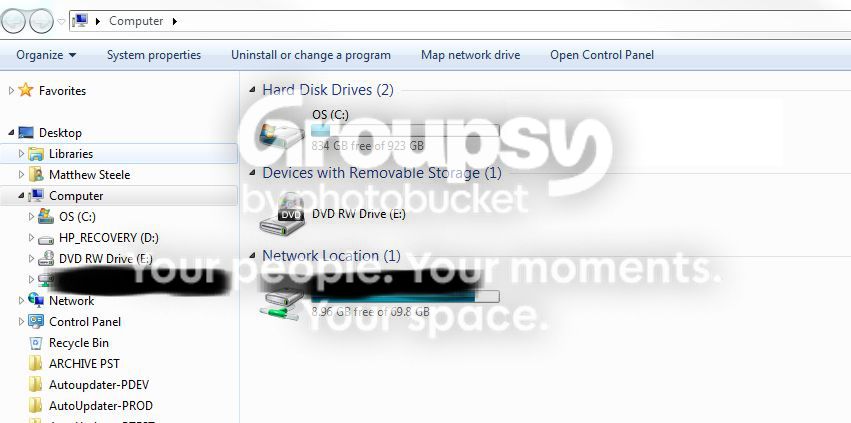
You'll see something like this:

drive_zpscbcf8ab2.jpg


Note that you see a section named "Hard Disk Drives". Here there is only one, named "OS". This means that there is only one hard drive, or one partition. So there is only one place for a backup to be stored, if this is the case, it is likely that there is no way to recover your documents.

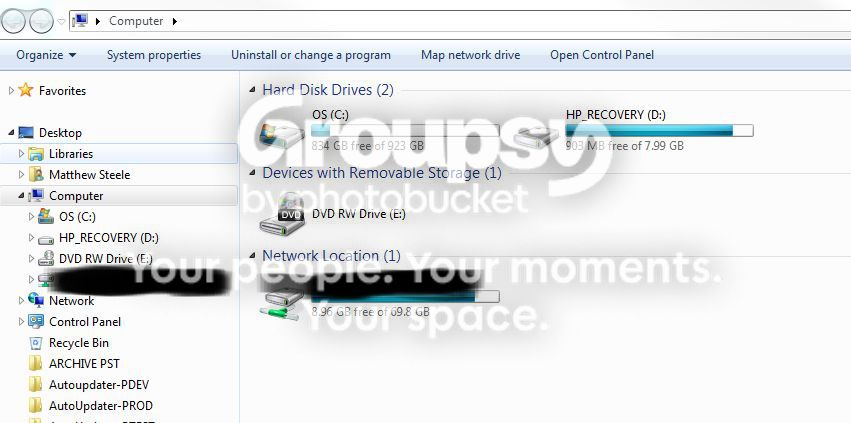
Now look at this picture:

drives_zps645732cd.jpg


You now see that it says there is a second disk or partition, in this case named "HP_RECOVERY". If you see this, you might be in luck. Do not attempt to open this drive, instead at this point I would recommend contacting your better IT guy and ask him if he can attempt to restore the backup saved on this second partition or drive.

Hope this helps in at least understanding where you are and what you're up against with this.
 
Ah... work issues, my condolences. :hug::
 
To err is human, to really screw up requires a computer!

That used to be printed on really, really large pencil erasers.

The whole point of a backup is that it allows you to return the system to the time the backup was made. Many backup systems also allow individual files to be restored. Restoring from a backup should not affect the backup and you should be able to restore from it, over and over again.

Files on a server or on individual workstations is a philosophical argument. How many files, how many employees, education, cost, server capacity; lots of factors go into the decision.

Since you are at a decision point... Let's say there were a fire, flood or theft tonight. How would you recover tomorrow? Fortunately nasty events don't happen often, but they are not carefully scheduled like an upgrade. If upgrades are this traumatic, what would happen if there were an actual disaster?

Based on your report, you need to procure different IT personnel, both in house and contractors. Keep the number for that IT guy in the other city, perhaps he knows someone close to you, or is close enough to visit, himself, when necessary.
 
Very important point highlighted by Matt.. Also, if you guys have a dedicated IT team, maybe it's worth checking if they do periodic backups or not as is usually the norm with the IT teams, if so you may recover most, if not all the lost data.
 
This is why employees shouldn't be storing important files directly to their hard drives and not a file server. Seems like a very an irresponsible rinky-dink IT department.

Seriously. Even working for a small non-profit, this is standard practice. I have no sympathy for our end users who get ****ty with me because their locally saved files disappeared (because they turned off their computer during a windows update and the screen clearly said "Do not power off or unplug your machine").

Sorry, I'm a bit jaded. I do hope you are able to recover your files. I'd definitely reconsider any future dealings with the IT contractors if they did not perform a full backup before reconfiguring/reimaging the machines.
 
yeah, dont pull a Lerner.
 

Create an account or login to comment

You must be a member in order to leave a comment

Create account

Create an account on our community. It's easy!

Log in

Already have an account? Log in here.

New Topics

Back
Top Bottom