What's new

Deviled Eggs

tevo

Recovering TPF Junkie
Joined
Nov 19, 2010
Messages
2,507
Reaction score
440
Location
San Jose, CA
Can others edit my Photos
Photos OK to edit
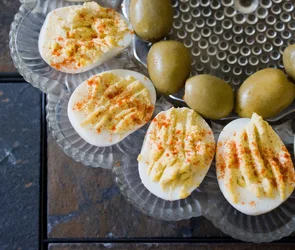
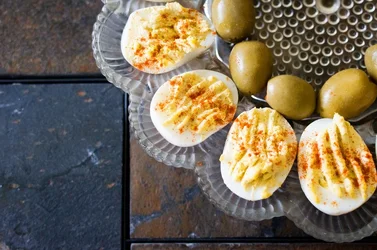
Brought my camera to Easter dinner tonight, and I tried my hand at my photographing the most staple food in my family's holiday gatherings - deviled eggs. Feedback is very much appreciated. No preparation was done to the food, as this attempt was rather impromptu.

#1
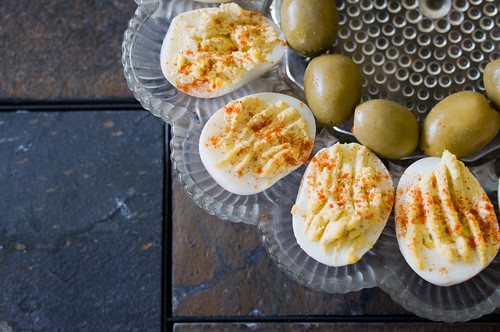
Deviled Eggs by theofficialtevo, on Flickr
 
$eggscropped.webp

I dunno...maybe?
 
I'm kind of diggin the contrast between the tiles and the plate of eggs, but I get Derrel's point.

The light just seems flat to me. Highlights might be blown in this one, if not, they're very very close. Sorry.


$foo.webp
 
I'm kind of diggin the contrast between the tiles and the plate of eggs, but I get Derrel's point.

The light just seems flat to me. Highlights might be blown in this one, if not, they're very very close. Sorry.

<img src="http://www.thephotoforum.com/forum/attachment.php?attachmentid=40768"/>

That was something I struggled with when processing this one, the highlights seemed blown to me too and I couldn't fix it without turning the eggs gray or underexposing. Any tips on fixing that?
 
Uh, well. I used a curves adjustment rather than a simple contrast control, so hopefully I didn't do TOO much damage to the highlights.

The eggs ARE white and featureless (or at any rate have areas which are white and featureless), ultimately, so there's that.
 
I'm kind of diggin the contrast between the tiles and the plate of eggs, but I get Derrel's point.

The light just seems flat to me. Highlights might be blown in this one, if not, they're very very close. Sorry.

<img src="http://www.thephotoforum.com/forum/attachments/general-gallery/40768-deviled-eggs-foo.jpg"/>

That was something I struggled with when processing this one, the highlights seemed blown to me too and I couldn't fix it without turning the eggs gray or underexposing. Any tips on fixing that?

Select all the eggs with the lasso tool then select the inverse under adjustments and use the level to change the histogram of the inverse part you selected....it should clean up just fine.
 
Select all the eggs with the lasso tool then select the inverse under adjustments and use the level to change the histogram of the inverse part you selected....it should clean up just fine.

I'll have to take this picture into photoshop, then (I generally process in Lr)
 
Nothing says Easter like deviled eggs. Thanks for the photo, I missed out on these this year :(
 

Create an account or login to comment

You must be a member in order to leave a comment

Create account

Create an account on our community. It's easy!

Log in

Already have an account? Log in here.

Back
Top Bottom