What's new

Discovering Techniques

markomni

TPF Noob!
Joined
Jun 19, 2010
Messages
13
Reaction score
0
Can others edit my Photos
Photos OK to edit
Last edited:
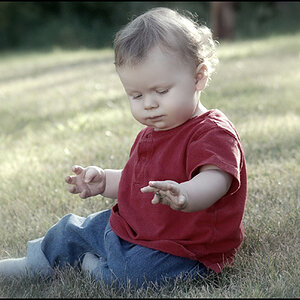
It looks like a reasonably strong cooling Photo Filter Effects application. Something in the LBB or the 82-series, to get the tones to shift toward the too-cool range. That makes the darker tones (especially) look a bit bluish, almost like these were taken on 1970's Ektachrome.
 
Yes, I love the effect. It also helps cover up noise at indoor events. I'd love to create an action to apply it flexibly.

Playing around now, it looks like some sort of cross process.
 
Looks like they basically compressed the tonal range, bumped the fill light slider a bunch, then came back in the the black point, then desaturated he photo a bit, then did a basic split tone, adding a sepia one to the highlights and and a cool blue tone to the shadows. It's a great look, and one that I use often as well.
 
Instead of worrying about manipulation techniques, why not concentrate on content? Are you American?

To me these look just awful.
 
Am I on the right track here? Is there further direction I can be pushed?

Is this all done in camera raw?

straight from camera...
web_example1.jpg


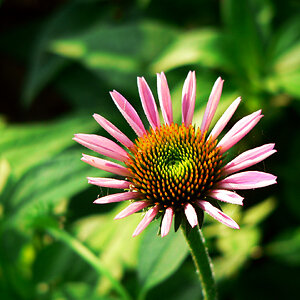
after attempting the changes listed above...
web_example2.jpg
 
I'm just not sure if I like my result...
 
Instead of worrying about manipulation techniques, why not concentrate on content? Are you American?

To me these look just awful.

Am I American? What does that have to do with it? What is so awful about those photos?

Don't speak your sharp tongue without explaining yourself, Sir.


They aren't my photos, they are of a friend at her wedding. I'm simply mimicking results, as explained.
 
Instead of worrying about manipulation techniques, why not concentrate on content? Are you American?

To me these look just awful.
Content? They're wedding photos. Not much you'd be able to do. I think they look nice? :(
 
It looks like a reasonably strong cooling Photo Filter Effects application. Something in the LBB or the 82-series, to get the tones to shift toward the too-cool range. That makes the darker tones (especially) look a bit bluish, almost like these were taken on 1970's Ektachrome.

Derrel may have the answer at the very end. Use of a plug-in for Photoshop that duplicates the look of a particular film.

skieur
 
Instead of worrying about manipulation techniques, why not concentrate on content? Are you American?

To me these look just awful.

Am I American? What does that have to do with it? What is so awful about those photos?

Don't speak your sharp tongue without explaining yourself, Sir.

They aren't my photos, they are of a friend at her wedding. I'm simply mimicking results, as explained.

They don't look good. Forget trying to ape someone else's techniques.
 
have a look at exposure 2 or 3. 500 preset for film simulations, its quite the software.

and prime, maybe you have the european stick too far up your **s
 
Are you American?
Probably, since most of the forum members are here in the US.

Obviously, many new members don't include a geographical clue to what country they reside in, in their profiles.

I see your profile says you are in Ohio. Did you get kicked out of your country or are you an American too?
 
Thanks for the input.

I'm not trying to steal anyone's style, but learn more about post and techniques in photoshop used to effect colors and such. Sorry for the misunderstanding.
 

Create an account or login to comment

You must be a member in order to leave a comment

Create account

Create an account on our community. It's easy!

Log in

Already have an account? Log in here.

Back
Top Bottom