What's new

Do you guys like this self portrait? (C&C please)

TheKenTurner

No longer a newbie, moving up!
Joined
Dec 18, 2011
Messages
562
Reaction score
32
Location
Ottawa
Can others edit my Photos
Photos NOT OK to edit
Hey guys! So I'm 15, I own a T3i, and I was using my brothers 50mm f/1.8 lens for this shot. It was not planned out, but I like the look of it. After, I decided to put a little bit of color correction. Here are the final shots:

Before Color Correction:
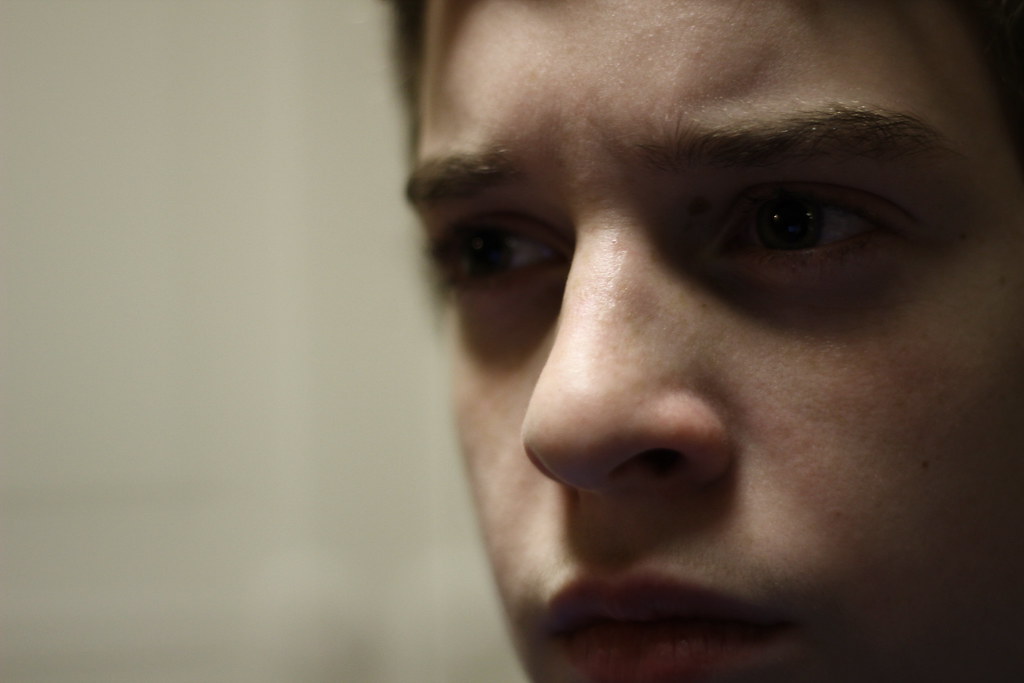
6532969345_b9b9053a99_b.jpg


After Color Correction:

6532980871_2b5d060e6b_b.jpg


I'm not sure which one I like more, and if you guys want, maybe you could edit it and post it below? Thanks in advance!

Link to my Flickr: Flickr: Ken.Sterling's Photostream
 
It's an interesting photograph, however your eyes are much too dark, and the focus appears to be on your nose rather than on your eyes. I would recommend doing something similar, but with a bit of a fill flash to brighten up your eyes, and a smaller aperture to get more of the face in focus. I do like the non-color-corrected better with the cooler colors. For some reason when I first saw it, the first thought that popped into my mind is that you were being interrogated by police in a small room with harsh fluorescent lighting. It's very cool.
 
It's an interesting photograph, however your eyes are much too dark, and the focus appears to be on your nose rather than on your eyes. I would recommend doing something similar, but with a bit of a fill flash to brighten up your eyes, and a smaller aperture to get more of the face in focus. I do like the non-color-corrected better with the cooler colors. For some reason when I first saw it, the first thought that popped into my mind is that you were being interrogated by police in a small room with harsh fluorescent lighting. It's very cool.

Thank you! I'm still learning A LOT about this camera and lens. I'm not very big into flash, but I should probably start messing around with it a little bit ;) I'll probably work on a lot of photography throughout the winter break.
 
40% of the frame is BLANK, empty, dead space. 60% of the frame is filled with two-thirds of a darkly-lit face. Not much to like really.
 
I like the second one the most, but shadows are very harsh, imo. Here is what I did for you. Hope you like it. First thing I did was to use a Shadow and Highlight adjustment to bring out some of the dark areas. Then I ran the image through Topaz Adjust to add some details to the skin and facial area. I also painted with light around eyes and cheeks. And finally I desaturated background area as it was too distracting to the subject itself, and cropped. Here is my retouch for you.
http://www.pbase.com/brw_2909/image/140403435/original
 
Great example of dark eye sockets (Raccoon eyes) from a directly overhead light source.

You don't have to be 'very big into flash' but you do have to be very big into understanding photographic lighting.

Lighting is the difference between ho hum looking and pro looking photos.

From the greenish color cast in the first one I would guess the lighting was flouescent and the T3i white balance was set to sunlight.

The devil is in the details. the more details you are aware of, the better your photos will be.

Photography has many technical and artistic details that have to be considered. Digital Photography Tutorials

Digital Photography Techniques

Photo Editing Tutorials

I tried an edit, but the eyes are so badly under exposed the noise artifacts get to bad even editing parametrically using ACR..
 
Last edited:
I like the second one the most, but shadows are very harsh, imo. Here is what I did for you. Hope you like it. First thing I did was to use a Shadow and Highlight adjustment to bring out some of the dark areas. Then I ran the image through Topaz Adjust to add some details to the skin and facial area. I also painted with light around eyes and cheeks. And finally I desaturated background area as it was too distracting to the subject itself, and cropped. Here is my retouch for you.
Retouched photo - WILKERSON PHOTOGRAPHY photos at pbase.com

Thank you for doing that for me! I can see what people mean by dark eyes, now... I was aiming for a darkish feel, but I really like what you did with it!
 
Thank you for the advice! :)
 
Yes, you have dealt with the dark eyes in pix 2 but I agree that skin tone is a bit red. I like what 4Stl did with his retouching...since I'm new at this too worth learning from!
 
40% of the frame is BLANK, empty, dead space. 60% of the frame is filled with two-thirds of a darkly-lit face. Not much to like really.
I have to agree. Even the edits that others have done don't look right because your pupils are dilated. Eyes are the windows to the soul and in a photograph they are normally the first thing that people see. They HAVE to be right or it wrecks the entire photograph. In this case the emphasis is on the nose and not the eyes, not the place you want it to be.
 
You can only do so much with a photograph that does not have the proper technique used. Sometimes you just work with what you have, and if you had to make that work--then so-be-it. I personally like photographs that have a little bit of a raw, improper style to them, IF you can make them work. His eyes are already dilated..... Sometimes you only have one chance to get a shot, and if that is the only chance you had, you'll have to try to make it work.
 

Create an account or login to comment

You must be a member in order to leave a comment

Create account

Create an account on our community. It's easy!

Log in

Already have an account? Log in here.

New Topics

Back
Top Bottom