What's new

Edit and tutor for me please!

Kmiller

TPF Noob!
Joined
Mar 14, 2011
Messages
50
Reaction score
0
Location
Oregon, USA
Can others edit my Photos
Photos OK to edit
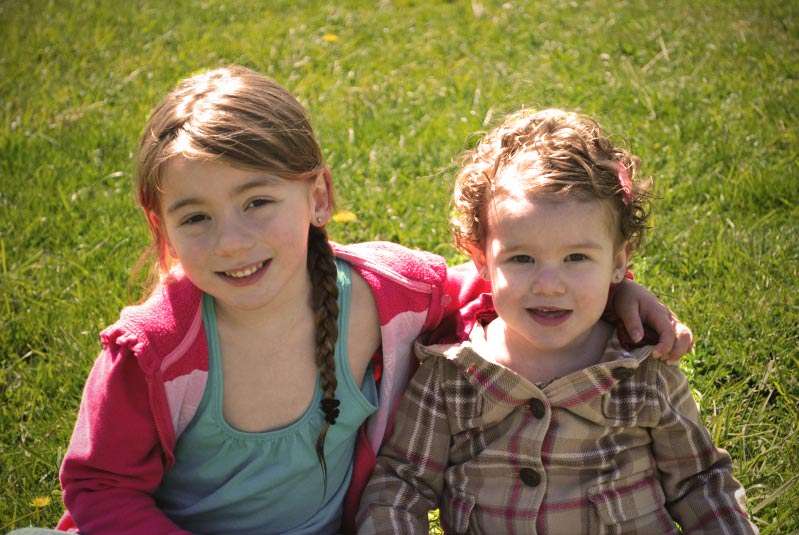
Would someone edit this photo for me, and then tell me what they did? I am looking for the classic photographers photo look where it is bright and cheery!!

Edit; I realized I forgot the image, oops!!
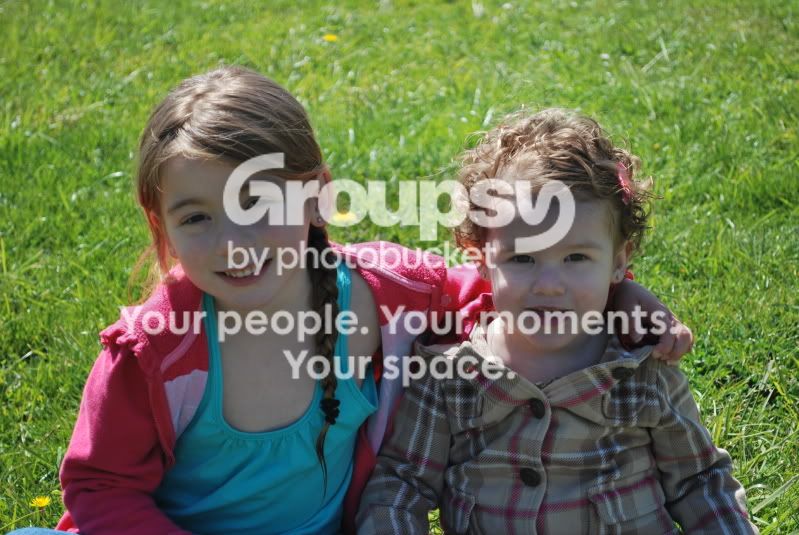
DSC_0261.jpg
 
I'll take a stab at it.


brightcheery.jpg


I increased the brightness about 75% to make it brighter, then drew in a smiley face to make it cheery.


j/k.


You need to learn how to create the right lighting to begin with, not try to salvage a shot in post long after the moment is gone. A reflector of some sort, or a fill strobe, would have done wonders.

Second, the itty-bitty images we post here are far too small for real editing. I might be able to do something better if I had the original file..... a RAW image would be best.
 
You need to learn how to create the right lighting to begin with, not try to salvage a shot in post long after the moment is gone. A reflector of some sort, or a fill strobe, would have done wonders.

Second, the itty-bitty images we post here are far too small for real editing. I might be able to do something better if I had the original file..... a RAW image would be best.

I agree, but if you want to email me the full res, pref. the RAW, image I will mess with it for you some. aspeck77@gmail I dl'd the one from here, but it looks like garbage and I can't get any good coloring b/c of the craptastic quality.
 
Before scrolling down, I thought Sparky had drawn boobs on there to make it cheery. O.o :lol:
 
I'll take a stab at it.


I increased the brightness about 75% to make it brighter, then drew in a smiley face to make it cheery.


j/k.


You need to learn how to create the right lighting to begin with, not try to salvage a shot in post long after the moment is gone. A reflector of some sort, or a fill strobe, would have done wonders.

Second, the itty-bitty images we post here are far too small for real editing. I might be able to do something better if I had the original file..... a RAW image would be best.


I am not a photographer by any means, nor do I have an extensive line of equipment. This was solely just a quick snapshot taken at the park earlier today that I didn't even prepare for. I was hoping someone could just enhance it (even if it is garbage to most of you) for me, so I can be a little happier with it. Thanks though
 
Repeated Levels, Curves adjustments. Some shadow/highlight adjustment. Saturation adjustment. A little sharpening.

5676722511_d358734e52_b.jpg
 
Two words....Fill Flash....to make a photo of back lit people look " bright and cheery".

Their faces are way to dark in the original to make them "bright and cheery" post process.

For kids, get the camera down to their level.
 
Last edited:
As Keith said; it's a backlit photo of people without fill -- never do that.

With that said:

kids.jpg


I used Photoshop (CS3). I used Photoshop's blending modes (Screen and Soft Light) through stacked layers with a mask to hold the highlights. I then shifted the color of the two children to remove the blue sky color cast.

With time and more effort it could be more polished; the key is the mask and blending modes.

Joe
 
OK, here's my take for real:

brightcheery2.jpg


Selected the skin tones, and increased the brightness as well as turned the blue cast down a bit. Selected the background grass, and lowered the brightness. Then applied increased saturation to the whole thing. Selected the dark area around the boy's left ear and brightened that area up just a tad more.
 

Create an account or login to comment

You must be a member in order to leave a comment

Create account

Create an account on our community. It's easy!

Log in

Already have an account? Log in here.

Back
Top Bottom