What's new

Experiment: New Backdrop, New Reflector... Yay for Toys!!!

Photographiend

No longer a newbie, moving up!
Joined
Jul 31, 2012
Messages
1,234
Reaction score
188
Can others edit my Photos
Photos OK to edit
Last time I posted images everyone commented on how the focus was just not there in my pics. I am still working on it. But I have changed some of the settings. Instead of standard I increased the detail to "Fine". As far as composition it had 3 settings Hard, Normal, and Soft. Being that it was already set for Normal I moved it up to hard (still not sure I like it better but ya learn as ya go I guess). Also, I am now controlling all the settings (as much as possible) apart from the focus that is still automatic.

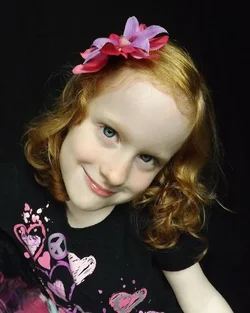
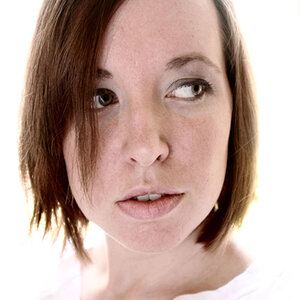
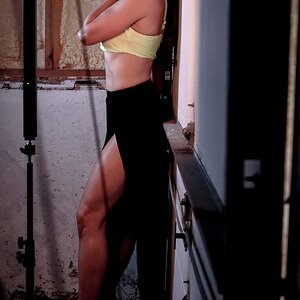
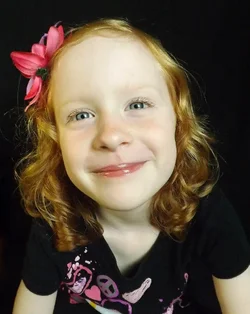
Here are the new ones from playing around this morning with the new toys.
$559130_10151322606057373_105379424_n.webp

Gold Reflector

$602012_10151322605952373_1368861930_n.webp

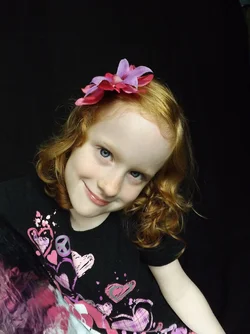
Silver reflector

Shooting all natural light.
 
What would cause that? and how do I fix it?
 
The camera is also a bit too close to be "optimal"... the closenes of the camera, combined with the focal length of the lens being used, is making her nose appear unnaturally large, in comparison to the rest of her head and ears....this effect is pretty commonly seen when the camera is closer than about five feet. As to the greenish undertone, yes, I see it. It could be a white balance issue, or could be the way the camera is procvessing the images, or maybe, just maybe, there's a wall or large object with very strong color nearby???
 
What Derrel said. Focus is good, pose is good (great model!), use of natural light with reflector is pretty good. Cropping isn't bad but try to avoid cropping at the elbows (or any joints). The wb issue may be your bridge camera, what is it? The WB issues could be fixed in post.

All in all, I'd give 'em a pass mark. ;)
 
FujiFilm FinePix S4250. Nothing in the environment that could be the source for the green. Although I have noticed her fair skin will pick up all sorts of colors from the environment.

That tip about being too close to the person you are taking a pic of will come in handy too. Although usually I try to get closer to improve the clarity of the eyes. Seems the farther I am the more likely the camera is to pick some obscure point to focus on. I try not to zoom so I can avoid the issue of zoom distortion... Maybe I could give the zoom another shot for the up close pics.

Thanks for all the advice guys :mrgreen:
 
Nice shots, but I agree with the above comments. Green cast - white balance issue and camera to close to subject
 
My only comment that hasn't been said is I definitely like the silver better. My opinion.
 
Can you post the original, with no editing? Curious to see what it looks like. The image has some off looking artifacts. Did you run some sort of preset or something?

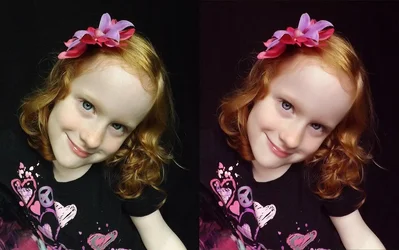
Here is a quick edit and color correction for comparison

$asdfasfeeeee.webp
 
Can you post the original, with no editing? Curious to see what it looks like. The image has some off looking artifacts. Did you run some sort of preset or something?

Here is a quick edit and color correction for comparison

View attachment 40093

Like my grandpappy used to say, "Now we're loggin'!"

(Funny...that was always said when we were cutting down trees and sawing them up into rounds or splitting the firewood....)
 
I actually didn't do too much editing with this set. Just cropping really. Could compressing the file create an artifact? I usually post them from my FB which compresses them quite a bit. Had to down size the original to get it to post here.

Please tell me what you are seeing so I know what I am looking for.

$DSCF2291a.webp
 
I actually didn't do too much editing with this set. Just cropping really. Could compressing the file create an artifact? I usually post them from my FB which compresses them quite a bit. Had to down size the original to get it to post here.

Please tell me what you are seeing so I know what I am looking for.

My advice is DONT post from FB... they suck the life out of images. Get a Flickr account... best option. Or Photobucket.... but make sure you size the images to 1000 long side before you post them to PB, or they will compress the images badly too. Also check the WB on your camera.... set it daylight, flash, or cloudy day..... not auto... not Fluorescent, etc...

What do you see when you look at the edit I posted? good color? too red? too green? anything odd?
 
Great advice. Thanks.

The Edit: Looks a bit on the red side to me. Although the tone is preferable on her skin and strawberry hair.
 
Great advice. Thanks.

The Edit: Looks a bit on the red side to me. Although the tone is preferable on her skin and strawberry hair.

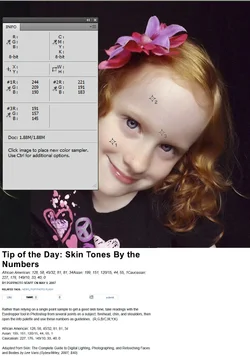
I put this together to let you see why she is the color she is. Tip of the Day: Skin Tones By the Numbers | Popular Photography These numbers are more guidelines than trying to get them exact... as people vary, lighting varies, etc! If the averages are somewhat close... that is what counts.

Red / Blue - Her cheeks are at 244 and the average is 212 ... the article uses 227
Green / Magenta - is a little high, but the average of those three is 185.. the article uses 176
Yellow / Blue - average is 172, and the article uses 149

I probably should have pulled a bit more magenta... that is the tone you are seeing. I did this just eyeballing it, and got it pretty close. Getting rid of that Green cast was my goal...

$Untitled-1.webp

I also suspect your monitor is set too Red or Magenta.... and that is why you thought those green skin tones looked ok!
 
Last edited:

Create an account or login to comment

You must be a member in order to leave a comment

Create account

Create an account on our community. It's easy!

Log in

Already have an account? Log in here.

New Topics

Back
Top Bottom